
Summary of SPI Interfaces using Arduino
This article presents an Arduino tutorial on controlling LED brightness using SPI communication and the AD5204 Digital Potentiometer. It provides a downloadable parts list, software links for programming and circuit design, and references to related projects involving SPI devices like RGB LED matrices.
Parts used in the SPI Device Control Project:
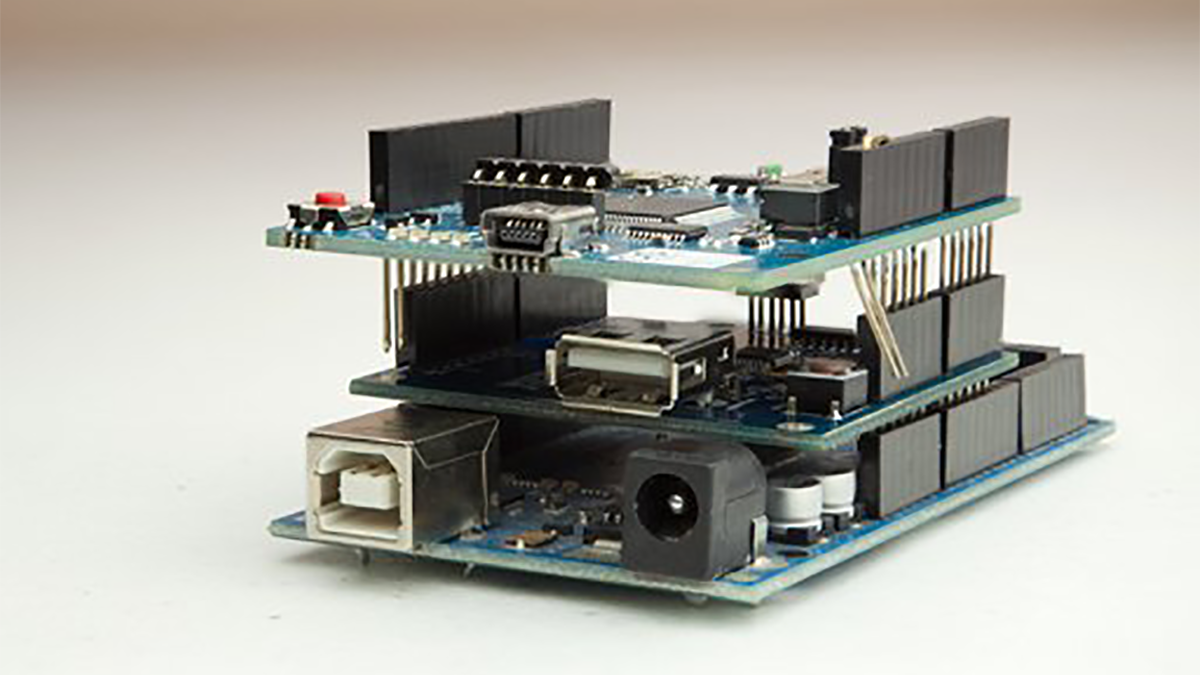
- Arduino Uno
- USB Cable
- Arduino Software
- Eagle CAD Software
- Breadboard
- LEDs
- 220 ohm Resistor
- 10k ohm Resistor
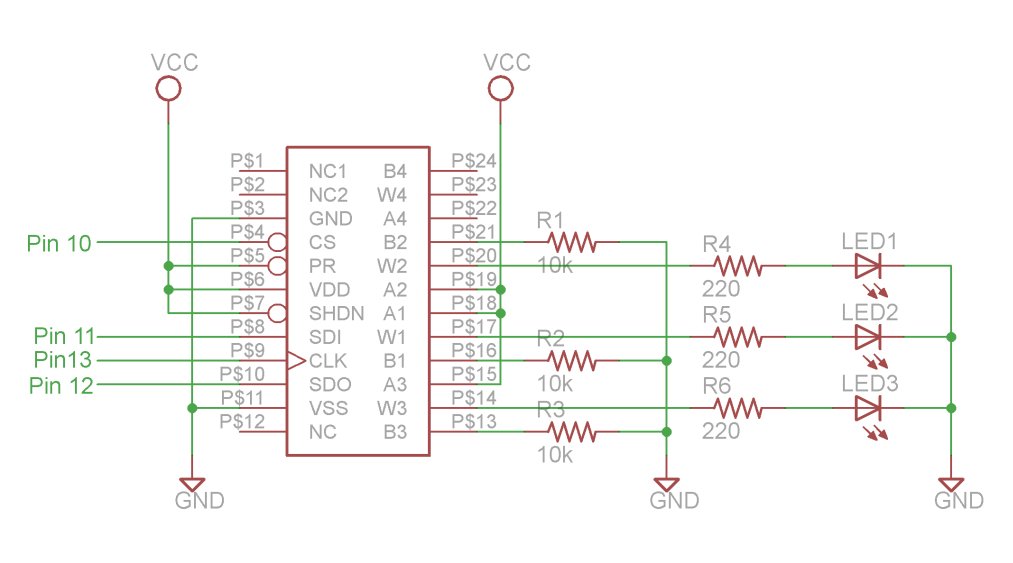
- AD5204 Digital Pot
- Jumper Kit
Update (6/7/2012) – I’ve had to disable comments on this post, because it is being targeted by spam bots for some reason. Please use the contact page if you have a question about this topic.
Attributes
Thanks to Jeremy , for this articles
In this week’s arduino tutorial, we’ll be taking a look at SPI device control using the arduino. Specifically, we’re going to be using the Analog Devices 5204 Digital Potentiometer to control the brightness of several LEDs. For an example of another device that uses SPI control, checkout these Sparkfun RGB LED matrices that I’m using in my ReacXion Audio/Visual Theremin. Enjoy the video!
You can download the files associated with this episode here:
Major Components in Project
PARTS LIST
1. Arduino Uno: http://us.element-14.com/arduino/a000046/arduino-uno -board/dp/13T9285
2. USB Cable: http://us .element – 14.com/jsp/search/productdetail.jsp?SKU=73H0884
3. Arduino Software: http://arduino.cc/en/Main/Software
4. Eagle CAD Software: http://www.cadsoft.de/download.htm
5. Breadboard: h ttp://us.element -14.com/jsp/search/productdetail.jsp?SKU=17C6965
6. LEDs: http://us.element-14.com/jsp/search/productdetail.jsp?SKU=30K0645
7. 220 ohm Resistor: http://us.element-14.com/multicomp/mccfr0w4j0221a50/resistor-carbon -film -220ohm-250mw/dp/58K5029
8. 10k ohm Resistor: http://us.element-14.com/multicomp/mccfr0w4j0103a50/resistor-carbon -film -10kohm-250mw/dp/58K5002
9. AD5204 Digital Pot: http://us.element- 14.com/analog-devices/ad5204brz10/ic -digital-pot-10kohm-256 -quad/dp/19M0789?Ntt=AD5204
10. Jumper Kit: http://us.element-14.com/3m/923351-i/pcb-accessories/dp/65F2290
1. Arduino Uno: http://us.element-14.com/arduino/a000046/arduino-uno -board/dp/13T9285
2. USB Cable: http://us .element – 14.com/jsp/search/productdetail.jsp?SKU=73H0884
3. Arduino Software: http://arduino.cc/en/Main/Software
4. Eagle CAD Software: http://www.cadsoft.de/download.htm
5. Breadboard: h ttp://us.element -14.com/jsp/search/productdetail.jsp?SKU=17C6965
6. LEDs: http://us.element-14.com/jsp/search/productdetail.jsp?SKU=30K0645
7. 220 ohm Resistor: http://us.element-14.com/multicomp/mccfr0w4j0221a50/resistor-carbon -film -220ohm-250mw/dp/58K5029
8. 10k ohm Resistor: http://us.element-14.com/multicomp/mccfr0w4j0103a50/resistor-carbon -film -10kohm-250mw/dp/58K5002
9. AD5204 Digital Pot: http://us.element- 14.com/analog-devices/ad5204brz10/ic -digital-pot-10kohm-256 -quad/dp/19M0789?Ntt=AD5204
10. Jumper Kit: http://us.element-14.com/3m/923351-i/pcb-accessories/dp/65F2290
For more detail: SPI Interfaces using Arduino
- What device is used to control LED brightness in this tutorial?
The Analog Devices 5204 Digital Potentiometer is used to control the brightness of several LEDs. - How can I access the files associated with this episode?
You can download the Episode 08 Arduino Programs, Schematics, and Parts List from the provided links. - Does this project use SPI control?
Yes, the tutorial focuses on SPI device control using the Arduino. - What software is required for circuit design?
Eagle CAD Software is listed as a major component for the project. - Can I find another example of a device that uses SPI control?
Yes, Sparkfun RGB LED matrices are mentioned as another example using SPI control. - What type of resistors are included in the parts list?
The project requires both 220 ohm and 10k ohm carbon-film resistors. - Is there a specific digital potentiometer model recommended?
The AD5204 Digital Pot is specified for this project. - Why were comments disabled on this post?
Comments were disabled because the post was being targeted by spam bots.
