Home > Projects > WiFi Robot

WiFi Robot

Summary of WiFi Robot


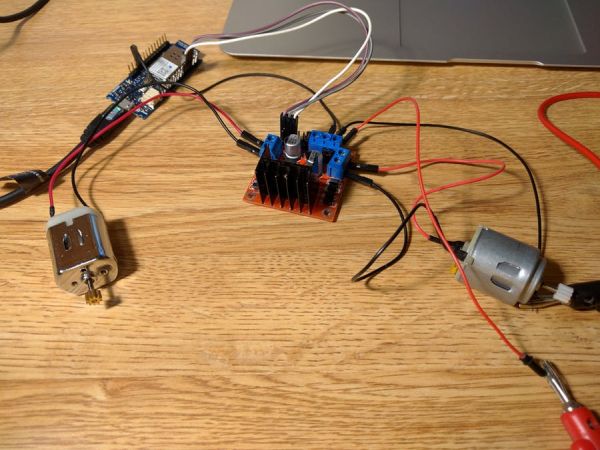
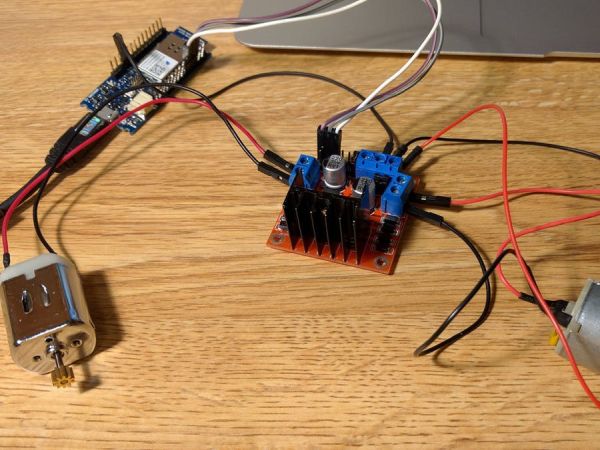
I created a WiFi- and voice-control framework for a robot using the Arduino MKR1000 to receive controls over WiFi. A browser-based JavaScript joystick sends directional commands to a simple web server on the MKR1000, which reads client input and will forward commands to motor drivers (L298) to drive two DC motors. Voice commands were added on the client side. Example Arduino server and motor-control sketches are included for reading joystick data and controlling motor direction and speed.

Parts used in the WiFi Robot:

  • Arduino MKR1000
  • DC motor (generic) ×2
  • Wheels
  • SparkFun Dual H-Bridge motor drivers L298
  • 9V battery (generic)

I have created the framework for WiFi and voice control of a robot. The MKR1000 chip enables us to receive controls over WiFi.
Things used in this project

Hardware components

Arduino MKR1000
Arduino MKR1000
× 1
DC motor (generic)
× 2
Wheels
× 1
Dual H-Bridge motor drivers L298
SparkFun Dual H-Bridge motor drivers L298
× 1
9V battery (generic)
× 1

Story

Schematics

Code

WiFi Server

Arduino

This is a generic server that allows us to read data that clients send. Specifically, when I get a connection from the Joystick, it can take the inputs.
#include <SPI.h>
#include <WiFi101.h>

char ssid[] = "";       // your network SSID (name) 
char pass[] = "";           // your network password
int status = WL_IDLE_STATUS;

WiFiServer server(80);

bool issetup = false;

void setup() {
   delay(5000);
   Serial.begin(9600);
   Serial.println("Attempting to connect to WPA network...");
   Serial.print("SSID: ");
   Serial.println(ssid);

   status = WiFi.begin(ssid, pass);

   Serial.print("IP: ");
   IPAddress ip = WiFi.localIP();
   Serial.println(ip);

   // check for the presence of the shield:
   if (WiFi.status() == WL_NO_SHIELD) {
     Serial.println("WiFi shield not present"); 
     // don't continue:
     while(true);
   } 
  
   // attempt to connect to Wifi network:
   while ( status != WL_CONNECTED) { 
     Serial.print("Attempting to connect to SSID: ");
     Serial.println(ssid);
     // Connect to WPA/WPA2 network. Change this line if using open or WEP network:    
     status = WiFi.begin(ssid, pass);

     // wait 10 seconds for connection:
     delay(10000);
   } 
}
void loop() {
   WiFiClient client = server.available();
   if(client){                          // if there's a client, 
     Serial.println("New client: ");
     //if(client.available()) {         // if there's bytes to read from the client,
       Serial.println(client);
       char c = client.read();          // read a byte, then
       Serial.write(c);                 // print it out to the serial monitor
     //}
     client.stop();
   }
   //else{
   // Serial.print(".");
   //}
}

Motor

Arduino

This is sample code that shows how to write to a motor connected using an L298N module. Ultimately, this will be updated and written from the Client’s controls in the Wifi server file.
//This is just sample code, ultimately this will read from the JS joystick

int pinI1=0;//define I1 port
int pinI2=1;//define I2 port
int speedpin=2;//define EA(PWM speed regulation)port
void setup()
{
 pinMode(pinI1,OUTPUT);//define this port as output
 pinMode(pinI2,OUTPUT);
 pinMode(speedpin,OUTPUT);
}
void loop()
{
 analogWrite(speedpin,100);//input a value to set the speed
 delay(2000);
 digitalWrite(pinI1,LOW);// DC motor rotates clockwise
 digitalWrite(pinI2,HIGH);
 analogWrite(speedpin,100);
 delay(2000);
 digitalWrite(pinI1,HIGH);// DC motor rotates anticlockwise
 digitalWrite(pinI2,LOW);
 analogWrite(speedpin,100);
 delay(2000);
 digitalWrite(pinI1,HIGH);// DC motor stop rotating
digitalWrite(pinI2,HIGH);
delay(2000);
}

Source : WiFi Robot

Quick Solutions to Questions related to the WiFi Robot:

  • What microcontroller is used to receive WiFi controls?
    The Arduino MKR1000 is used to receive controls over WiFi.
  • How are joystick commands sent to the robot?
    A JavaScript joystick in the browser sends arguments over WiFi to the MKR1000 web server.
  • Can the MKR1000 run a web server for remote control?
    Yes, the MKR1000 hosts a WiFiServer on port 80 to read client data.
  • What motor driver is used to control the DC motors?
    The SparkFun Dual H-Bridge motor drivers L298 is used.
  • How many DC motors does the project use?
    The project uses two DC motors.
  • What power source is listed for the project?
    A generic 9V battery is listed as the power source.
  • Does the example server sketch read client bytes?
    Yes, the server sketch accepts a client, reads a byte with client.read, and writes it to Serial.
  • How is motor speed controlled in the sample motor code?
    Motor speed is controlled using analogWrite on a speed PWM pin.

About The Author

Ibrar Ayyub

I am an experienced technical writer holding a Master's degree in computer science from BZU Multan, Pakistan University. With a background spanning various industries, particularly in home automation and engineering, I have honed my skills in crafting clear and concise content. Proficient in leveraging infographics and diagrams, I strive to simplify complex concepts for readers. My strength lies in thorough research and presenting information in a structured and logical format.

Follow Us:
LinkedinTwitter
Scroll to Top