
Summary of Arduino omni-wheel robot and pen plotter
This article describes an Arduino-powered Omni Wheel CNC pen plotter by "Lingib," capable of receiving commands via Bluetooth from smartphones. Built for under $100, it uses an interpreter to process G-code from Inkscape with a resolution of 22 steps per mm. The project highlights excellent accuracy despite minor slippage issues inherent to the wheel design and motor gearing.
Parts used in the Omni Wheel CNC Pen Plotter:
- Arduino Uno
- Bluetooth module
- Four 28BYJ-48 stepping motors
- One SG90 servo
- Four 58mm plastic omni-wheels
- Couplings
Instructables member “Lingib” has created a awesome Arduino powered Omni Wheel CNC pen plotter, powered by an Arduino Uno and Bluetooth module allowing the system to receive commands via a linked smartphone or tablet. If you’re not familiar with omni-wheels the unique wheels only provide traction in the direction of rotation. Any oblique force causes the wheel to move sideways. Check out the video below to learn more about its construction using four 28BYJ-48 stepping motors an SG90 servo connected to the Arduino development board.
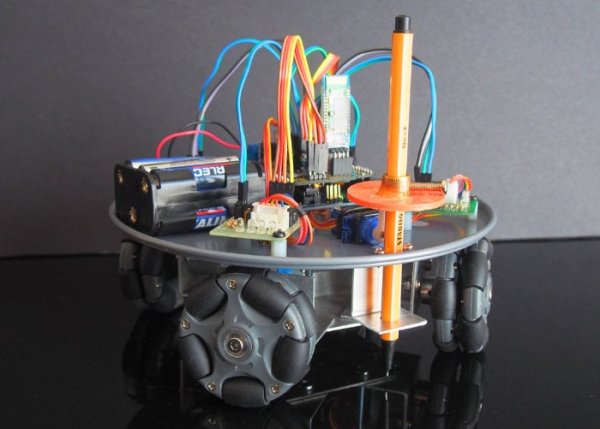
The robot was built for less than $100 with the most expensive item consisting of the omni-wheels and couplings. Its creator explains a little more about its functionality and construction. “The CNC plotter has an on-board interpreter that recognises the g-code output from “Inkscape”. All that is required is an XON XOFF terminal that can send text-files one line at a time. Extremely large drawings are possible due to the Bluetooth design. The plotter accuracy is excellent providing the wheels don’t slip! The plotter has a resolution of 22 steps per mm”
“The video demonstrates a proof-of-concept plotter made from four 58mm plastic omni-wheels. The slight inaccuracies are due to wheel slippage and a tiny amount of back-lash in the 64:1 gearing in the 28BYj-48 stepper motors.”
Source : Arduino omni-wheel robot and pen plotter
- How does the plotter receive commands?
The system receives commands via a linked smartphone or tablet using a Bluetooth module. - What software generates the G-code for this plotter?
The on-board interpreter recognizes G-code output generated by Inkscape. - How is the plotter accuracy affected by the wheels?
Accuracy is excellent provided the wheels do not slip during operation. - What causes slight inaccuracies in the plotter's performance?
Inaccuracies are caused by wheel slippage and a tiny amount of back-lash in the motor gearing. - What is the resolution of this specific plotter?
The plotter has a resolution of 22 steps per millimeter. - Can extremely large drawings be created with this device?
Yes, extremely large drawings are possible due to the Bluetooth design allowing text-file transmission. - What type of terminal is required to send files to the plotter?
An XON XOFF terminal that can send text-files one line at a time is required. - What is the most expensive item used in the construction?
The most expensive items were the omni-wheels and couplings.
