
Summary of Controlling A Linear Actuator With An Arduino
This article outlines a project to automate linear actuator movement using an Arduino microcontroller for enhanced efficiency. It details the hardware assembly, including power supplies and motor drivers, and provides C++ code to control extension, retraction, and stopping sequences via relays. The guide emphasizes easy setup with accessible components and offers software logic to test system functionality through repeated cycles.
Parts used in the Controlling Linear Actuator using Arduino:
- Arduino UNO
- Progressive Automation PA-14-6-50
- 12V 5A power supply
- Female power plug
- Small flat head screwdriver
- Pololu VNH5019 motor driver rated at 12v5a
- SPDT relays
There is a wide application of linear actuator where one wants to move something but they do not want to physically get involved in moving it. There are quite a number of ways to control linear actuators depending on the application and the user experience required. These are the key aspects determining the setup and the way this setup will operate. It is common for most movements to involve manual control using remote control or a rocker switch. It is however paramount, that the system has some form of intelligence to improve the level of efficiency involved.
Microcontrollers, and relays in some cases are required for the intelligence in the system setup. Here we use an Arduino, a popular microcontroller board that provides an ease of setting up. There are other alternatives, but Arduino has a lower learning curve.

Controlling Linear Actuator using Arduino
The parts required for the project setup are Arduino UNO, progressive automation PA-14-6-50, 12V 5A power supply, female power plug, small flat head screwdriver, pololu VNH5019 motor driver rated at 12v5a and SPDT relays. These are easily available, and are part of a setup that is easy to build and comes up with a powerful automated system.
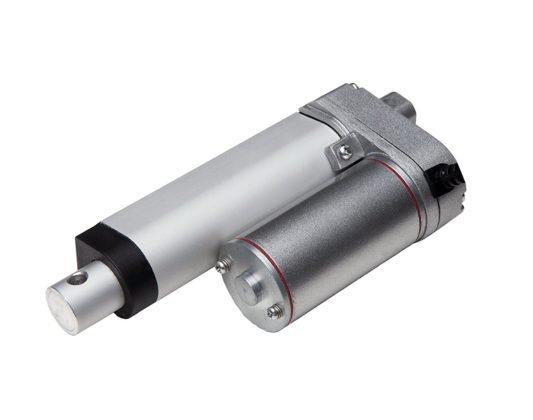
Actuator
In reference to the linear actuator circuit assembly, the board comes with male headers and screw terminals unattached. This can be attached through a soldering iron. There are four holes on the board which are considerably large. These are for the wires which are not the right spacing, considering the screw terminals. However, there are a pair of smaller holes which are the right fit.. The female power plug is then screwed onto the GND/VIN on the VNH5019. This allows easy plugging and unplugging the power supply. It is also possible to put switch to facilitate for an E-stop.
Arduino is powered via a USB. It is also possible to have a 12v5a power as well as the USB. It is important to note that the Arduino can handle 12V power, so one can get the 12v6a power supply and still power everything using the USB.
Software
There is software required to automate the functions of the setup.The first part includes making sure that the Arduino pins that trigger the relays are set to outputs.
[stextbox id=”grey”]//Use constants for the relay pins in case you need to change these later
const int relay1 = 6; //Arduino pin that triggers relay #1
const int relay2 = 7; //Arduino pin that triggers relay #2
void setup() {
//Set pinMode to OUTPUT for the two relay pins
pinMode(relay1, OUTPUT);
pinMode(relay2, OUTPUT);
}
void extendActuator() {
digitalWrite(relay1, HIGH);
digitalWrite(relay2, LOW);
}
It is crucial to test if the setup is working. In the code below, the actuator is set to extend for one second, stop for one second, retract for one second and the pause for five seconds, before repeating the process.
[stextbox id=”grey”]void retractActuator() {
digitalWrite(relay1, LOW);
digitalWrite(relay2, HIGH);
}
void stopActuator() {
digitalWrite(relay1, LOW);
digitalWrite(relay2, LOW);
void loop() {
extendActuator();
delay(1000);
stopActuator();
delay(1000);
retractActuator();
delay(1000);
stopActuator();
delay(5000);
/Use constants for the relay pins in case you need to change these later
const int relay1 = 7; //Arduino pin that triggers relay #1
const int relay2 = 6; //Arduino pin that triggers relay #2
Read More Detail:Controlling A Linear Actuator With An Arduino
- What is the primary purpose of using a microcontroller in this setup?
A microcontroller like Arduino adds intelligence to the system to improve efficiency levels. - How do you connect the female power plug to the motor driver?
The female power plug is screwed onto the GND/VIN terminals on the VNH5019 board. - Can the Arduino be powered by sources other than USB?
Yes, the Arduino can also be powered via a 12V 5A or even a 12V 6A power supply. - Which pins are configured as outputs in the provided software code?
Pins 6 and 7 are set as outputs to trigger relay #1 and relay #2 respectively. - How long does the actuator extend before stopping in the test loop?
The actuator extends for one second before the stop function is called. - What happens after the actuator retracts for one second in the loop?
After retracting for one second, the system stops for five seconds before repeating the process. - Are the large holes on the actuator board suitable for wire spacing?
No, the four large holes have incorrect spacing, so the smaller pair of holes should be used instead. - Does the Pololu VNH5019 motor driver require a specific voltage rating?
Yes, the Pololu VNH5019 motor driver used in this project is rated at 12V 5A.
