
Summary of Interfacing Stepper Motor to Arduino
This project explains interfacing a unipolar 28BYJ-48 stepper motor with an Arduino Uno using a ULN2003A Darlington driver. It covers stepper motor basics, wiring, and code to rotate the motor in desired directions, using a simple Arduino stepper library. The 28BYJ-48’s center-tapped windings connect to ULN2003A outputs, with the ULN2003A common tied to Arduino 5V for driving the 5V motor.
Parts used in the Stepper Motor with Arduino Project:
- Arduino Uno
- 28BYJ-48 stepper motor
- ULN2003A Darlington pair transistor IC
- 470 Ohm resistors (4)
- LEDs (4)
In this article, we are publishing a project which explains different aspects of interfacing a Stepper Motor with Arduino. Stepper motor is a specially designed DC motor which comes with advantages of both a servo motor and a normal dc motor. Compared to a normal Dc motor, the maximum rpm a stepper motor can produce is very low. But they have the advantage that they can be positioned accurately. Unlike servo motor, stepper motor can also be rotated continuously. On the basis of the winding arrangement inside, the stepper motor can be categorized into unipolar and bipolar. The stepper motor we are using here is a unipolar stepper motor named 28BYJ-48. After going through the project you can run or turn the motor to desired direction.
Let’s begin our tutorial and learn how to interface a stepper motor to Arduino.
Objectives of the Project
- Understanding the basic working of stepper motor.
- Interfacing of stepper motor with Arduino.
- Generating code for turning motor to a desired direction.
- Using a simple Arduino library for stepper motor interfacing.
Let’s begin to build our project!
Components Used
| Component | Specification | Quantity |
|---|---|---|
| Arduino | Uno | 1 |
| Stepper Motor | 28BYJ-48 | 1 |
| Darlington Pair Transistor | ULN2003A | 1 |
| Resistors | 470 Ohms | 4 |
| LED | 4 |
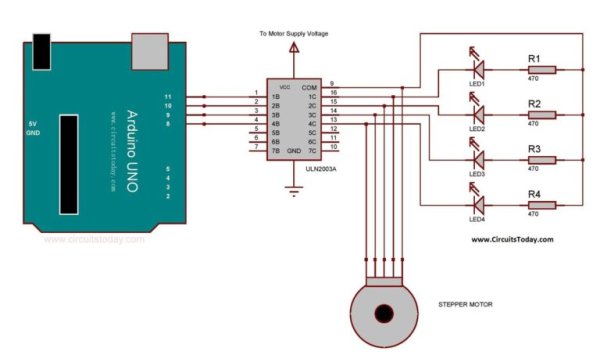
Arduino Stepper Motor Interfacing – Circuit Diagram
Assemble the circuit as shown in the diagram. Components required and connections are explained below
28BYJ-48 Stepper Motor
As mentioned earlier stepper motors are classified into unipolar and bipolar stepper motors according to their winding arrangement. 28BYJ-48 is a unipolar stepper motor with both windings center tapped and connected to the common pin of the ULN2003A. As per the circuit remaining four ends of the windings are connected to the output pins of a Darlington IC (ULN2003A). ULN2003 is a monolithic Darlington IC consists of seven NPN Darlington transistor pairs with high voltage and current capability. It consists of common cathode clamp diodes for each NPN Darlington pair, which makes this driver IC useful for switching inductive loads. Darlington IC is used here as the stepper motor driver for Arduino. Since 28BYJ works at 5V, we connect the com pin of ULN2003A to 5V pin of Arduino.
Read more: Interfacing Stepper Motor to Arduino
- What stepper motor is used in the project?
The unipolar 28BYJ-48 stepper motor is used in the project. - Which Arduino board is used for interfacing?
Arduino Uno is used for interfacing the stepper motor. - What driver IC is used to drive the stepper motor?
The ULN2003A Darlington driver IC is used to drive the stepper motor. - Why is ULN2003A used with the 28BYJ-48?
ULN2003A provides Darlington transistor pairs and clamp diodes suitable for switching the inductive loads of the stepper motor and its common is tied to 5V for the 5V motor. - How are the windings of the 28BYJ-48 connected?
The 28BYJ-48 has center-tapped windings; the center taps connect to the common pin of ULN2003A and the remaining four ends connect to ULN2003A outputs. - What supply voltage is used for the stepper motor?
The stepper motor works at 5V, so the ULN2003A common pin is connected to the Arduino 5V. - Are resistors and LEDs part of the circuit?
Yes, four 470 Ohm resistors and four LEDs are listed among the components used. - What are the objectives of the project?
Objectives include understanding stepper motor basics, interfacing with Arduino, generating code to turn the motor, and using a simple Arduino stepper library.
