
Summary of Stock Monitoring featuring 4Duino-24
This project utilizes a 4Duino-24 microcontroller and IR sensors to monitor inventory presence. It reads analog values from IR LEDs and phototransistors to detect items in a multi-slot box, transmitting status updates to a ThingSpeak channel every 15 seconds. The system is programmed using Workshop 4, which interfaces with the Arduino IDE for compilation without requiring direct IDE modification.
Parts used in Inventory Monitoring System:
- 4Duino-24
- Box with 4 or more slots
- 4 or more IR LEDs
- 4 or more IR Phototransistors
- uUSB cable
- uSD Card
In this project, we will use several IR sensors to check if an item from an inventory box is present or not.
This project makes use of a 4Duino-24 to check whether an item is present or missing from the inventory. The 4Duino uses its analog pins to read the values from each IR sensor. This reading value changes depending on whether or not the item is present.
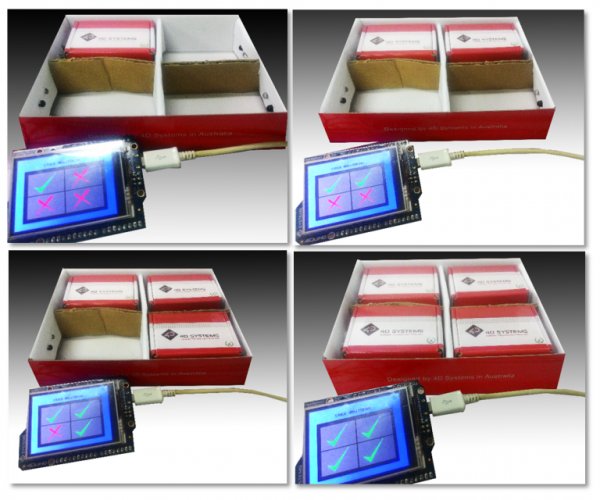
The 4Duino is set to send most recent status to a Thing Speak channel every 15 seconds.
How it works
Components
- 4Duino-24
- 1 Box with 4 or more slots
- 4 or more IR LEDs
- 4 or more IR Phototransistors
- uUSB cable
- uSD Card
Implementation
Step 1: Build
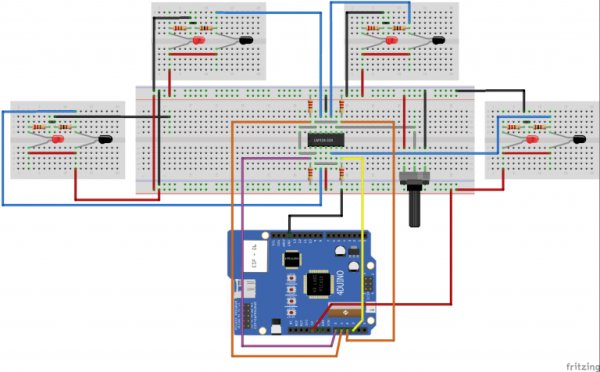
Build the circuit as shown in the following diagram and table.
Step 2: Program
Workshop 4 – 4Duino Basic Graphics environment is used to program this project.
This project requires the Arduino IDE to be installed as Workshop calls the Arduino IDE for compiling the Arduino sketches. The Arduino IDE however is not required to be opened or modified to program the 4Duino.
Open this file using Workshop 4.
Note: Download the code here.
Step 3: Compile
Click on the “Compile” button.
Note: This step could be skipped. However, compiling is essential for debugging purposes.
Step 4: Comms Port
Connect the 4Duino to the PC using µUSB cable.
Then navigate to the Comms tab and select the Comms port to which the 4Duino connected.
Read more: Stock Monitoring featuring 4Duino-24
-
How does the system detect if an item is present?
The 4Duino uses its analog pins to read values from IR sensors, where the reading changes depending on whether an item is present or missing. -
What software is used to program the 4Duino for this project?
Workshop 4 – 4Duino Basic Graphics environment is used to program this project. -
Does the user need to open the Arduino IDE to program the device?
No, the Arduino IDE is not required to be opened or modified as Workshop calls it for compiling sketches. -
How frequently is data sent to the ThingSpeak channel?
The 4Duino sends the most recent status to a ThingSpeak channel every 15 seconds. -
Can the compilation step be skipped during setup?
Yes, the compile step could be skipped, but it is essential for debugging purposes. -
What hardware connection is needed to link the 4Duino to the PC?
You must connect the 4Duino to the PC using a uUSB cable. -
How many IR sensors are required for this specific implementation?
The project requires 4 or more IR LEDs and 4 or more IR Phototransistors.
