
Summary of Arduino Electromagnetic Field Detector
This article details a DIY Electromagnetic Field (EMF) Detector project, modifying an original design by Aaron ALAI and Conner Cunningham to replace a bargraph with a 7-Segment LED Display. The build uses an Arduino microcontroller, specific resistors for signal conditioning, and a custom wire antenna to detect EMF levels, displaying the results numerically on the display via breadboard wiring.
Parts used in the EMF Detector:
- Arduino
- 7-Segment LED Display
- 3.3M Resistor
- 470 ohm resistor
- Wire
- Breadboard
- Computer with Arduino IDE
- USB A-B cable
- Wire Strippers
A while back I saw an EMF (Electromagnetic Field) Detector at makezine.com that used a led bargraph. I decided to modify it to use a 7-Segment LED Display! Here’s my project. Sorry I don’t have any pictures of it in use. Hopefully I can post some soon.
Credit goes to Aaron ALAI for the original project. Also Conner Cunningham at Make: for doing a remake.
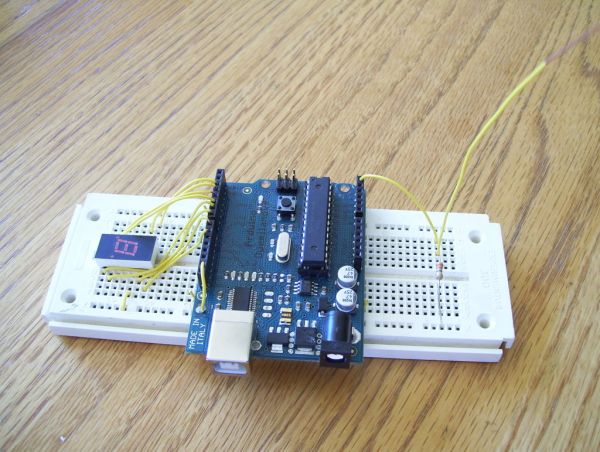
Step 1: The Stuff:
The parts & tools.
Parts:
– Arduino
– 7-Segment LED Display
– 3.3M Resistor (Orange, Orange, Green)
– 470 ohm resistor (Yellow, Violet, Brown) or a similar value for the LED display
– Wire. I’m using 26 gauge wire
– Breadboard
Tools:
– Computer with Arduino IDE
– USB A-B cable for Arduino
– Wire Strippers
Step 2: Wire the 7-Segment LED Display
This is probably one of the most confusing parts of the project, so I’ll try to be clear. But if I’m not please ask any questions you have.
I used pins 2-8 on my arduino for the display. I wired the pins on the display counter-clockwise starting at the upper-left corner. Hopefully the pictures help explain it better.
Picture 1) Display before installation.
Picture 2) Display after installation.
Picture 3) Pin 1 on the display goes to pin 2 on the Arduino.
Picture 4) Pin 2 on the display goes to pin 3 on the Arduino.
Picture 5) Pin 4 on the display goes to pin 4 on the Arduino.
Picture 6) Pin 5 on the display goes to pin 5 on the Arduino.
Picture 7) Pin 6 on the display goes to pin 6 on the Arduino.
Picture 8) Pin 8 on the display goes through the 470 ohm resistor to the side rail on the bread board
Picture 9) Pin 9 on the display goes to pin 7 on the Arduino. Also Ground on the arduino is connected to the side rail on the arduino.
Picture 10) Pin 10 on the display goes to pin 8 on the Arduino.
If you have any question please ask them!
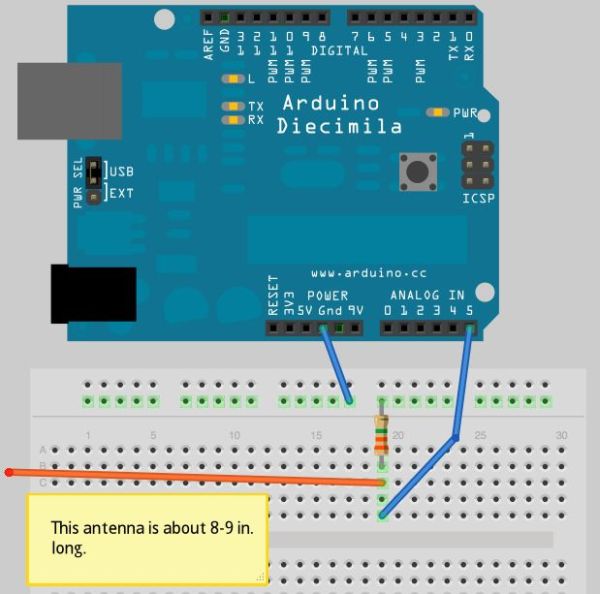
Step 3: Add the Probe/Antenna
Make the antenna/probe:
– Cut a 6-7 in. piece of solid core wire.
– Strip one end so you can plug it into your breadboard
– Strip the other end about 2 in. from the end.
Add the antenna: (Pictures 2-6)
– Take the 3.3M ohm resistor and connect it from the ground on the arduino to a point on the breadboard
– Add another wire from where the resistor is connected to analog pin 5 on the arduino.
– Add the antenna to where the resistor and the wire are connected on the breadboard.
For more detail: Arduino Electromagnetic Field Detector
- What is the main purpose of this project?
The project modifies an existing EMF detector design to use a 7-Segment LED Display instead of a led bargraph. - Who created the original project being modified?
Credit goes to Aaron ALAI for the original project and Conner Cunningham for doing a remake. - Which Arduino pins are used for the 7-Segment LED Display?
Pins 2 through 8 on the Arduino are used to connect the display. - How do you construct the antenna for this detector?
Cut a 6-7 inch piece of solid core wire, strip one end for the breadboard, and strip about 2 inches from the other end. - What resistor value connects the ground to the analog pin for the probe?
A 3.3M ohm resistor is connected from the ground on the Arduino to the breadboard point where the antenna attaches. - Where does the antenna connect on the circuit board?
The antenna connects to the point on the breadboard where the 3.3M resistor and the wire leading to analog pin 5 meet. - What tool is required to prepare the wires for the antenna?
Wire strippers are needed to remove insulation from the ends of the solid core wire. - How many resistors are listed as essential components for the display?
A 470 ohm resistor or similar value is used for the LED display connections.
