
Summary of Face detection and tracking with Arduino and OpenCV
This article describes a face detection and tracking system where OpenCV on a Windows PC identifies faces, calculates their coordinates, and sends them via USB to an Arduino. The Arduino then controls two servos to pan and tilt a webcam, following the detected face in real-time.
Parts used in the Face Detection and Tracking System:
- PC running Windows 7 SP1
- Arduino Uno or compatible board
- Power source for Arduino
- Two standard servos
- Webcam with USB interface
- Breadboard
- Jumper wires
- Hobby wire
UPDATES
- Feb 20, 2013: In response to a question by student Hala Abuhasna if you wish to use the .NET Serial class, use the naming convention “\\\\.\\COMn” and replace n with a number > 9 to define your com port for COM ports above 9 such as COM10, COM11, etc.
- Mar 23, 2012: Featured on Adafruit’s Blog
- Mar 23, 2012: Featured on Interactive Design
- Dec 13, 2011: Featured on Floss For Science
This guide will also be maintained on my blog http://techbitar.blogspot.com/2012/04/face-detection-and-tracking-with.html
INTRODUCTION
In this project I have assembled a face detection and tracking system. You can see the video of the final project here:
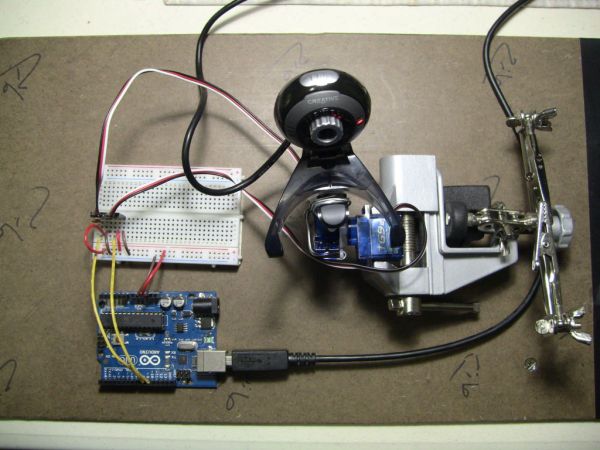
Basically, the webcam sends video frames to OpenCV running on a Windows PC. If OpenCV detects a face it will track it and calculate its center’s X,Y coordinates. The coordinates are then passed on to the Arduino via a serial USB connection. The Arduino controls the movement of the webcam with the help of two pan/tilt servos to follow the detected face.
OpenCV (Open Source Computer Vision Library: http://opencv.willowgarage.com/wiki/) is an open-source library that includes several hundreds of real-time computer vision algorithms. The OpenCV 2.x library is a C++ API.
This is an integration project between hardware and software tools. The image processing C++ code samples are provided with the openCV library and all I did was to modify the sample code for this project. I removed some of the unnecessary code and added serial communications to it so it can send X,Y values to Arduino.
CREDIT
This project would not have been possible without the team who developed OpenCV. I also benefited from Ryan Owens’ tutorial (http://www.sparkfun.com/tutorials/304) which is based on Processing, OpenFrameworks, and an earlier version of OpenCV. I tried to install Processing and OpenFrameworks with no luck. So Instead, I opted for Microsoft Visual C++ 2010 Express and the latest version of OpenCV which is 2.3.1 without any middleware or wrappers.
TOOLS
Software Required
Arduino IDE 1.0 for Windows
OpenCV 2.3.1 SuperPack For Windows
Microsoft Visual C++ 2010 Express SP1
Serial C++ Library for Win32 (by Thierry Schneider)
Code Required
– OpenCV C++ (attached) techbitarFaceDetection.cpp (based on OpenCV’s example facedetect.cpp)
– Arduino’s (attached) cam_servo.ino (based on Ryan Owens’ example SerialServoControl.pde)
Hardware Required
– PC preferably running Windows 7 SP1. The faster CPU the better.
– Arduino Uno or compatible + power source.
– Standard servos X 2.
– Webcam w/UBS interface.
– Breadboard.
– Jumper wires.
– Hobby wire to tie pan/tilt servos and webcam together.
 cam_servo.ino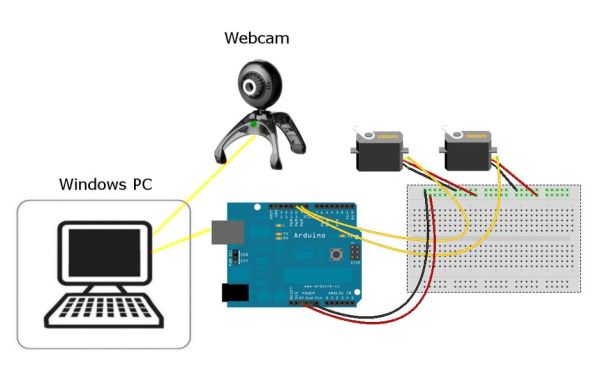
Step 1: Installation and integration issues
1) Download and install the OpenCV-2.3.1-win-superpack.exe if you don’t wish to deal with generating the support files yourself. Everything you need from OpenCV to build this project has already been generated in this download.
http://sourceforge.net/projects/opencvlibrary/files/opencv-win/2.3.1/
2) Download and install Microsoft Visual C++ 2010 Express
http://www.microsoft.com/visualstudio/en-us/products/2010-editions/visual-cpp-express
The OpenCV installation documentation explains how to make Visual C++ aware of the OpenCV support files (include, bin, etc). This is not a one-click job. Careful attention must be given to how Visual C++ must be configured to recognize OpenCV files.
The OpenCV team tested version 2.3.1 and Visual C++ 2010 on Windows 7 SP1. If you are using a different configuration, be prepared for a few hiccups.
– Arduino Uno
– Standard servos X 2.
For more detail: Face detection and tracking with Arduino and OpenCV
- How does the system track a detected face?
OpenCV calculates the X,Y coordinates of the face center and sends them to the Arduino via serial USB connection. - What software is required to run this project?
The project requires Arduino IDE 1.0, OpenCV 2.3.1 SuperPack, Microsoft Visual C++ 2010 Express SP1, and the Serial C++ Library for Win32. - Can I use COM ports above number 9?
Yes, but you must use the naming convention \\.\COMn and replace n with a number greater than 9. - Which version of OpenCV was used for this guide?
The author used OpenCV version 2.3.1 without any middleware or wrappers. - What programming language is used for the image processing code?
The image processing uses C++ code samples provided with the OpenCV library. - What hardware components control the webcam movement?
Two pan/tilt standard servos controlled by the Arduino move the webcam to follow the face. - Is a specific operating system recommended for the PC?
A PC preferably running Windows 7 SP1 is recommended, with a faster CPU being better. - What happens if I cannot install Processing or OpenFrameworks?
The author opted for Microsoft Visual C++ 2010 Express and OpenCV 2.3.1 as an alternative solution.
