
Summary of OLED on the Cheap!
This article reviews inexpensive Chinese dual-color OLED displays as a budget alternative to Adafruit's premium $16 models. The author shares their experience with a $4 Yellow-Blue unit, noting shipping times and the trade-off between cost and software support. It provides instructions for running the display on a Maple Mini clone using Arduino 1.6.1 and specific STM32 core files.
Parts used in the Cheap OLED Project:
- Inexpensive "mono" or dual-color OLED display (128x64 pixels)
- Maple Mini Clone (STM32F103 ARM microcontroller)
- Arduino 1.6.1 IDE (unmodified)
- STM32 ARM core files
I like cheap electronics for playing.
Cheap is good for budget conscious hobbyists and China is delivering lots of toys for playing – one being the inexpensive “mono” OLED displays. The single-color displays often come in a dual-color implementation where the top row of pixels are one color and the remaining majority of the lower pixels are another color. These dual-color units allow the title information to be easily distinguished from the lower part of the screen which is usually utilized for changing data.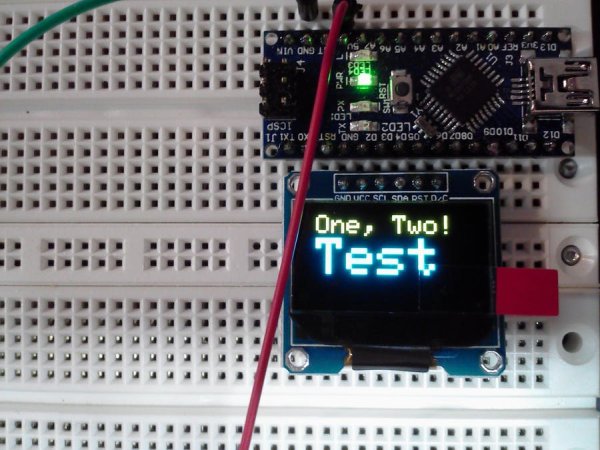
In a recent eBay (no endorsement intended) special, one Chinese vendor was offering $4 OLED screens in a Yellow-Blue implementation with free-shipping. That was back in mid-February and I received the modules this week: about 6 weeks. Mostly my experience is that the ePackets are arriving in 3 to 4 weeks and the economy shipping (often free) is coming in 6 to 8 weeks: your experience is likely to be different as pinning down the shipping times is difficult.
But,
This article is about the color module which is very similar to the one that Adafruit sells and has written libraries to support: Adafruit 0.96″ OLED. Of course, there is $16 dollars difference between the two (and about 31 – 45 days in getting your hands on it!) I encourage anyone wanting “a play” to support Adafruit as you gain access to their web-support which is really not bad and the little extra you spend supports the software development.
However,
If you are just experimenting and could care less about whether the Chinese part will work or not (or even if you actually receive it), then the $4 clone may be the way to go.
Low cost + low expectations = low risk.
Generally speaking,
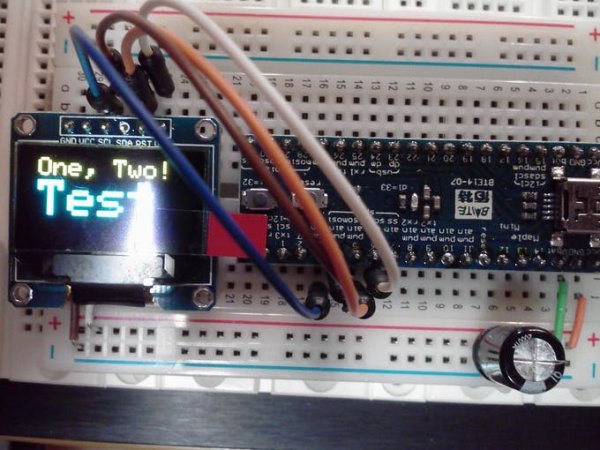
I would not post an entire article just to highlight a product sold and supported by Adafruit (or any vendor), but in this case, I am attaching a ZIP to support the OLED running on a Maple Mini Clone (also $4 – $5) which is supported by these new core files for Arduino 1.6.1. To duplicate this project, you need Arduino 1.6.1 (unmodified), a SPI OLED 128×64 pixel display (warning: some are I2C only), the STM32 ARM core files from the above link, and your choice of 8-bit Arduino or 32-bit ARM STM32F103 (Maple, Maple Mini.)
The attached ZIP is for the Maple Mini ARM STM32 Maple Mini running at 72MHz.
- What is the main advantage of the dual-color OLED implementation?
The top row of pixels uses one color while the lower pixels use another, allowing title information to be easily distinguished from changing data. - How much does the Chinese vendor offer the OLED screen for?
The Chinese vendor offered the screens for $4 with free shipping. - Does the article recommend buying the cheaper clone if you want guaranteed software support?
No, the author encourages supporting Adafruit to gain access to their web-support and software development. - What type of OLED display is required for this project?
You need a SPI OLED 128x64 pixel display, though some units are I2C only. - Which version of Arduino is necessary to duplicate this project?
You need Arduino 1.6.1 without any modifications. - Can I use an 8-bit Arduino board for this setup?
Yes, you can choose either an 8-bit Arduino or a 32-bit ARM STM32F103 like the Maple Mini. - What is the clock speed of the Maple Mini used in the attached ZIP file?
The Maple Mini ARM STM32 runs at 72MHz. - How long did it take to receive the module from China?
The author received the modules about 6 weeks after ordering.
