
Summary of Step-by-step guide for making a very simple temperature and humidity meter with 7-segment LED displays
This article gives step-by-step instructions to build a simple indoor temperature and relative humidity meter using an Arduino Uno (or compatible), a DHT11 sensor, and a MAX7219-based 8-digit serial 7-segment LED display. Temperature is shown in °C and humidity in percent; the project uses the LedControl library to drive the MAX7219 display and reads calibrated digital outputs from the DHT11.
Parts used in the Temperature and Humidity Meter:
- Arduino Uno board (or compatible Crowduino Uno SD)
- Crowduino Uno SD (example compatible board with extra features)
- DHT11 temperature and humidity sensor
- MAX7219-based SPI7SEGDISP8.56-2R 8-digit (two rows of 4-digit) 7-segment LED display module
- Connections/wiring for 3-wire serial interface (SPI) between Arduino and MAX7219 module
- Power supply (3.3V or 5.0V as supported by board and sensor)
- LedControl Arduino library (software for driving MAX7219)
In this blog post, I am providing you step by step instructions to build a very simple temperature and relative humidity meter for indoor use. All you need to build this project are an Arduino Uno or compatible board, a DHT11 sensor, and a MAX7219 based 8-digit serial 7-segment LED display. The temperature is displayed in degree Celsius and relative humidity in percentage.
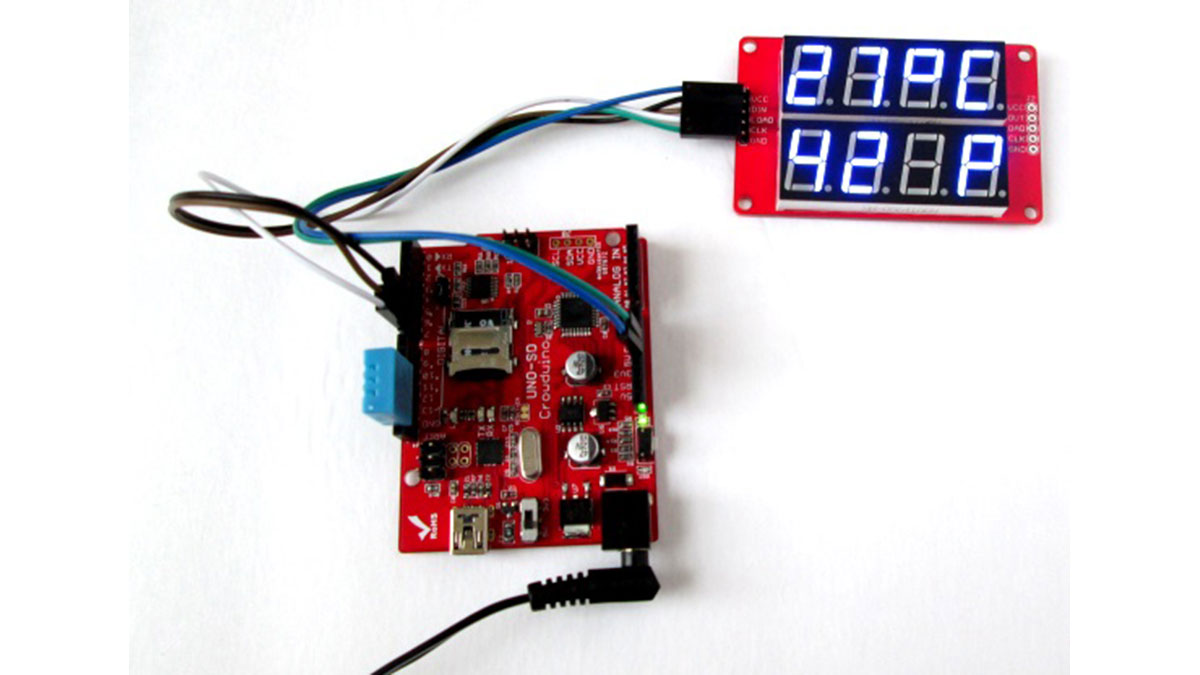
Things required to build this project
Arduino Uno board
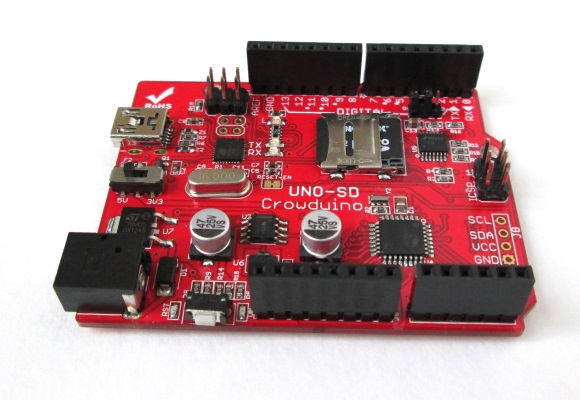
I am using Crowduino Uno SD board, which is manufactured by Elecrow and is fully compatible with Arduino Uno board. Crowduino has the following additional features that the standard Arduino Uno board doesn’t have.
1 Reset button is placed on the left side edge, and thus more convenient to access.
2 Improved power supply circuit with selectable 3.3V and 5.0V for operation.
3 Uses the mini USB connector to avoid the potential risk of connecting to the shield plugged in.
4 Micro SD card slot on board, which makes this board useful for data logging applications.
DHT11 sensor
DHT11 is an ultra low cost digital sensor for measuring temperature and relative humidity. It operates from 3.0-5.0V and provides calibrated digital outputs for temperature (in degree Celsius) and humidity through a single wire serial interface. It can measure humidity ranging from 20-80% with 5% accuracy, and temperature ranging from 0-50 degree Celsius with 2% accuracy. When it is active, the maximum current consumption is 2.5mA. The sensor has 4 pins with 0.1” spacing as shown below.
MAX7219-based seven segment display
The next thing required to do this project is two rows of 4-digit seven segment LED displays for displaying temperature and humidity simultaneously. This project uses SPI7SEGDISP8.56-2R display module, which is MAX7219 driven and allows you to control all 8 digits through a 3-wire serial interface. The display brightness can also be adjusted through software commands. In addition, library routines are available for interfacing the SPI7SEGDISP8.56-2R module to Arduino. This project, in particular, uses the LedControl library.
- What components are needed to build the meter?
An Arduino Uno or compatible board, a DHT11 sensor, and a MAX7219-based 8-digit serial 7-segment LED display module are needed. - Can I use a board other than Arduino Uno?
Yes, the article uses a Crowduino Uno SD as a compatible example. - How does the DHT11 communicate with the Arduino?
The DHT11 provides calibrated digital outputs for temperature and humidity through a single-wire serial interface. - What ranges and accuracy does the DHT11 provide?
Humidity range 20–80% with 5% accuracy; temperature range 0–50 °C with 2% accuracy, as stated in the article. - How many digits does the display module provide and how is it driven?
The project uses a MAX7219-driven SPI7SEGDISP8.56-2R module with two rows of four digits each (8 digits total) controlled via a 3-wire serial interface. - Which library is recommended to drive the MAX7219 display?
The article specifies using the LedControl library to interface the MAX7219 module with Arduino. - Can the display brightness be adjusted?
Yes, the MAX7219 display brightness can be adjusted through software commands. - What voltage does the DHT11 operate at?
The DHT11 operates from 3.0 to 5.0 V according to the article. - Does the Crowduino Uno SD offer additional features over standard Uno?
Yes; the Crowduino Uno SD has a convenient reset button placement, selectable 3.3V and 5.0V power, a mini USB connector, and a micro SD card slot, as described.
