
Summary of SP0256-AL2 Speech With Arduino
This article details an Arduino project using the General Instruments SP0256-AL2 vintage speech synthesis chip to pronounce "hello world." The system sends 8-bit addresses representing English allophones to the chip via PORTC. The audio output is processed through a filter and an LM386 amplifier connected to a speaker. The author also plans to integrate an infrared ranger for future motion-triggered speech functionality, with code provided in C for the ATmega328P microcontroller.
Parts used in the SP0256-AL2 Speech Project:
- Arduino with ATmega328P
- General Instruments (GI) SP0256-AL2 speech synthesis chip
- Breadboard
- LM386 audio amplifier
- Speaker
- Sharp infrared ranger
Here’s the Arduino version of a project to use the General Instruments (GI) SP0256-AL2 vintage speech synthesis chip to say “hello world”. I’d previously shown how to do this with a Basic Stamp 2.
Here’s what it sounds like saying, “hello world” 20101215_164333.mp3
How it works, in short, is that the GI chip must be given an 8-bit address corresponding to a vocalization. It sends an audio signal on its digital out pin which is filtered and presented to an LM386 audio amplifier with a speaker connected.
The 8-bit address is presented to the SP0256 on pins A1-A8. The address is latched into the chip with the !ALD (Address LoaD) pin.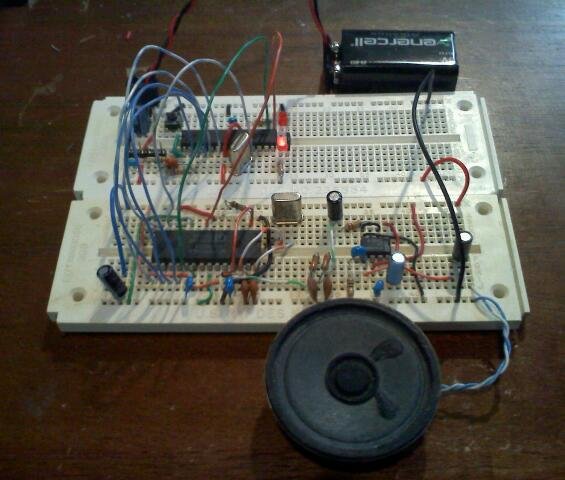 The address represents a speech sound in the chip’s internal ROM which corresponds to an English allophone (like CH, SS, LL, EH, EE, AH, …). The SBY (standby) pin goes low until the chip is done speaking the allophone just presented.
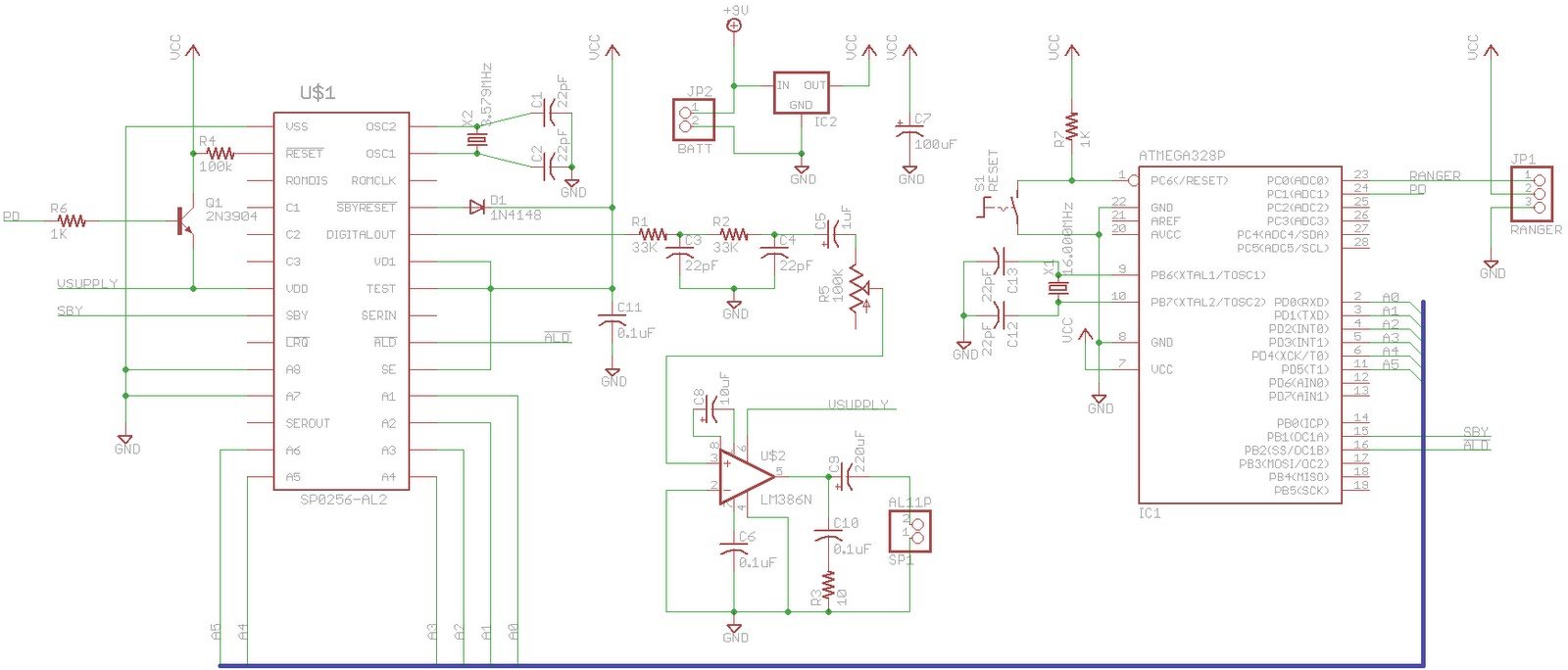
I used a breadboard Arduino with ATmega328P and wired the address lines to PORTC (Arduino digital pins 0..5) so that in software I could simply assign the allophone address all at once ala PORTC = address rather than a pin at a time. I arbitrarily hooked up !ALD to PD6 (digital pin 10) and SBY to PB1 (digital pin 9). Here’s a schematic that shows the hookup.
There are many more details to hooking up the SP0256. Here’s a link to the datasheet I scanned in.
SP0256-AL2.zip (5.2 MB download)
Astute readers may have noticed the IR ranger in the schematic. My current plan is to create a device that speaks random phrases whenever a Sharp infrared ranger detects the presence of an object (like a person walking by).
As for the code, it was a simple matter of porting the BS2 code to C for Arduino. Here it is:
/* SP0256-AL2 Speech Chip
* Control Code
* Text: HELLO WORLD.
* Phoneme: HH EH LL AX OW (PAUSE) WW ER1 LL PA2 DD1 (PAUSE)
* Octal: 033 007 055 017 065 003 056 063 055 001 025 004
* Dec: 27 7 45 15 53 3 46 51 45 1 21 4
*/
char data[64];
// PINOUT
// SBY -> PB1 / Pin 9
// !ALD -> PD6 / Pin 10
// A6..A1 -> PD5..0 / Pin 0..5
#define SBY 9
#define ALD 10
#define LED 13
void setup()
 {
int i;
// DON'T USE Serial Ports!!!
// LOAD data
i = 0;
data[i++] = 27; //HH1
data[i++] = 7; //EH
data[i++] = 45; //LL
data[i++] = 15; //AX
data[i++] = 53; //OW
data[i++] = 3; //PA4
data[i++] = 46; //WW
data[i++] = 51; //ER1
data[i++] = 45; //LL
data[i++] = 1; //PA2
data[i++] = 21; //DD1
data[i++] = 4; //PA5
data[i++] = 0; //end
{
int i;
// DON'T USE Serial Ports!!!
// LOAD data
i = 0;
data[i++] = 27; //HH1
data[i++] = 7; //EH
data[i++] = 45; //LL
data[i++] = 15; //AX
data[i++] = 53; //OW
data[i++] = 3; //PA4
data[i++] = 46; //WW
data[i++] = 51; //ER1
data[i++] = 45; //LL
data[i++] = 1; //PA2
data[i++] = 21; //DD1
data[i++] = 4; //PA5
data[i++] = 0; //end
For more detail: SP0256-AL2 Speech With Arduino
- How does the GI chip generate sound?
The chip receives an 8-bit address corresponding to a vocalization and sends an audio signal on its digital out pin which is filtered and amplified. - What represents the speech sounds in the chip's internal ROM?
The 8-bit address represents an English allophone like CH, SS, LL, EH, EE, AH. - Which Arduino pins are used for the SBY and !ALD signals?
The SBY pin is connected to PB1 (digital pin 9) and the !ALD pin is connected to PD6 (digital pin 10). - How are the address lines wired to the Arduino?
The address lines A1-A8 are wired to PORTC, which corresponds to Arduino digital pins 0 through 5. - When does the SBY pin go low?
The SBY pin goes low until the chip finishes speaking the allophone just presented. - Can I use Serial Ports for this project?
No, the code explicitly states not to use Serial Ports. - What is the plan for the IR ranger in the schematic?
The plan is to create a device that speaks random phrases whenever the Sharp infrared ranger detects the presence of an object. - Where can I find more details about hooking up the SP0256?
More details are available in the scanned datasheet linked as SP0256-AL2.zip.
