
Summary of MIDI Bass Pedal Arduino Encoder using arduino
This article describes a MIDI Bass Pedal Arduino Unit capable of converting up to 30 momentary switches into MIDI note commands. It features a 6x5 key matrix for a two-and-a-half octave range, starting at C1 (or programmable C2), and includes a 4-way DIP switch for selecting one of 16 MIDI channels. The system supports integration with older non-MIDI pedals using magnetic/reed switches for isolation while maintaining original functionality.
Parts used in the MIDI Bass Pedal Arduino Unit:
- Assembled Arduino Board
- Assembled MIDI IN & OUT circuit Board
- MIDI 5-pin DIN output socket
- MIDI 5-pin DIN input socket
- 2 Male Headers x6
- 1 Male Header x8
- Power-on LED
- 4-way DIP switch
- 2.1mm power socket
- Associated LED for power socket
- IN4148 diodes
MIDI BASS PEDAL ARDUINO UNIT
The MIDI Bass Pedal circuit is capable of encoding any number of momentary action, push to make, single pole single throw (SPST), switches from 1 up to 30 to produce the equivalent MIDI note-on/note-off data commands. The encoded switches are wired via IN4148 diodes. The keys are arranged in an 6 x 5 (30 keys) matrix, for up to a two and a half octave range.
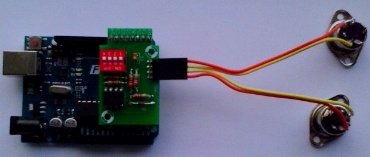 The MIDI start Note is set to C1 (Note 24), but any different start note can be pre-programmed if required. The MIDI channel (1 to 16) is set using the 4-way DIP switch, see Table. The encoded switches are wired via IN4148 diodes, see switches schematic.
This unit can be connected to new bass pedals or it can be used with an older non-MIDI bass pedals by using magnetic/reed switches to isolate the old and new scanning circuits. This will allow the older bass pedal synthesizer to continue to operate as normal while also providing a MIDI output.
The MIDI Bass Pedal Arduino Unit consists of:
- An assembled Arduino Board
- An assembled MIDI IN & OUT circuit Board,
- A MIDI 5-pin DIN output socket,
- A MIDI 5-pin DIN input socket,
- 2 Male Headers x6,
- 1 Male Header x8,
- A power-on LED,
- A 4-way DIP switch which selects the MIDI channel at power-on, see Table 1
- The velocity byte is preset to the maximum value,
- The start Note of the keyboard encoder is preset to C2 (Note 36), but may be programmed to any value on request,
- A 2.1mm power socket, and associated LED.
DIP Switch Selections
MIDIChannel 4 3 2 1 on on on on 1 on on on off 2 on on off on 3 on on off off 4 on off on on 5 on off on off 6 on off off on 7 on off off off 8 off on on on 9 off on on off 10 off on off on 11 off on off off 12 off off on on 13 off off on off 14 off off off on 15 off off off off 16 Table 1 MIDI Channels
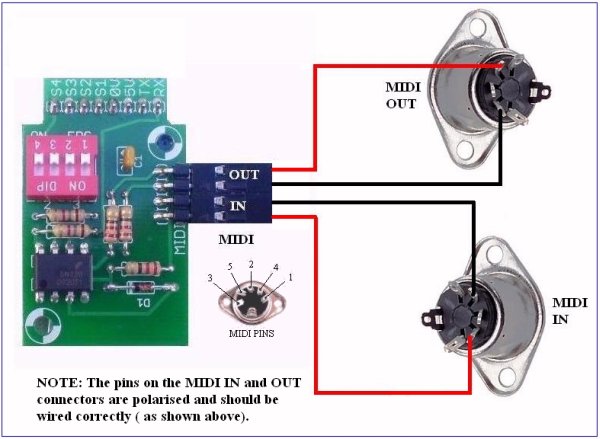
For more detail: MIDI Bass Pedal Arduino Encoder
- How many switches can this unit encode?
The circuit is capable of encoding any number of momentary action switches from 1 up to 30. - What is the maximum octave range provided by the matrix?
The keys are arranged in a 6 x 5 matrix, providing up to a two and a half octave range. - Can I use this unit with an older non-MIDI bass pedal?
Yes, you can use it with older pedals by employing magnetic or reed switches to isolate the scanning circuits. - How do I select the MIDI channel on this device?
The MIDI channel from 1 to 16 is set using the 4-way DIP switch located on the board. - What is the default start note for the keyboard encoder?
The MIDI start note is preset to C1 (Note 24), though the text also mentions a preset of C2 (Note 36) which may be programmed to any value. - How are the encoded switches wired in the circuit?
The encoded switches are wired via IN4148 diodes. - Is the velocity byte adjustable by default?
No, the velocity byte is preset to the maximum value. - What type of switches are compatible with this project?
The unit accepts momentary action, push to make, single pole single throw (SPST) switches.
