
Summary of New Arduino WiFi Shield (Testing) usign arduino
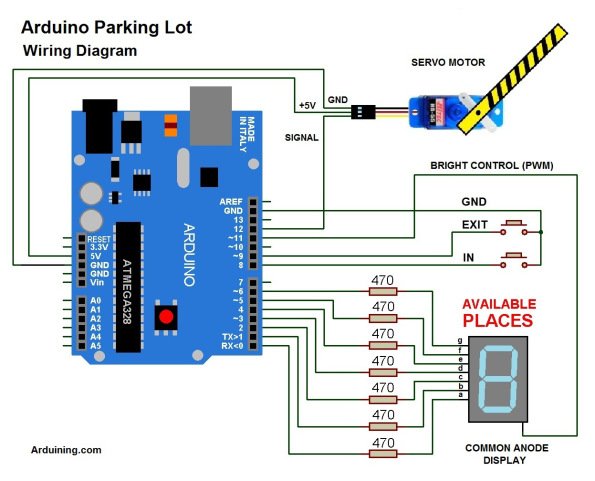
This article describes two Arduino-based projects: a parking lot counter using an Arduino UNO and WiFi Shield, and a stopwatch measuring car speed with a Texas Instruments LaunchPad. The parking system tracks capacity via buttons and displays numbers on a 7-segment display while controlling a servo barrier. The stopwatch project uses magnets and switches to time vehicle movement over a fixed distance, sending results via serial communication.
Parts used in the Parking Lot Counter:
- Arduino UNO Rev 3
- WiFi Shield
- Servo motor
- EXIT button
- IN button
- 7-segment display
Parts used in the LaunchPad Stopwatch:
- Texas Instruments LaunchPad version 1.5
- MSP430G2553 microcontroller
- START contact switch
- STOP contact switch
- Neodymium magnets
- Small nails
- Colored headed pins
- GREEN LED
- RED LED
The WiFi Shield was delivered by Amazon.
The Arduino UNO Rev 3 was found at RadioShack…
First you need to load the last Arduino IDE (Ver 1.0.2) it has the necessary library to use the WiFi shield.
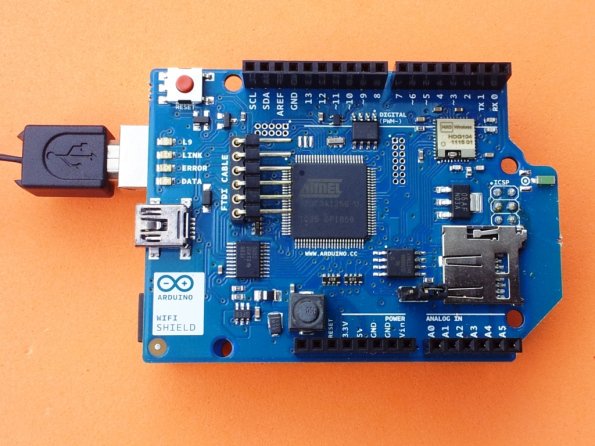 Tried the examples “Scan for available networks” and “WPA network example”
from:
http://arduino.cc/en/Guide/ArduinoWiFiShield
It works like a charm!
thanks Arduino Team…
Now some work is comming…
Thinking in some applications…
Here is the code:
/*ParkingL02.pde
Arduining.com 08 JUL 2012
Code used in the production of the Youtube material.
*/

#include <Servo.h>
Servo myservo;  // create servo object to control a servo

#define ServoM    12        //Connected to the servo motor.
#define Bright    11        //servo library disable PWM on pins 9 and 10.
#define Exit      9         //Pin connected to the EXIT button.
#define In        8         //Pin connected to the IN button.

#define BarLow    177       //Low position of the barrier.
#define BarUp     95        //Up position of the barrier.
#define CAPACITY  8         //Capacity of the parking lot.
#define INTEN     80        //Display intensity %

//Pins conections to segments (cathodes).
#define  segA  0
#define  segB  1
#define  segC  2
#define  segD  3
#define  segE  4
#define  segF  5
#define  segG  6

//Array with the segments to represent the decimal numbers (0-9).
byte segments[10] = {
// pgfedcba  <--- segments
  B00111111, // number 0
  B00000110, // number 1
  B01011011, // number 2
  B01001111, // number 3
  B01100110, // number 4
  B01101101, // number 5
  B01111101, // number 6
  B00000111, // number 7
  B01111111, // number 8
  B01101111  // number 9
};

void setup(){
  myservo.attach(ServoM);          // attaches the servo.

  pinMode(Exit, INPUT);           // set "EXIT" button pin to input
  pinMode(In, INPUT);             // set "IN" button pin to input
  digitalWrite(Exit, HIGH);       // Connect Pull-Up resistor.
  digitalWrite(In, HIGH);         // Connect Pull-Up resistor.
  pinMode(segA,OUTPUT);
  pinMode(segB,OUTPUT);
  pinMode(segC,OUTPUT);
  pinMode(segD,OUTPUT);
  pinMode(segE,OUTPUT);
  pinMode(segF,OUTPUT);
  pinMode(segG,OUTPUT);
  pinMode(Bright,OUTPUT);
  analogWrite(Bright,255*INTEN/100);
  myservo.write(BarLow);          //Barrier in the low position
//  delay(1000);
}

int  Available= 9;                    // Number of places available.

//================================================================
void loop(){
Display(Available);
if(digitalRead(In)==0)
{
  if(Available != 0){
    Available--;
    myservo.write(BarUp);
    delay(3000);
    myservo.write(BarLow);
    }
  }
if(digitalRead(Exit)==0)
{
  if(Available != CAPACITY){
    Available++;
    myservo.write(BarUp);
    delay(3000);
    myservo.write(BarLow);
    }
  }
}

/*-------------------------------------------------------------------
Put the segments according to the number.
--------------------------------------------------------------------*/
void Display(int number){
byte segs =  ~segments[number];        //"~" is used for commom anode.

digitalWrite(segA, bitRead(segs, 0) );
digitalWrite(segB, bitRead(segs, 1) );
digitalWrite(segC, bitRead(segs, 2) );
digitalWrite(segD, bitRead(segs, 3) );
digitalWrite(segE, bitRead(segs, 4) );
digitalWrite(segF, bitRead(segs, 5) );
digitalWrite(segG, bitRead(segs, 6) );
}
LaunchPad and Energia ( StopWatch )
This is a simple project using the LaunchPad from Texas Instruments and Energia (Arduino-like IDE).
The Launchpad version 1.5 comes with the MSP430G2553 microcontroller, it has a hardware UART (use the jumpers as shown in the image).
This is a funny and very low cost project.
The LaunchPad measures time (in microseconds) .The car travels a fixed distance between contacts (10 Cms).
Time is measured using START and STOP contact switches.
Contact switches are implemented using neodymium magnets.
You’ll need small nails, miniature neodymium magnets and colors headed pins to assemble the switches.
Here is the code used:
/* Cronometer01.ino
Arduining.com 25/AUG/12
Used in the LaunchPad V-1.5 with the MSP430G2553
Measuring time between the signals of START and STOP in microseconds.
The result is sent serial at 9600 bauds.
GREEN LED on indicate READY TO START.
RED LED on indicate MEASURING TIME.
RED LED blinking indicate MEASURE DONE.
Push RESET in the LaunchPad to repeat the measurement.
*/
#define START 11 //Pin P2.3
#define STOP 12 //Pin P2.4
 unsigned long time;
void setup() {
pinMode(START,INPUT_PULLUP); //internal pull-up
pinMode(STOP,INPUT_PULLUP); //internal pull-up
pinMode(GREEN_LED, OUTPUT);
pinMode(RED_LED, OUTPUT);
Serial.begin(9600);
}
void loop() {
Serial.println("READY");
digitalWrite(GREEN_LED, HIGH); // set the GREEN LED on
digitalWrite(RED_LED, LOW); // set the RED LED off
while(!digitalRead(START)){}
time = micros();
digitalWrite(GREEN_LED, LOW); // set the GREEN LED off
digitalWrite(RED_LED, HIGH); // set the RED LED on
while(!digitalRead(STOP)){}
time = micros()-time;
digitalWrite(RED_LED, LOW); // set the RED LED off
Serial.print(time);
Serial.println(" Microseconds");
while(1){ // Blink to indicate END.
delay(900); // wait 0.9 second
digitalWrite(RED_LED, HIGH); // set the RED LED on
delay(100); // wait 0.1 second
digitalWrite(RED_LED, LOW); // set the RED LED off
}
}
unsigned long time;
void setup() {
pinMode(START,INPUT_PULLUP); //internal pull-up
pinMode(STOP,INPUT_PULLUP); //internal pull-up
pinMode(GREEN_LED, OUTPUT);
pinMode(RED_LED, OUTPUT);
Serial.begin(9600);
}
void loop() {
Serial.println("READY");
digitalWrite(GREEN_LED, HIGH); // set the GREEN LED on
digitalWrite(RED_LED, LOW); // set the RED LED off
while(!digitalRead(START)){}
time = micros();
digitalWrite(GREEN_LED, LOW); // set the GREEN LED off
digitalWrite(RED_LED, HIGH); // set the RED LED on
while(!digitalRead(STOP)){}
time = micros()-time;
digitalWrite(RED_LED, LOW); // set the RED LED off
Serial.print(time);
Serial.println(" Microseconds");
while(1){ // Blink to indicate END.
delay(900); // wait 0.9 second
digitalWrite(RED_LED, HIGH); // set the RED LED on
delay(100); // wait 0.1 second
digitalWrite(RED_LED, LOW); // set the RED LED off
}
}
For more detail: New Arduino WiFi Shield (Testing)
- How do I load the necessary library for the WiFi shield?
You must load the last Arduino IDE version 1.0.2 which contains the required library. - What components are needed to assemble the contact switches?
The switches require small nails, miniature neodymium magnets, and colored headed pins. - Does the parking system use pull-up resistors for buttons?
Yes, the code connects internal pull-up resistors by setting the Exit and In pins to HIGH. - What is the fixed distance between contacts in the stopwatch project?
The car travels a fixed distance of 10 centimeters between the START and STOP contacts. - Can I change the display intensity in the parking code?
Yes, you can set the display intensity percentage using the INTEN variable defined as 80. - What does the blinking RED LED indicate in the stopwatch?
A blinking RED LED indicates that the measurement is done. - Which microcontroller is included in the LaunchPad version 1.5?
The LaunchPad version 1.5 comes with the MSP430G2553 microcontroller. - How is the parking barrier position controlled?
The barrier moves to a low or up position using a servo motor attached to pin 12. - What baud rate is used for serial communication in the stopwatch?
The result is sent via serial at 9600 bauds. - What happens if available spots reach zero in the parking system?
If available spots equal zero, the system will not decrement the count when a car enters.
