
Summary of BeagleLogic – BeagleBone Logic Analyzer
BeagleLogic transforms a BeagleBone Black into a 14-channel, 100Msps logic analyzer using kernel modules and Programmable Real-Time Units (PRU). It supports binary captures via standard commands, integrates with sigrok for protocol decoding, and offers a web interface for beginners. The system writes samples directly to DDR RAM without ARM core intervention, configurable from 10 Hz to 100 MHz.
Parts used in the BeagleLogic Project:
- BeagleBone [Black]
- beaglelogic kernel module
- Programmable Real-Time Units (PRU)
- remoteproc interface
- System Memory (DDR RAM)
- sigrok library
- libsigrok bindings
- web interface (demo)
New: Introducing the BeagleLogic cape. Click here for more details
Click Here for instructions on how to build BeagleLogic kernel modules
Click Here to get started, once the modules have been built and installed
Your BeagleBone. Now a Logic Analyzer.
BeagleLogic turns your BeagleBone [Black] into a 14-channel, 100Msps Logic Analyzer. Once loaded, it presents itself as a character device node /dev/beaglelogic.
The core of the logic analyzer is the ‘beaglelogic’ kernel module that reserves memory for and drives the two Programmable Real-Time Units (PRU) via the remoteproc interface wherein the PRU directly writes logic samples to the System Memory (DDR RAM) at the configured sample rate one-shot or continuously without intervention from the ARM core.
BeagleLogic can be used stand-alone for doing binary captures without any special client software.
dd if=/dev/beaglelogic of=mydump bs=1M count=1
is sufficient to grab a binary dump, once sample rate has been configured via sysfs.
When used in conjunction with the sigrok library, BeagleLogic supports software triggers and decoding over 30 different digital protocols. Since the BeagleLogic bindings for libsigrok have been merged upstream, the latest built-from-source sigrok libraries and tools support capturing from BeagleLogic.
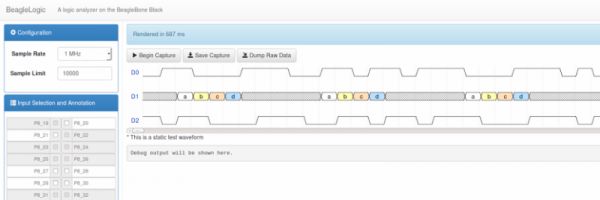
BeagleLogic also offers a web interface (demo) which, once installed on the BeagleBone, can be accessed from port 4000 and can be used for low-volume captures (upto 3K samples). It makes BeagleLogic a useful tool for beginners as a learning tool to learn about digital protocols.
Core Specifications:
- Sample Rate: 10 Hz to 100 MHz [(100/N) MHz; integer N]
- Sample Size: 8-bit or 16-bit [a maximum of 14 inputs: P8_39 to P8_46, P8_27 to P8_30, P8_20 and P8_21 (after disabling the eMMC)]
For more detail: BeagleLogic – BeagleBone Logic Analyzer
- How does BeagleLogic capture data?
The beaglelogic kernel module drives PRUs to write logic samples directly to System Memory at the configured sample rate. - Can I use BeagleLogic without special client software?
Yes, it can be used stand-alone for binary captures using simple dd commands. - What is the maximum sample rate supported?
The device supports a sample rate up to 100 MHz. - How many input channels are available?
It presents itself as a 14-channel logic analyzer. - Does BeagleLogic support digital protocol decoding?
Yes, when used with the sigrok library, it supports decoding over 30 different digital protocols. - Is there a web interface available for this project?
Yes, a web interface demo is available on port 4000 for low-volume captures up to 3K samples. - Which ports are used for the inputs?
Inputs include P8_39 to P8_46, P8_27 to P8_30, P8_20, and P8_21. - How do I configure the sample rate?
The sample rate is configured via sysfs before capturing.
