
Summary of Using Arduino tide predictions using arduino
This article describes building a "limpet splasher" system using an Arduino to simulate natural tidal cycles for aquarium animals. The system uses tide prediction code to control a sprinkler solenoid via a relay, spraying water intermittently during high tide and remaining off during low tide. A real-time clock provides timing data, while LEDs indicate operational states.
Parts used in the Limpet Splasher System:
- Arduino UNO
- DS3231 real time clock (Chronodot)
- Two LEDs
- Solid state relay
- Garden sprinkler solenoid
- Terminal block
- Circuit board designed for toner transfer
In the previous post, I outlined some Arduino code to generate tide height predictions for a NOAA tidal reference station.
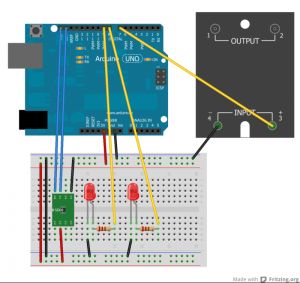
Now let’s do something useful with this newfound functionality. In the experiments I run, it’s useful to keep intertidal animals like snails and limpets on a natural tidal cycle. In addition, some animals like high-shore limpets really dislike being continuously submerged, and will crawl up out of the tank and die when they dry out. In this case, I built a “limpet splasher” system that sprays water in the aquarium for a few seconds at a time with pauses in between to simulate the wave beat, and shuts off completely during low tide. The code in this GitHub repository accomplishes this goal by activating a relay (hooked to a sprinkler solenoid) to spray water for a few seconds, pausing for 15 seconds, and then spraying again, simulating the splashing of waves. During low tide, no water flows.
The circuit uses a DS3231 real time clock (in the guise of a Chronodot) to provide the date and time, two LEDs to indicate low tide or when the relay is activated, and a solid state relay to interface with a common home garden sprinkler solenoid. The schematic is shown below.
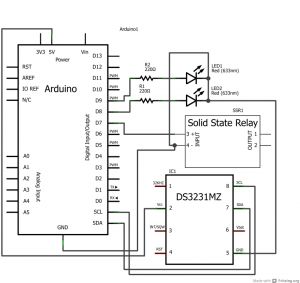
To implement this in real life, I made a circuit board to piggyback onto an Arduino UNO. It holds the Chronodot, LEDs, and a terminal block to wire to a solid state relay. Here’s a pdf of the circuit board design, suitable for toner transfer.
For more detail: Using Arduino tide predictions
-
How does the system simulate wave action?
The code activates a relay to spray water for a few seconds, pauses for 15 seconds, and repeats this cycle. -
What happens during low tide?
No water flows through the system during low tide periods. -
Which component provides the date and time?
A DS3231 real time clock, specifically in the guise of a Chronodot, is used to provide the date and time. -
How is the sprinkler solenoid controlled?
A solid state relay interfaces with the common home garden sprinkler solenoid to control water flow. -
What do the two LEDs indicate?
The LEDs indicate when the system is in a low tide state or when the relay is activated to spray water. -
Can I build the circuit board myself?
Yes, there is a PDF available of the circuit board design suitable for toner transfer implementation. -
Why was this system built?
It was built to keep intertidal animals like snails and limpets on a natural tidal cycle and prevent them from drying out.
