
Summary of Home Made Bezel / Window for LCD, LED, TFT Displays.
This project details a low-cost method to create a professional, water-resistant bezel for displays like 16x2 LCDs. By designing a scaled CAD template and printing it on card, the author cuts an acrylic window that mimics an iPhone-style black glass frame. This approach offers impact resistance, easy replacement, and a clean finish without expensive machining or full enclosure modifications.
Parts used in the 16x2 LCD Bezel Project:
- 16x2 LCD display
- Perspex (clear acrylic)
- CAD software (CADSoft Eagle)
- Blank BRD file
- Card stock
- Sharp knife or scalpel
- Scissors
I’ve been working on a project that used a 16×2 LCD display and wanted a nice finish that also allowed me to seal against water and other liquids. I also needed impact resistance, low cost and the ability to be changed easily if worn or broken.
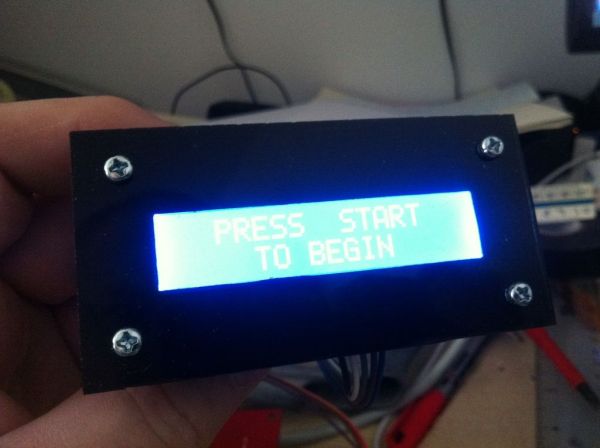
I considered many different ideas:-
1) A full sheet of perspex on the front of my enclosure. Great finish but expensive and difficult to seal as fully transparent.
2) A small piece of perspex over a cut hole in the enclosure. Cheaper but not so nice finish, showing the full LCD through and any rough enclosure cutting.
3) Looking for access to a laser cutter to make a profiled perspex window that sits through the enclosure hole to sit flush with surface. Difficult tolerances and no depth control with a laser.
4) Asking a local workshop to make a profiled perspex window on CNC milling machines. Cost more than using a full perspex sheet.
So, eventually I tried something else and ended up with what I think is a nice professional finish that is easy to do, cheap, and results in an iPhone type black glass frame style, with a clear window exactly the right size to show the display properly. It can also be easily adapted to any other type or size of display.
Step 1: Create And Print A Template
The first step was to take the existing display and get this transferred to some kind of CAD drawing, so that a template can be made.
Since I’ve been getting more proficient with CADSoft Eagle, I simply used a blank BRD file with mm grid to create my drawing and print at scale on to some card.
You could use any package that allows you to create accurate drawings at a 1:1 scale. You need it to come out in print to the correct scale.
I took the original dimensions of the 16×2 LCD display I had and drew it up, including the stand-off holes. I then added an additional 5mm surround to give my bezel additional strength around the fixing holes, and also to make it look better since the holes wouldn’t be right on the edge.
Print the template off and then use a sharp knife (craft knife, trimming knife, scalpel), or scissors, to cut out the outline and the inside border.
I used plain card for this, but a bit of extra time to make a plastic/acrylic template might be better if you intend to make a lot of these.
 16×2 LCD Bezel Template.pdf
Step 2: Use Template To Mark Out On A Piece of Perspex
Next use the cut out template to mark up a piece of clear acrylic / perspex with the outside dimension and then cut this out.
For more detail: Home Made Bezel / Window for LCD, LED, TFT Displays.
- What is the main advantage of this bezel design?
It provides a professional finish with water resistance, impact resistance, low cost, and easy adaptability. - How do you create the template for the bezel?
You use CAD software to draw the display dimensions at a 1:1 scale and print it onto card stock. - Why was a 5mm surround added to the drawing?
The extra 5mm adds strength around fixing holes and improves aesthetics by keeping holes away from the edge. - Can this method be used for other display types?
Yes, the design can be easily adapted to any other type or size of display. - What tools are needed to cut the card template?
A sharp craft knife, trimming knife, scalpel, or scissors can be used to cut the outline and border. - Why did the author reject using a laser cutter?
Laser cutting was rejected due to difficult tolerances and a lack of depth control. - What material is recommended for the final window?
Clear acrylic or perspex is used to mark out and cut the final window piece. - Is it better to make the template from plastic instead of card?
Making a plastic or acrylic template takes more time but is better if you intend to make many bezels.
