
Summary of Drive with PID Control Using Arduino Board
This example demonstrates simulating and deploying a closed-loop PID steering controller for a four-wheel vehicle in Simulink and running it on supported Arduino boards, comparing open-loop and closed-loop performance, and showing hardware setup and deployment steps for the Arduino Mega 2560 (also compatible with several other Arduino boards).
Parts used in the Arduino Mega2560 Drive Closed-loop:
- Supported Arduino board (Arduino Leonardo, Arduino Mega 2560, Arduino Mega ADK, Arduino Pro, or Arduino Uno)
- USB cable
- Texas Instruments SN754410 quadruple high-current half-H driver
- Two 10 kOhm resistors
- Small breadboard
- Breadboard wires
- Four-wheel mobile platform with four DC motors
- Two optical encoders wired to front DC motors
- Battery pack of five AA 1.5V batteries
- Single pole single throw (SPST) switch
This example shows how to simulate a simple closed-loop control algorithm in Simulink® and how to run it on an Arduino® board.
Supported Hardware:
- Arduino Leonardo
- Arduino Mega 2560
- Arduino Mega ADK
- Arduino Pro
- Arduino Uno
Available versions of this example:
Arduino Mega 2560 board:
Introduction
In a vehicle using independent wheel control, applying the same power to each wheel generally does not result in the vehicle moving straight. This is caused by mechanical and surface differences experienced by each of the wheels. To reduce deviation in the vehicle heading, a better approach is to use a closed-loop controller which adjusts the power applied to two motors based on the difference in their rates of rotation. One such controller is a well-known proportional-integral-derivative (PID) controller.
PID control is a basic control loop feedback mechanism. The controller minimizes the difference between the measured and the desired value of a chosen system variable by adjusting the system control inputs.
This example shows you how to simulate the controller using a simple plant model, first with no feedback control (Open-Loop Control), and then with feedback control (Closed-Loop Control). This example also illustrates how to switch between simulating the PID controller and running it on hardware in the same model.
Prerequisites
We recommend completing Getting Started with Arduino Hardware.
Required Hardware
To run this example you will need the following hardware:
Controller board:
- Supported Arduino board
- USB cable
Motor controller parts:
- Texas Instruments™ SN754410 quadruple high-current half-H driver
- Two 10 kOhm resistors
- Small breadboard
- Breadboard wires
A four-wheel vehicle:
- A mobile platform with four wheels powered by four DC motors
- Two optical encoders wired to front DC motors
- A battery pack consisting of five AA 1.5V batteries
- A single pole, single throw (SPST) switch
Notes:
- This example was tested with the four-wheel vehicle built using DFRobot 4WD Arduino-Compatible Platform w/Encoders.
- Other vehicle kits can be used as long as they have the same mechanical characteristics (four wheels, four DC motors and two encoders).
- With a minor modification to the controller connections, a vehicle with only two DC motors can be used as well.
- Encoders used in this example are ten-step encoders. Different encoders can be used with minor modifications to the example models.
Task 1 – Build the Vehicle
1. Assemble the mobile platform. Attach the two DC motors with encoders to the front wheels.
2. Attach the other two DC motors to the rear wheels. If your platform has only two DC motors, let the rear wheels rotate freely.
3. Assemble the battery pack and attach it to the mobile platform using suitable fasteners.
4. Connect the positive end of the battery pack to the switch using the breadboard wires.
Note: If you are using DFRobot 4WD Arduino-Compatible Platform w/Encoders kit, follow the vendor’s instructions.
Task 2 – Build the Motor Controller
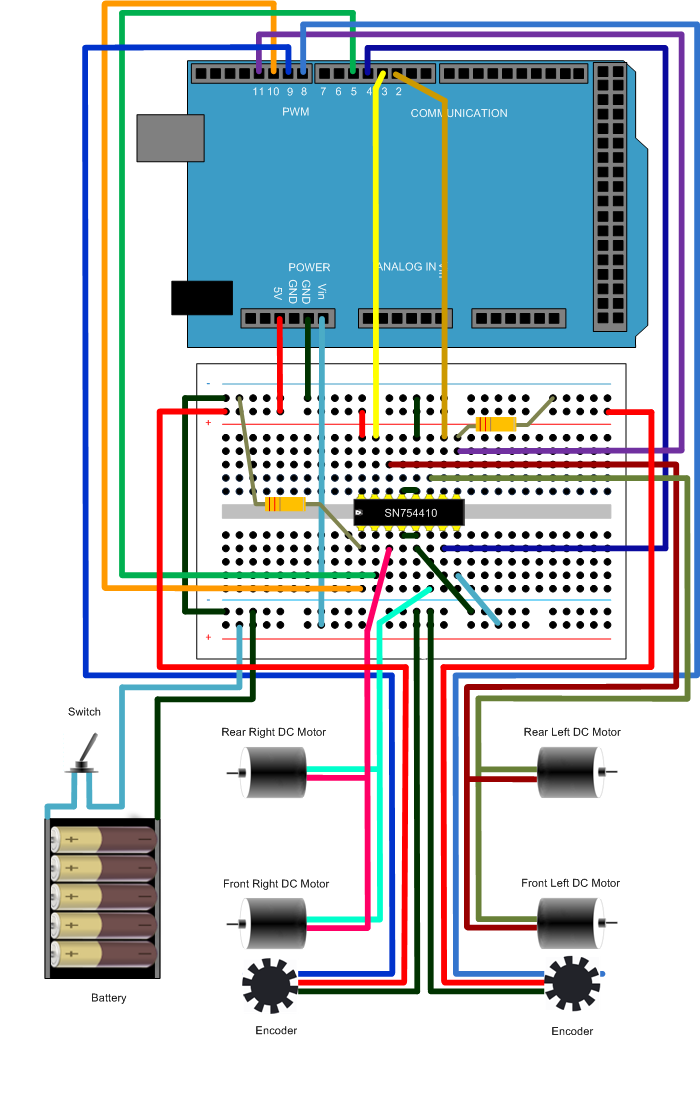
The Arduino board alone cannot provide high enough current to power DC motors. For that purpose, you will build the motor controller based on the Texas Instruments SN754410 quadruple high-current half-H driver.
1. Assemble the motor controller using the following circuit diagram. This example shows how to assemble on Arduino Mega2560 board.
2. Connect the controller to the vehicle battery pack following the same circuit diagram.
Task 3 – Simulate Open-Loop Control Model
This step illustrates that independently powered wheels cause deviations in vehicle heading.
1. Open the model. Observe two subsystems in the model.
2. Open the Open-Loop Controller subsystem. This subsystem controls the vehicle driving. Observe that the controller does not use the difference between two encoder outputs to control the motors.
3. Notice the Motors subsystem. The subsystem contains both simulated and actual motors. The Environment Controller block takes the outputs of the simulated or actual motors, depending on the current environment. This allows you to represent both simulated and actual motors in one model. As an alternative, you may create two models, one for simulation, and the other one for running on actual hardware.
4. Click Run button in the Simulink toolbar. Click the Scope block and observe that the Encoder Output Mismatch increases over time. This indicates that the vehicle will not move straight.
Task 4 – Run Open-Loop Control Model on the Arduino Mega 2560 Board
1. Disconnect the battery power wire leading to the Vin terminal on the Arduino Mega 2560 board since the board will get powered via a USB cable.
2. Connect the Arduino Mega 2560 board to your host computer using USB cable.
3. In the model, click the Deploy To Hardware button on the toolbar.
For more detail: Drive with PID Control Using Arduino Board
- What is the purpose of the example?
To simulate a closed-loop PID controller for steering in Simulink and run it on an Arduino board. - Which Arduino boards are supported?
Arduino Leonardo, Arduino Mega 2560, Arduino Mega ADK, Arduino Pro, and Arduino Uno are supported. - What motor driver is used for the motor controller?
The Texas Instruments SN754410 quadruple high-current half-H driver is used. - How many encoders does the example require?
Two optical encoders wired to the front DC motors are required. - What battery pack is specified?
A battery pack consisting of five AA 1.5V batteries is specified. - How do you observe deviation in open-loop simulation?
Run the Simulink model and view the Scope block to see Encoder Output Mismatch increasing over time. - What should you do with the Arduino Vin connection before deploying over USB?
Disconnect the battery power wire leading to the Vin terminal since the board will be powered via USB. - Can platforms other than the tested DFRobot kit be used?
Yes, other vehicle kits can be used if they have similar mechanical characteristics (four wheels, four DC motors, and two encoders). - Are modifications needed for different encoders or two-motor platforms?
Minor modifications to the example models and controller connections are required for different encoders or a two-motor platform.
