
Summary of 7 Segment Digital Thermometer using ATtiny 85
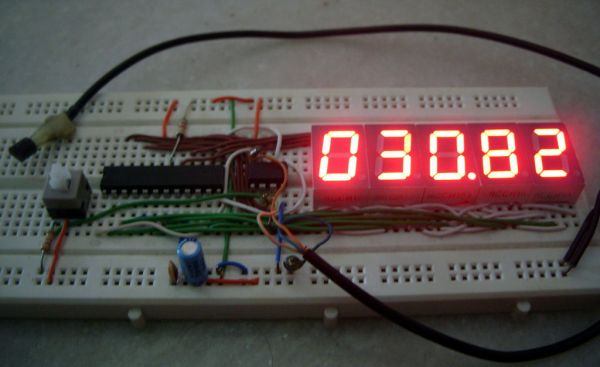
This DIY project creates a digital thermometer using an ATtiny 85 microcontroller, LM35 temperature sensor, and MAX7219 driver for a 4-digit display. It measures temperatures from 0 to 150°C (32 to 300°F) and toggles between Celsius and Fahrenheit via a push button. The system runs on a regulated 5V supply and is programmed in Arduino.
Parts used in the Digital Thermometer:
- ATtiny 85
- LM35 temperature sensor
- MAX7219 driver
- Resistors
- Capacitors
- 4 digit multiplexed 7 segment display (Common Cathode)
- Push button
- Regulated 5 V supply
Temperature Measurement Range : 0 to 150’C
32 to 300’F
Controller: ATtiny 85
Display type – 4 digit multiplexed 7 segment display(Common Cathode type)
Programming Language: Arduino
The setup can display both in Celsius and Fahrenheit. By default the temperature is shown in Celsius but can be toggled to display in Fahrenheit using the push button.
Step 1: Working
The LM35 series are precision integrated-circuit temperature sensors, whose output voltage is linearly proportional to the Celsius temperature. The LM35 does not require any external calibration or trimming to provide typical accuracies of ±1⁄4°C at room temperature and ±3⁄4°C over a full −55 to +150°C temperature range. The LM35’s low output impedance,linear output, and precise inherent calibration make interfacing to MCU easy.As it draws only 60 μA from its supply, it has very low self-heating, less than 0.1°C in still air.
The MAX7219 is a compact, serial input/output common-cathode display drivers that interface microprocessors (µPs) to 7-segment numeric LED displays of up to 8 digits. It implements a SPI compatible slave interface that can be controlled from the Arduino using only 3 of the digital output pins.
All the necessary calculations and control signals are generated by the ATtiny85. The Data, CLK & Load pin of MAX7219 is connected to pin 2,1,0 of the ATtiny85 respectively. Analog output from LM35 is feed to the ADC channel 3 of the ATtiny85.
For more detail: 7 Segment Digital Thermometer using ATtiny 85
- What is the temperature measurement range of this project?
The setup measures from 0 to 150 degrees Celsius or 32 to 300 degrees Fahrenheit. - How can the user toggle between Celsius and Fahrenheit?
Users can switch units by pressing the push button connected to the circuit. - Which programming language is used for the controller?
The project uses the Arduino programming language. - Does the LM35 require external calibration?
No, the LM35 does not require any external calibration or trimming. - How many digital output pins are needed to control the MAX7219?
Only 3 digital output pins are required to interface with the MAX7219. - Which pins on the ATtiny 85 connect to the MAX7219 data, clock, and load signals?
Data connects to pin 2, CLK to pin 1, and Load to pin 0. - Where is the analog output from the LM35 connected?
The analog output feeds into ADC channel 3 of the ATtiny 85. - What type of power supply does the setup require?
The circuit runs off a regulated 5 V supply.
