
Summary of TourBox – The Ultimate Controller For Photoshop And Lightroom
TourBox is an advanced, fully customizable creative controller designed to optimize workflows for Photoshop, Lightroom, and other image processing software. It features ergonomic inputs like knobs, rollers, buttons, and a turntable that can be tailored to specific shortcuts, reducing repetitive tasks for photographers and designers while maintaining compatibility with standard mice and keyboards.
Parts used in the TourBox:
- Knob
- Roller
- Buttons
- Turntable
- Dial
Tour Technology is a group of tech engineers and designers working together to make innovative products for designers and creators. After several years of research and development, they created an advanced controller with customized creative inputs to simplify and optimize control of Photoshop, Lightroom, and other software.
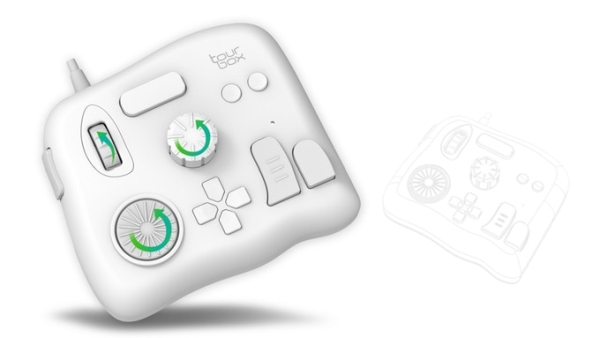
TourBox is the advanced creative controller for Photoshop, Lightroom, SAI, and other image processing software. It is designed for photographers and designers who want to improve their work efficiency. It frees users from endlessly repeated tasks such as drawing, editing, and retouching. It uses a new, straightforward approach that is ergonomic and natural.
TourBox is a fully customizable device. In addition to Photoshop, Lightroom, or PaintTool SAI, in future, it will further integrate recommended presets for other popular software such as Capture One, Final Cut Pro, Premiere and many others. A user can also adapt any knob, dial, button or even a combination of them to the shortcuts choosing to suit any software. This opens the possibility to user to customize their own TourBox to best fit personal workflow.
With the Engine Tuning capability, TourBox can accommodate an incredibly user-friendly experience at all times. TourBox has inputs like a knob, a roller, buttons, a turntable, each of their rotations can be customized the way a user wants. The company claims that Tourbox’s engine has been polished and fine-tuned over a thousand times to make workflows smooth and natural.
The layout design of TourBox makes shortcuts easy to handle. User can easily switch between all tools of PS, LR, and SAI instantly. Changing the complicated keyboard shortcut combinations, with the shortcuts of TourBox. It is also compatible with any mouse and keyboard combination.
Read more: TourBox – The Ultimate Controller For Photoshop And Lightroom
- What software does TourBox support?
TourBox supports Photoshop, Lightroom, PaintTool SAI, Capture One, Final Cut Pro, Premiere, and more. - Can users customize the device inputs?
Yes, users can adapt any knob, dial, button, or combination to suit their personal workflow. - How does TourBox improve work efficiency?
It frees users from endlessly repeated tasks such as drawing, editing, and retouching. - Is TourBox compatible with standard peripherals?
Yes, it is compatible with any mouse and keyboard combination. - What is the Engine Tuning capability?
It refers to the fine-tuning of the engine over a thousand times to ensure smooth and natural workflows. - Can shortcuts be switched instantly?
Users can easily switch between all tools of PS, LR, and SAI instantly. - Does TourBox replace keyboard shortcuts?
It replaces complicated keyboard shortcut combinations with its own intuitive shortcuts.
