
Summary of THE AUGMENTED REALITY BREADBOARD OF THE FUTURE
VirtualComponent transforms the classic breadboard into a mixed-reality prototyping tool using augmented reality and advanced electronics. Developed at KAIST, it allows users to virtually plug in components via software while maintaining physical row connectivity. The system features dynamic component adjustment, such as variable resistors and capacitors, controlled through an Android tablet that overlays virtual elements onto the real workspace, enabling efficient circuit simulation without physical swapping.
Parts used in the VirtualComponent:
- AD75019 cross-point switch arrays
- Arduino microcontroller
- AD5241 digital potentiometers
- Real capacitors
- ADG715 digital switch array
- Android tablet with camera
- Augmented reality software
You’d be hard pressed to find a carpenter who didn’t own a hammer, or a painter that didn’t have a couple of brushes kicking around. Some tools are simply so fundamental to their respective craft that their ownership is essentially a given. The same could be said of the breadboard: if you’re working with electronics on the hobby or even professional level, you’ve certainly spent a decent amount of time poking components and wires into one of these quintessential prototyping tools.
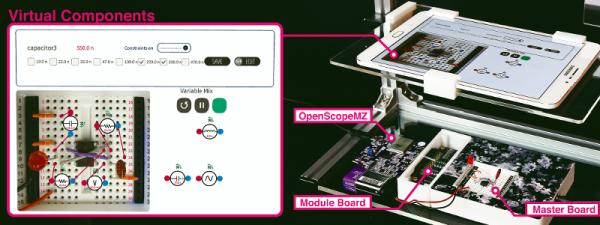
There’s little danger that the breadboard will loose its relevance going forward, but if [Andrea Bianchi] and her team have anything to say about it, it might learn some impressive new tricks. Developed at the Korean Advanced Institute of Science and Technology, VirtualComponent uses augmented reality and some very clever electronics to transform the classic breadboard into a powerful mixed-reality tool for testing and simulating circuits. It’s not going to replace the $3 breadboard you’ve got hiding at the bottom of your tool bag, but one day it might be standard equipment in electronics classrooms.
The short version is that VirtualComponent is essentially a dynamic breadboard. Holes in the same row are still electrically linked like in the classic breadboard, but with two AD75019 cross-point switch arrays and an Arduino in the base, it has the ability to virtually “plug in” components at arbitrary locations as selected by the user. So rather than having to physically insert a resistor, the user can simply tell the software to connect a resistor between two selected holes and the cross-point array will do the rest.
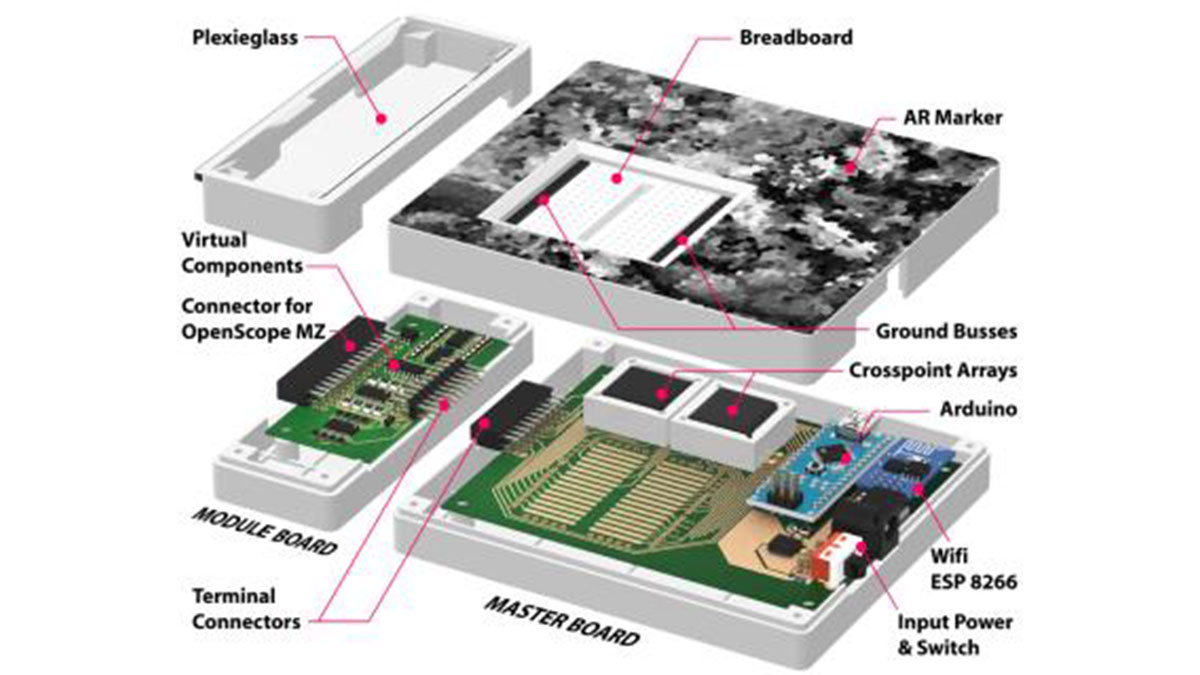
What’s more, many of those components can be either simulated or at least augmented in software. For example, by using AD5241 digital potentiometers, VirtualComponent can adjust the value of the virtual resistor. To provide variable capacitance, a similar trick can be pulled off using an array of real capacitors and a ADG715 digital switch to connect them together; essentially automating what the classic “Decade Box” does. In the demonstration video after the break, this capability is extended all the way out to connecting a virtual function generator to the circuit.
The whole system is controlled by way of an Android tablet suspended over the breadboard. Using the tablet’s camera, the software provides an augmented reality view of both the physical and virtual components of the circuit. With a few taps the user can add or edit their virtual hardware and immediately see how it changes the behavior of the physical circuit on the bench.
People have been trying to improve the breadboard for years, but so far it seems like nothing has really stuck around. Given how complex VirtualComponent is, they’ll likely have an even harder time gaining traction. That said, we can’t help but be excited about the potential augmented reality has for hardware development.
Source: THE AUGMENTED REALITY BREADBOARD OF THE FUTURE
- What is VirtualComponent?
It is a dynamic breadboard developed at KAIST that uses augmented reality and electronics to simulate circuits. - How does the system connect components virtually?
The user selects holes via software, and two AD75019 cross-point switch arrays handle the connection. - Can the value of a virtual resistor be adjusted?
Yes, the system uses AD5241 digital potentiometers to adjust the value of the virtual resistor. - How is variable capacitance provided in this project?
An array of real capacitors connected by an ADG715 digital switch automates the function of a Decade Box. - What device controls the whole system?
An Android tablet suspended over the breadboard controls the system via its camera. - Does this tool replace the standard $3 breadboard?
No, it is not intended to replace the cheap breadboard but could become standard in classrooms. - What happens when a user edits virtual hardware on the tablet?
The user immediately sees how the changes affect the behavior of the physical circuit on the bench. - Can a virtual function generator be connected?
Yes, the demonstration video shows extending capabilities to connecting a virtual function generator.
