
Summary of Send SMS with SIM900D in Proteus ISIS
This article demonstrates how to send SMS using the SIM900D module within Proteus ISIS simulation. The author utilizes a custom GSM library and avoids microcontrollers by issuing AT commands directly through a virtual terminal. The process involves testing the module, setting text mode, entering the recipient's number, typing the message body, and finalizing transmission with a Ctrl+Z command. This guide serves as a software testing method before implementing the circuit on actual hardware like Arduino or PIC.
Parts used in the Send SMS with SIM900D project:
- SIM900D module
- GSM Library for Proteus
- Proteus ISIS software
- Virtual Terminal
Hello friends, hope you all are fine and having fun with your lives. Today, I am going to share a new exciting post on Send SMS with SIM900D in Proteus ISIS. In my previous post, I have shared the new GSM Library for Proteus, which is the first ever designed library for Proteus, and I am quite excited while sharing its features. So, today, we will use this GSM Lirbary for Proteus and we are gonna send sms with Sim900D module available in that library. We are gonna design this whole project in Proteus ISIS.
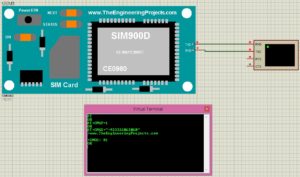
If you wanna implement it on hardware then you must have a look at Send SMS with SIM900D module with Arduino which is designed in real hardware but today we are gonna just do the simulation part. Iam not gonna use any Microcontroller today. Instead I will just send the AT commands through virtual Terminal and we will make it work.So, let’s get started with Send SMSM with Sim900D in Proteus ISIS.
Send SMS with SIM900D in Proteus ISIS
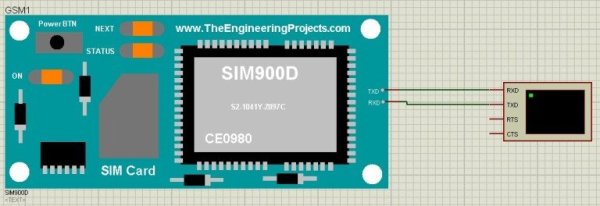
- First of all, I assume that you have already installed the GSM Library for Proteus. If you haven’t then first intall it because without this library you can’t use GSM module in Proteus ISIS.
- Next thing you need to do is to design a circuit as shown in the below figure:
- Now we need to run the simulation, so run it and in your virtual terminal, send these commands as shown in below figure:
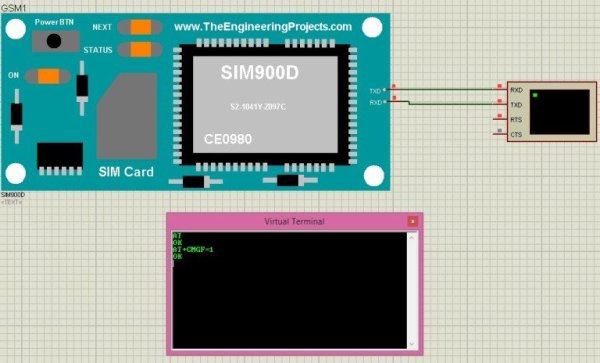
- The first AT command is for testing our GSM module and as it has given OK in reply so it means its working correctly.
- The second command AT+CMGF=1 is for converting our GSM module to text messages, which it has accepted correctly and has given us OK in reply.
- Now we are ready to send our SMS.
- So, in order to do that we have to send it the command, as shown in below figure:
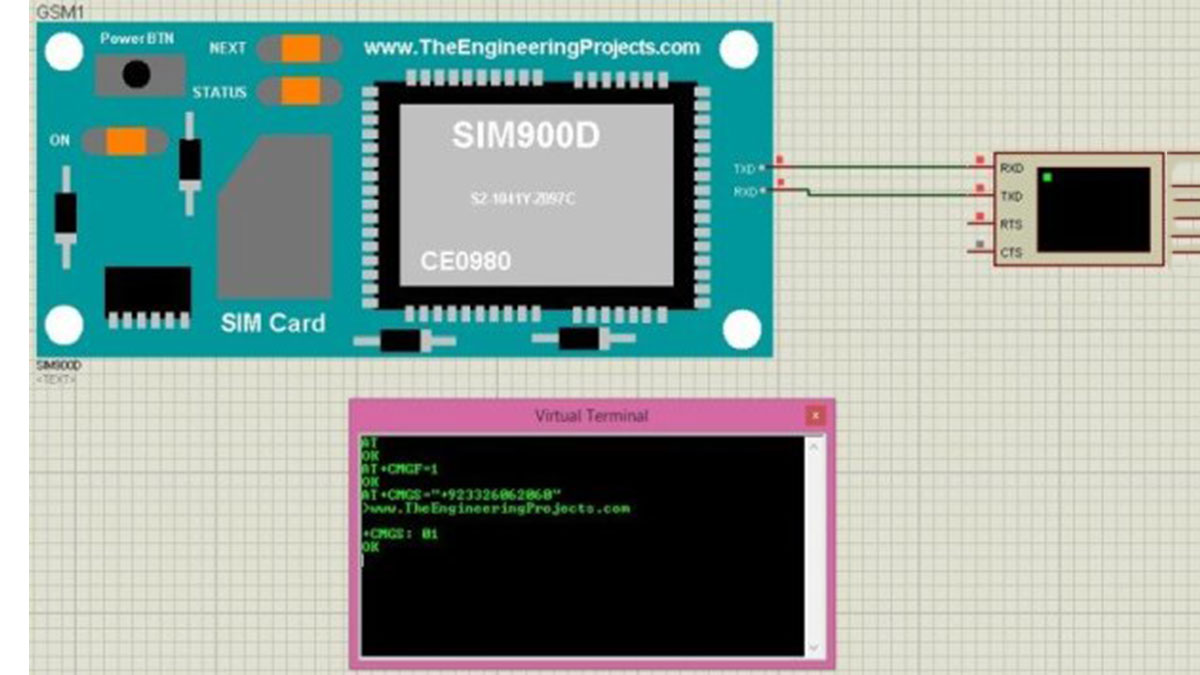
- Now you can see, when I have given it the command which is AT+CMGS=”+923326062060″ , it has accepted it and replied back with this sign “>” , now the GSM module is actually asking for the message body.
- So, let me write some text and then when I enter the Cntrl+Z command then it will send the message as shown in below figure:
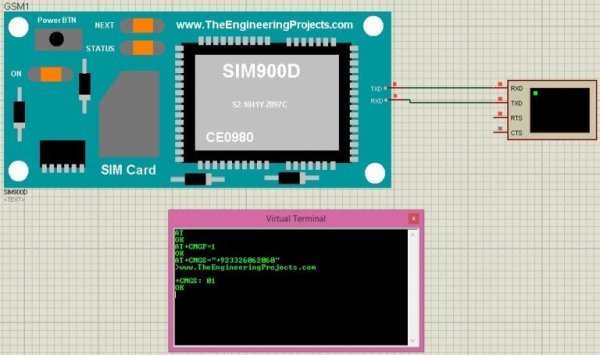
- So, I have given it the text of my blog link and then when I entered Cntrl+Z then it has sent the SMS and replied me back with +CMGS: 01 means its the first SMS sent from this GSM module.
- So, that’s how you can send any nmber of messages as you want from this module.
- AS its a simulation, so obviously you are not gonna get the actual message on your mobile number but you can use it for testing your codes.
- In the next post, I am gonna hopefully implement it using Arduino board or PIC Microcontroller.
So, that’s all for today, I hope you have enjoyed the Send SMS with Sim900D in Proteus ISIS software. Till next tutorial, take care and have fun!!!
Source: Send SMS with SIM900D in Proteus ISIS
- What is required to use the GSM module in Proteus ISIS?
You must first install the GSM Library for Proteus. - How do you test if the GSM module is working correctly?
Send the AT command, which should reply with OK. - Which command converts the GSM module to text messages?
The command AT+CMGF=1 sets the module to text message mode. - What command initiates sending an SMS to a specific number?
Use the command AT+CMGS followed by the phone number in quotes. - How do you finalize the message transmission after typing the body?
Enter the Cntrl+Z command to send the message. - What does the reply +CMGS: 01 indicate?
It confirms that the first SMS has been sent from the GSM module. - Can this simulation send actual messages to a mobile phone?
No, it is a simulation and will not deliver actual messages to a real number. - What hardware is planned for future implementation of this project?
The author plans to implement it using an Arduino board or PIC Microcontroller.
