
Summary of Arduino with Bosch BME280 Pressure Transducer using Arduino Uno with Proteus Simulation
Summary: This project shows how to interface a Bosch BME280 sensor with an Arduino Uno in Proteus simulation to measure temperature, humidity, pressure, and calculate altitude. It uses I²C communication and the Adafruit BME280 library, prints results to the serial terminal, and is intended for learning sensor communication, simulation testing, and prototype development.
Parts used in the Arduino with Bosch BME280 Pressure Transducer using Arduino Uno with Proteus Simulation:
- Arduino Uno (ATmega328P)
- Bosch BME280 Temperature, Humidity & Pressure Sensor
- I²C communication lines (SDA and SCL)
- Proteus Virtual Terminal or Arduino Serial Monitor (serial terminal)
- Power supply via Arduino
- Adafruit BME280 library (software component)
Introduction
This microcontroller project demonstrates how to interface a Bosch BME280 environmental sensor with an Arduino Uno using Proteus simulation. The system measures temperature, humidity, pressure, and calculated altitude and displays the results via serial output.
It is a practical embedded systems example ideal for learning sensor communication, I²C protocols, and real-world data acquisition.
This project is especially useful for DIY electronics, weather monitoring concepts, and sensor-based automation.
By simulating the circuit in Proteus, users can test firmware behavior before building physical hardware.
The project highlights a clean workflow from circuit diagram to source code and live sensor readings.
How the Project Works (Overview)
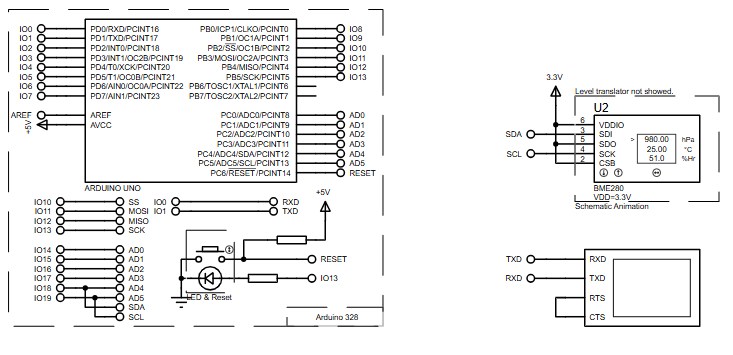
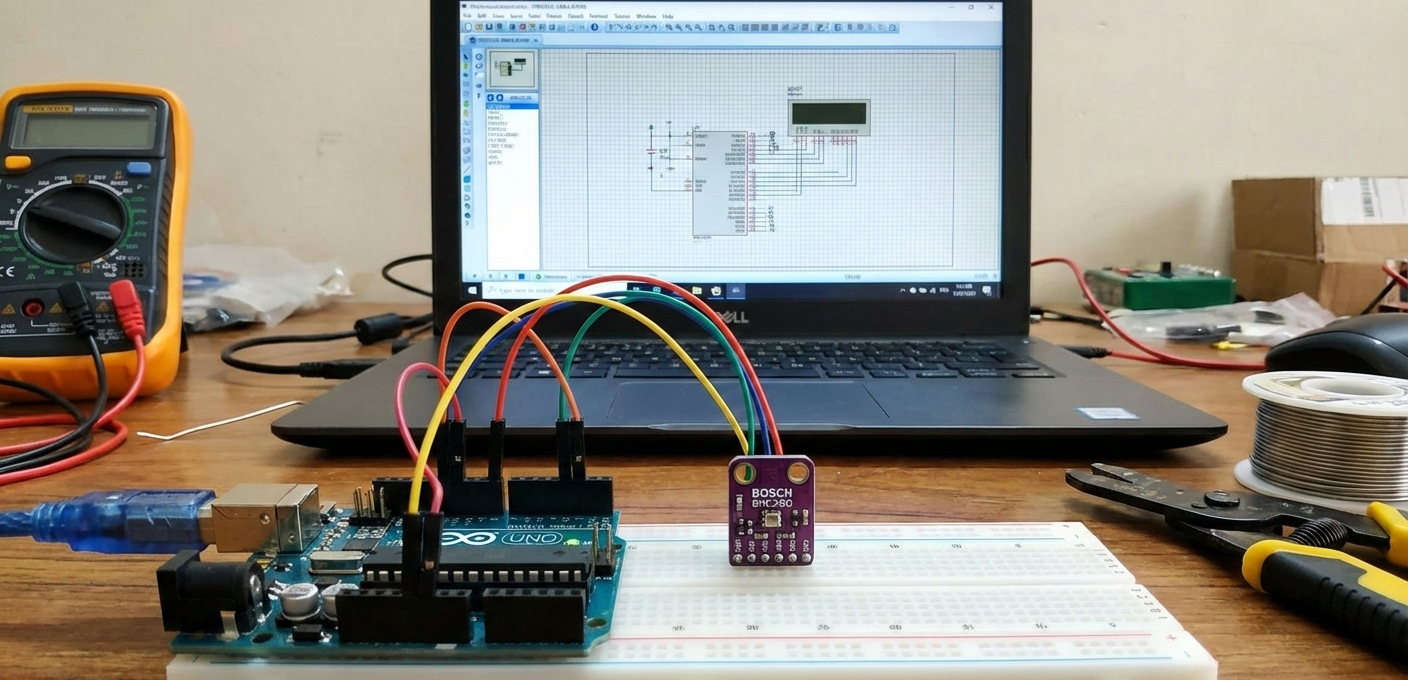
The Arduino Uno communicates with the BME280 sensor over the I²C bus using the Wire library.
Once initialized, the microcontroller periodically reads environmental data from the sensor.
Measured values include temperature (°C), atmospheric pressure (hPa), relative humidity (%), and estimated altitude (meters).
All sensor data is processed internally by the BME280 and transmitted digitally to the Arduino.
The results are then printed to the Serial Monitor, simulating real-time environmental monitoring.
Block Diagram / Workflow Explanation
-
Power Supply
The Arduino Uno provides power to the BME280 sensor through regulated voltage. -
Sensor Communication (I²C)
-
SDA and SCL lines connect the BME280 to the Arduino
-
The sensor operates at I²C address 0x76 or 0x77
-
-
Data Acquisition
-
Temperature, pressure, and humidity values are read digitally
-
Altitude is calculated using sea-level pressure reference
-
-
Processing & Output
-
Arduino processes raw sensor data
-
Results are sent to the serial terminal for display
-
Key Features
-
Digital measurement of temperature, humidity, and pressure
-
Altitude calculation using sea-level pressure reference
-
I²C sensor communication for minimal wiring
-
Fully testable using Proteus simulation
-
Uses reliable Adafruit BME280 sensor library
-
Real-time serial monitoring of environmental data
-
Suitable for both simulation and real hardware deployment
Components Used
-
Arduino Uno (ATmega328P)
-
Bosch BME280 Temperature, Humidity & Pressure Sensor
-
I²C communication interface (SDA / SCL)
-
Serial terminal (Proteus Virtual Terminal or Arduino Serial Monitor)
-
Power supply (via Arduino)
Applications
-
Weather monitoring systems
-
Environmental data logging
-
Smart home automation
-
Altitude-based navigation projects
-
IoT sensor nodes
-
Educational embedded systems labs
-
DIY electronics experimentation
Explanation of Code (High-Level)
The firmware uses the Adafruit BME280 library to simplify sensor communication.
During initialization, the Arduino checks if the BME280 sensor is detected correctly.
If the sensor is unavailable or misconfigured, the program halts and displays an error message.
Once initialized:
-
The ADC and sensor interface are handled internally by the BME280
-
Temperature, pressure, humidity, and altitude data are read every second
-
All values are sent to the serial output for monitoring
This approach keeps the code clean, readable, and ideal for beginners in embedded systems.
Source Code
Download
#include
#include
#include
#include

#define BME_SCK 13
#define BME_MISO 12
#define BME_MOSI 11
#define BME_CS 10

#define SEALEVELPRESSURE_HPA (1013.25)

Adafruit_BME280 bme; // I2C
//Adafruit_BME280 bme(BME_CS); // hardware SPI
//Adafruit_BME280 bme(BME_CS, BME_MOSI, BME_MISO, BME_SCK); // software SPI
Proteus Simulation
In Proteus, the Arduino Uno is connected to the BME280 sensor via I²C lines.
When the simulation starts, the serial terminal displays live sensor readings.
The virtual environment allows verification of sensor behavior, firmware logic, and data output without physical hardware.
This makes it ideal for testing, debugging, and learning working principles safely.
FAQs
[ultimate-faqs Include_category=”arduino-with-bosch-bme280-pressure-transducer”]Conclusion
This project is a clean and practical example of a microcontroller project using Proteus simulation.
It demonstrates real-world sensor interfacing, environmental monitoring, and structured firmware design.
Ideal for students, hobbyists, and embedded developers, it builds strong fundamentals in embedded systems, sensor communication, and simulation-based testing.
A great starting point for more advanced DIY electronics and IoT projects.
Complete File
Arduino with Bosch BME280 Pressure Transducer using Arduino Uno with Proteus Simulation
- How does the Arduino communicate with the BME280 sensor?
The Arduino communicates with the BME280 over the I²C bus using the Wire library. - Can the project be tested without physical hardware?
Yes, the project is fully testable using Proteus simulation and the Proteus Virtual Terminal. - What measurements does the BME280 provide?
The BME280 provides temperature, atmospheric pressure, and relative humidity, and altitude is calculated using sea-level pressure reference. - What I²C addresses does the BME280 use?
The sensor operates at I²C address 0x76 or 0x77. - Does the project use any library for the BME280?
Yes, the project uses the Adafruit BME280 sensor library. - How often are sensor readings taken?
Sensor readings for temperature, pressure, humidity, and altitude are read every second. - What happens if the sensor is not detected during initialization?
If the sensor is unavailable or misconfigured, the program halts and displays an error message. - How are the sensor results displayed?
Results are sent to the serial output and displayed on the Proteus Virtual Terminal or Arduino Serial Monitor.
