
Summary of Reaction Time Tester using an Arduino
This beginner Arduino project is a reaction and decision tester using an RGB LED, push button, piezo speaker, and LCD. Users hold the button, release on a red light to measure reaction time, ignore green/blue lights, and occasionally deal with distracting beeps. Lights and pauses are randomized for unpredictability. The creator used a common-anode RGB LED (HIGH = off, LOW = on) and provides a full sketch and Fritzing wiring for assembly.
Parts used in the Reaction Time Tester:
- Arduino microcontroller (Uno used)
- RGB LED (common anode)
- 4 resistors (220 ohm)
- LCD display
- Piezo speaker
- Breadboard
- Push button
- Wires
- Ping pong ball (optional)
- Box (enclosure)
A month ago I knew nothing about Arduino and now…..my first project!
Looking back, this project combines allmost all of the tutorials that I have read in this short period: blinking LED, push button, piezo and LCD display. A useful project for every beginner!
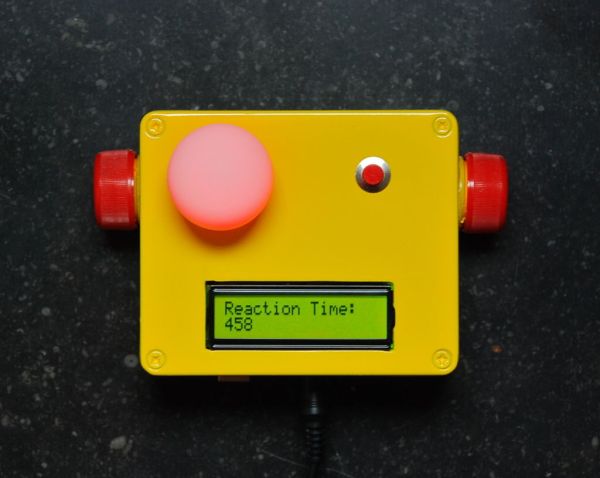
I have made this device for some of my friends who have a hard time admitting how fast alcohol influences their driving abilities.
It will test you on three levels because they all have to do with driving a car safely:
- DECISION time.
- REACTION time
- Resistance to DISTRACTION.
The test starts as soon as you hold down the push button. When a red light appears, you should let go off the push button as soon as possible. Your reaction time will appear on the screen.
However, driving has to do with making fast decisions as well. So in random order you can get a green or blue light first (or multiples). You should not react to this and hold down the push button until the red light appears.
Finally, on occasions you will hear a short beep in between lights (just for fun). By now you are so tense to do well, that a simple distraction like a beep can and WILL set you off!!
A fun game with your dinner guests upon arrival and confronting upon leaving!
Step 1: What you need
- Arduino microcontroller (I have used an Uno).
- 1 RGB LED (you can use 3 separate ones if you like).
- 4 resistors (220 ohm).
- LCD Display
- Piezo speaker
- Breadboard.
- Push button.
- Wires.
- Ping pong ball (optional).
- Box.
Step 2: The hardware.
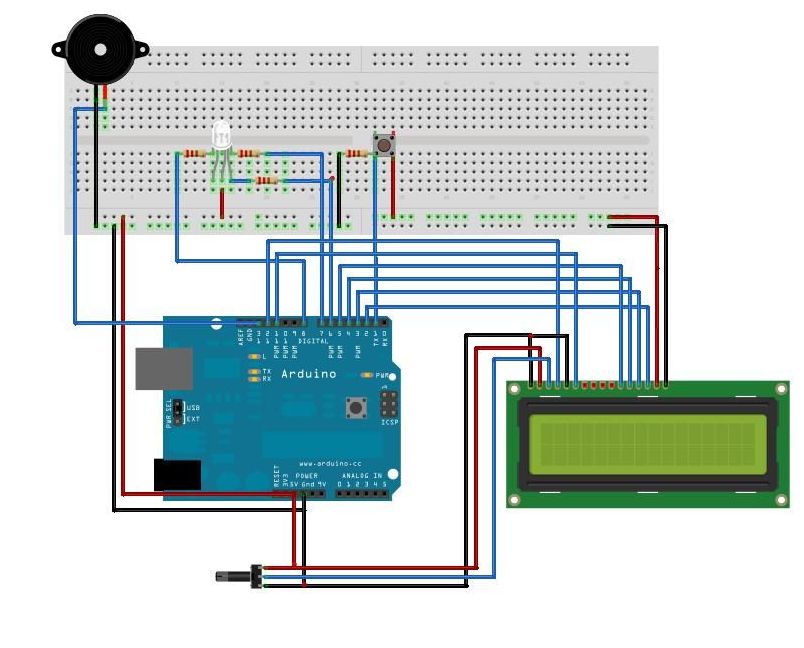
For the experienced Arduino user this total view makes immediate sense. However, if you’re a beginner just like me, a breakdown in steps can be useful.
Drawings were made with software by “Fritzing” (http://fritzing.org).
I have used a RGB Led with a common Anode (3 Cathodes: R, G, B). Therefore the setup may seem a bit ackward. The consequence is that in the sketch (step 3): HIGH=off and LOW=on.
Step 3: The Sketch.
To make the test even more unpredictable, I have added two other features:
- The duration of a light is random (within some limits).
- The pause between lights is random as well (within some limits).
This is to avoid that people get a feel of the “rhythm” of the test. Making it predictable.
You can make the test harder by increasing these intervals. The sketch is in the TEXT file below.
 ADRTT.txt3 KB
- Arduino
- 1 RGB LED
- 4 resistors (220 ohm).
- LCD Display
- Piezo speaker
- Breadboard.
- What does the device test?
It tests decision time, reaction time, and resistance to distraction. - How does the test start?
The test starts when you hold down the push button. - When should you release the push button?
You should release the button as soon as the red light appears to measure reaction time. - What should you do when green or blue lights appear?
You should not react to green or blue lights and keep holding the push button until red appears. - Why are lights and pauses randomized?
Lights and pauses are randomized to avoid predictable rhythm and make the test unpredictable. - What effect does the piezo speaker have?
The piezo provides occasional beeps as distractions to potentially cause errors. - How is a common-anode RGB LED wired in the sketch?
With a common-anode RGB LED used, the sketch treats HIGH as off and LOW as on. - Can the test difficulty be changed?
Yes, you can make the test harder by increasing the light durations and pause intervals.
