
Summary of PEZ Robo Dispenser Using Arduino
This article details an automated PEZ dispenser project using Arduino. An ultrasonic sensor detects users within 20 cm, triggering a servo motor to pull Mickey Mouse's ear back, dispensing a candy pellet. After five seconds, the servo resets to close the mouth. The system combines childhood nostalgia with modern automation for a fun, interactive treat-dispensing experience.
Parts used in the PEZ Robo Dispenser:
- Mickey Mouse PEZ dispenser
- Arduino Uno or clone (GOduino III)
- Ultrasonic Distance Sensor HC-SR04
- RC Servo
- Breadboard
- Jumper wires
- Wire fasteners or rubber bands
- Battery (7 volts or higher with about 500mAh)
I was strolling down the candy aisle at the supermarket and there it was: the PEZ dispenser, conjuring up sweet (literally) childhood memories served up by my favorite cartoon characters in squarish sugary pellets. Then, all of a sudden, an LED went off in my head. PEZ meets Arduino.
In this age of over-automation, where robots do everything short of scratching nostrils, I figured that my sugar-dispensing childhood toy, The PEZ, also deserves automation.
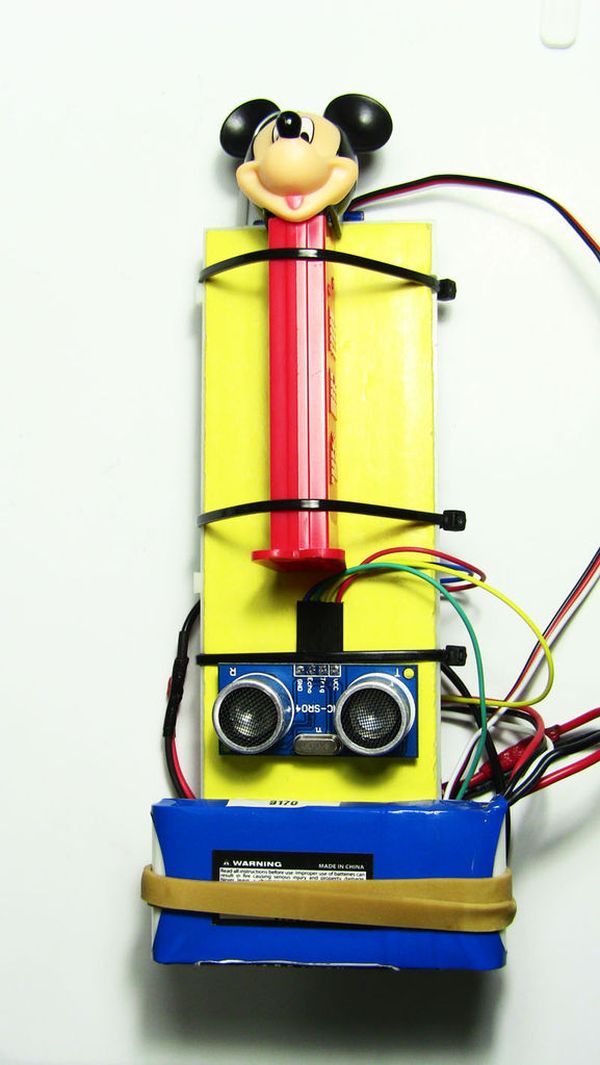
HOW IT WORKS
Basically, I am using an ultrasonic distance sensor to decide if someone is within 20 cm from the sensor which is attached next to PEZ. If so, Arduino will turn the servo 180 degrees back pulling with it the ear of Mickey Mouse. When Mickey’s head is pulled back, a PEZ pellet is pushed out of the mouse’s mouth. Yummy.
After a few seconds (5 seconds in my Arduino sketch) the servo returns back to 90 degrees, closing Mickey’s mouth and waiting for the next person in line to serve.
Step 2: Wiring Robo PEZ
SERVO
- Black —> Arduino GND pin
- Red —> Arduino 5V pin
- White/Yellow —> Arduino 9 pin
ULTRASONIC SENSOR
- GND pin —> Arduino GND pin
- VCC pin —> Arduino 5V pin
- TRIG pin —> Arduino 12 pin
- ECHO pin —> Arduino 13 pin
Step 3: Linking the servo to the PEZ
Please take note how I placed the servo against the breadboard and which side is up and which is down. This is important if you wish to use my code as it.
1) Before screwing the horn to the servo, make sure the servo is turned all the way away from the bread board until it can turn no more. You can use the servo horn without a screw to turn the servo. This is BACK position 180 aka BACK/OPEN position (see figure). You can screw the horn now as shown in figure.
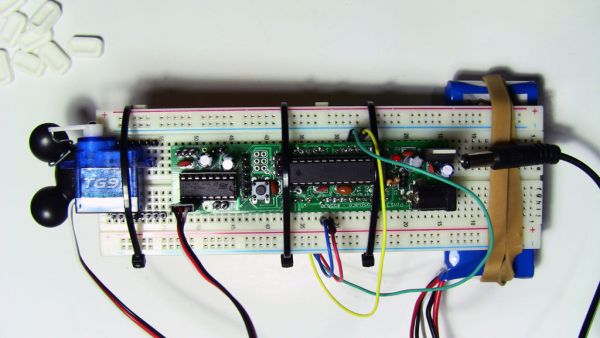
2) Now rotate the horn until it’s in the 90 position aka UP/CLOSED (see figure). Using a firm wire, bend one end into a hook and insert into the servo’s horn. Wrap the other end around Mickey Mouse’s ear.
- The PEZ Robo Dispenser. I picked a Mickey Mouse PEZ because big ears are better at holding a noose that will be tied to the rotating servo horn.
- Arduino Uno or clone. I used my GOduino III.
- Ultrasonic Distance Sensor HC-SR04. ($2.50 Ebay)
- RC Servo ($2.50 Ebay)
- Breadboard
- Jumper wires
- Wire fasteners or rubber bands
- Battery (Anything over 7 volts with about 500mAh).
For more detail: PEZ Robo Dispenser Using Arduino
- How does the PEZ dispenser know when to release candy?
The ultrasonic distance sensor detects if someone is within 20 cm from the sensor attached next to the PEZ. - What component pulls the Mickey Mouse ear back?
An RC servo turns 180 degrees to pull the ear and push out a PEZ pellet. - How long does the dispenser wait before closing the mouth?
The servo returns to the closed position after 5 seconds as defined in the Arduino sketch. - Which pins on the Arduino connect to the ultrasonic sensor?
The TRIG pin connects to Arduino pin 12 and the ECHO pin connects to Arduino pin 13. - What is the best way to attach the wire to the servo horn?
Bend one end of a firm wire into a hook to insert into the horn and wrap the other end around Mickey Mouse's ear. - Can I use any battery for this project?
You need a battery that provides anything over 7 volts with about 500mAh capacity. - Does the servo return to its original position automatically?
Yes, the servo returns to 90 degrees to close Mickey's mouth after dispensing the candy. - What specific model of ultrasonic sensor is recommended?
The project uses an Ultrasonic Distance Sensor HC-SR04.
