
Summary of NES in a Cartridge using Arduino
This article details a DIY project converting a Chinese Famicom clone (NOAC) into a portable NES console using original NES controllers. The author repurposes a Power Player unit, replacing its controller interface with an Arduino and TLC5940 chip to translate NES controller signals. The build involves disassembling the clone, modifying the PCB, integrating a 72-pin connector, and housing the electronics inside an old NES game cartridge case.
Parts used in the Portable NES Console Project:
- Power Player Unit (or similar Chinese Famicom clone)
- NES 72 pin connector
- 2 NES controller ports
- An NES game cartridge (used as the case)
- Atmega168 (Arduino chip)
- Texas Instrument TLC5940
- Basic electronic parts (switches, LEDs, 7805 voltage regulator)
- PCB making materials (toner transfer method)
- Dremel tool with bits and cut off discs
- Multimeter
Have your ever seen any of “Ben Hecks” portable console builds? Well if you haven’t, he often uses these Chinese Famicom clone consoles. These cloned consoles are often times refered to as NOAC’s, meaning NES On A Chip. They are called this because they are a fully functional Nintendo Entertainment System literally on one chip. The best part about the NOAC is that they include a 60 pin famicom game port, which in our case can easily be converted over to a 72 pin NES game port.
I originally got this idea from Kotomi (link below), and figured i would try to do the same thing. My plan was to use the original NES controllers, instead of the cheap super joy ones, which is what i believe Kotomi used. Kotomi’s system also incorporated the original Famicom connector instead of the NES connector. In order to use the NES controllers, I would have to convert the NES controller’s shift register data into the NOAC’s controller chips. So… what better way to do it than with an Arduino!!!!
http://kotomiblog.blogspot.com/
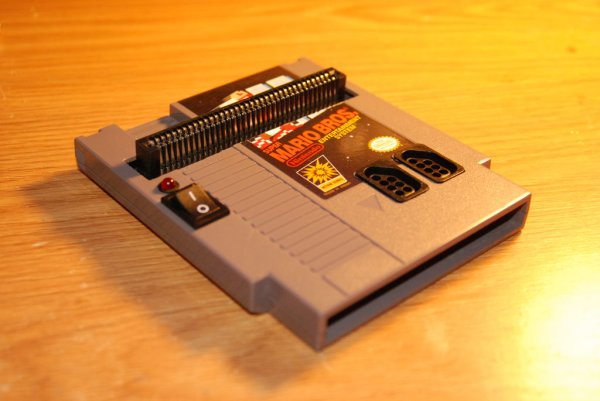
Step 1: Materials
One of the toughest things to find is the Chinese Power player unit (or Super joy thingy), which ever system you find, they all should work about the same. I was lucky enough to find mine at good will for 6 bucks… can’t beat that. Any ways, if you can’t find one locally then check on ebay. The only problem is that if you buy one off ebay then it will run you around 20 bucks. All the rest of the stuff you can get either from Radioshack, or once again on ebay. In my case I bought the 72 pin connector and the ports separate, however you would probably be better off just buying a broken NES. My only problem was that I was kinda pressed for time, and couldn’t find one FOR CHEAP!!!!
1. Power Player Unit (or similar)
2. NES 72 pin connector
3. 2 NES controller ports
4. An NES game that will serve as the case
5. An atmega168 (arduino chip)
6. Texas Instrument TLC5940 (you can get these as samples from their site… their free)
7. Some basic parts such as switches, leds, along with a 7805 voltage regulator
8. PCB making stuff (I used the toner transfer method)
9. Basic knowledge of soldering and electronics
10. And most definitely a dremel tool with some bits and cut off discs
11. A multimeter is probably a good idea as well, because you will need it for troubleshooting
Step 2: Disassembly
After you’ve played around a little with your Power Player, and got a kick out of some of the things they’ve put on it….. sadly it is time to take it apart. Hopefully it won’t be too long until you will being playing games on it once again though.
So once its all apart, start off by locating where the power inputs are. Something that I like to do is to take a picture of the board (or scan), and put it into photoshop and color in the traces according to their use. It’s a helpful tip that I like doing, because sometimes when your cutting up a board, you will forget what things went where and things just get crazy.
Once you’ve found the power connections, I would test to see what voltage the unit runs one. Most commonly it’s going to be 5 volts, but just check to make sure. In my case the wall adapter was ouputing 13 volts, but there was a 5 volt regulating circuit on the controller PCB.
The next thing you want to check on, is there or not the player buttons have a common connection. Most of the time they will use ground as the common, but I’ve seen others. In my case it was ground, which works out perfectly because the TLC5940 outputs only grounded signals to achieve PWM.
For more detail: NES in a Cartridge using Arduino
- What is a NOAC?
A NOAC stands for NES On A Chip, which is a fully functional Nintendo Entertainment System on a single chip. - How can you convert a 60 pin Famicom port to a 72 pin NES port?
The article states that the 60 pin Famicom game port included in NOACs can easily be converted over to a 72 pin NES game port. - Why did the author choose to use an Arduino?
The author chose an Arduino to convert the NES controller's shift register data into the NOAC's controller chips. - Where can you find a Power Player unit?
You can find these units at local thrift stores like Goodwill or purchase them online via eBay. - What voltage does the unit typically run on?
Most commonly the unit runs on 5 volts, though some wall adapters may output higher voltages like 13 volts before regulation. - How do you identify common connections on player buttons?
You should check if the buttons share a ground connection, as most use ground as the common, which works with the TLC5940 outputs. - What tool is recommended for modifying the board structure?
A Dremel tool with bits and cut off discs is needed for cutting up the board during the process. - What method was used to make the PCB?
The author used the toner transfer method to create the printed circuit board.
