
Summary of Lights off ! WiFi home lights monitoring and control
This project, "Lights Off," enables battery-powered WiFi control of home lights without rewiring. It uses wall switches to trigger an Arduino Mega and a latch relay, communicating via NRF24l01+ transceivers to a Raspberry Pi base station. The system features a remote-controlled web dashboard built with Meteor, allowing users to monitor switch states and reduce energy costs while maintaining long battery life on AAA cells.
Parts used in Lights Off:
- Arduino Mega
- Latch Relay
- NRF24l01+ WiFi Transceiver
- Watchdog Timer
- AAA Batteries
- Raspberry Pi Base Station
- MongoDB Database
- Meteor Webapp Framework
Story
One of my long running projects, “lights off” comes from the need to know : “Did I turned off my bathroom light?” ; “This light are on for too much time, I wonder how much I am paying for it”.
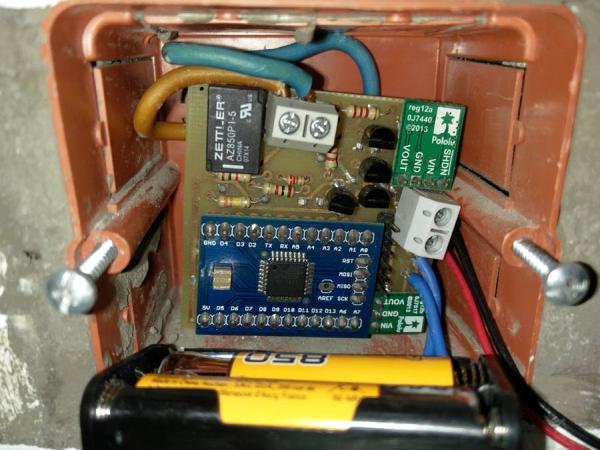
Without wanting to rewire my house, I came up with designing the WiFi switches, battery powered.
Switch unit
To do so, the wall switch is controlling the Mega’s inputs that is setting and resetting the relay.
For the relay I am using a latch relay as it does not consume power during a set state.
After the state is set/reset, using the WiFi transceiver NRF24l01+ information is sent to the base station.
The switch is designed to be able to be turned off remotely and therefore the watchdog is waking the device to listen for an off command.
This approach comes from the need of the project and also it is a major improvement on the battery life. The current configuration allows running on 2 AAA batteries for 2 months.
Base station
For the base station I chose the RasPi as it can act also as a server if needed to hold the DB and the webapp.
Hooked with a NRF24l01, a daemon is listening for events from the switches and inserting them in the DB ( MongoDB).
Also the daemon is responsible in sending off command to a certain switch.
The webapp
Created with Meteor, the dashboard of the web interface displays the current state of all configured switches.
The “on” switches can be turned off remotely from the app.
To do
— add power consumption calculation based on the historical data
— create a mesh of switches with NRF24Network ( current limitation is at 6 switches)
— attempt to decrease the power consumption.
Schematics — switch unit
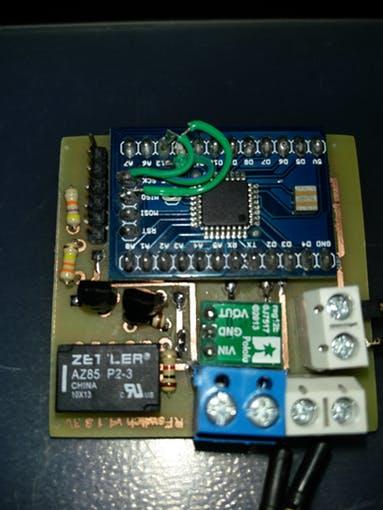
Currently I have made 2 versions ( 5V and 3.3V) both plugable in the wall as seen from the pictures.
The 3.3 V is attached to this project
Prototype pics
The pictures below show the finished prototypes.
For more detail: Lights off ! WiFi home lights monitoring and control
- How does the device save power?
The system uses a latch relay that consumes no power during a set state and a watchdog timer to wake the device only for off commands. - What hardware controls the wall switch inputs?
An Arduino Mega controls the inputs from the wall switch to set and reset the relay. - Can I turn off lights remotely?
Yes, the web app allows users to turn off currently on switches remotely. - What software runs on the base station?
A daemon listens for events from switches, inserts data into MongoDB, and sends off commands. - What framework is used for the web interface?
The dashboard is created using the Meteor framework. - How many switches can the current system support?
The current limitation restricts the system to 6 switches. - What are the planned improvements for the project?
Planned tasks include adding power consumption calculation, creating a mesh network, and decreasing power consumption. - Does this project require rewiring the house?
No, the design allows for battery-powered operation without rewiring the house.
