
Summary of Introducing CT-UNO, Cytron version of Arduino UNO
The CT-UNO is Cytron’s Arduino UNO-compatible board combining the Optiboot bootloader, FTDI USB-to-UART chip stability, and UNO R3 shield compatibility. It adds a USB micro-B connector for easy programming using common Android cables, retains 14 digital I/O (6 PWM), 6 analog inputs, UART, SPI, I2C (SDA/SCL), external interrupts, IOREF, and ISP header pins, making it compatible with existing UNO shields and the Arduino IDE.
Parts used in the CT-UNO:
- Optiboot bootloader
- FTDI USB-to-UART chip
- USB micro-B socket
- ATmega328P MCU (implied Arduino UNO core)
- 14 Digital I/O pins header
- 6 PWM-capable pins
- 6 Analog input pins
- UART interface pins
- SPI interface pins
- I2C SDA and SCL pins
- IOREF pin
- ISP header (SPI and power)
- Power circuitry (implied for board operation)
Yes, this is Cytron version of Arduino UNO, we called it CT-UNO!!!
Since 3 years ago, we started using Arduino and today we use a lot of Arduinos, particularly Arduino UNO. For tutorial, shield development, test jig, internal projects and many more. We’re keep looking for the simplest, most stable version. We love the FTDI (USB to UART chip) on Arduino Duemilanove, and like the program loading of optiboot on UNO, so we combine both features and added some improvements into CT-UNO. It is compatible with Arduino UNO from Arduino IDE and Shield point of view.
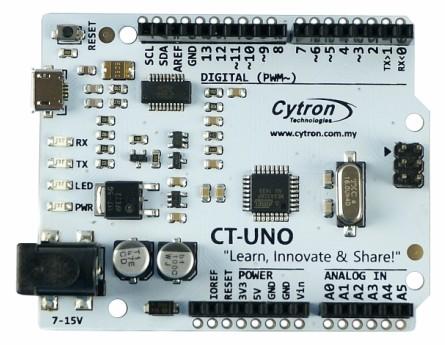
The CT-UNO combines the simplicity of the UNO’s Optiboot bootloader (which load program faster), the stability of the FTDI and the R3 shield compatibility of the latest Arduino UNO R3.
Besides, we know many are using Android phone which comes with USB micro-B cable (power bank also require micro-B to charge), therefore, to lower down the cost needed for customer to get started, we populate the USB micro-B socket for USB connection! Program can be loaded from Arduino UNO by utilizing your Android phone USB cable. Select “Arduino UNO” from the board and choose the correct COM port, you are ready to upload the code
CT-UNO has all the amazing features Arduino UNO offer. 14 Digital I/O pins with 6 PWM pins, 6 Analog inputs, UART, SPI, external interrupts, not to forget the I2C too. The SDA, SCL and IOREF pins which being broken out on UNO R3 are on CT-UNO too. We has also populated the ISP header pins (SPI and power). With this, CT-UNO will be compatible with all Arduino UNO’s shield.
For more detail: Introducing CT-UNO, Cytron version of Arduino UNO
- Can I program CT-UNO using an Android phone USB cable?
Yes. CT-UNO has a USB micro-B socket so you can use an Android phone USB cable to load programs. - Is CT-UNO compatible with Arduino UNO shields?
Yes. CT-UNO includes UNO R3 broken-out SDA, SCL, IOREF, and an ISP header, making it compatible with Arduino UNO shields. - Which bootloader does CT-UNO use?
CT-UNO uses the Optiboot bootloader for faster program loading. - What USB-to-serial chip does CT-UNO use?
CT-UNO uses the FTDI USB-to-UART chip for USB serial communication. - Does CT-UNO work with the Arduino IDE?
Yes. CT-UNO is compatible with the Arduino IDE; select Arduino UNO as the board and choose the correct COM port. - How many digital and analog pins does CT-UNO provide?
CT-UNO provides 14 digital I/O pins (6 PWM) and 6 analog input pins. - Does CT-UNO support I2C and SPI?
Yes. CT-UNO supports I2C (SDA and SCL) and SPI and exposes the ISP header. - Why did Cytron choose USB micro-B for CT-UNO?
Cytron populated USB micro-B so users can use common Android cables and reduce the cost to get started.
