
Summary of Eagle v7 Beta Review
Eagle v7 introduces a new design interface and an improved autorouter. This article reviews these updates through a tutorial project: designing an audio-controlled hobby servo circuit for animatronics. Key features include hierarchical schematic modules for better organization and a modernized user interface, though long silkscreen names due to module prefixes remain a challenge.
Parts used in Audio-Controlled Hobby Servo Circuit:
- Audio signal source
- Hobby servo
- Animatronic mechanism
- Resistors (e.g., TIMER:R5)
- Capacitors
The new version of Eagle is on out! The biggest changes coming are a new design feature and an improved autorouter. We are both veterans of Eagle and PCB board design so this blog is intended as both a review and a tutorial of the new features that Eagle v7 brings. Let’s dive right in.
To make the design process more real, we decided to design a circuit from scratch. A simple circuit that Sophi has worked with is one that uses an audio signal to control a hobby servo, which could be used to control an animatronic. It’s a little early for Halloween, but Sophi had used this circuit before and planed on using it again in October. Many thanks to Scary Terry who gave us permission to use his design.
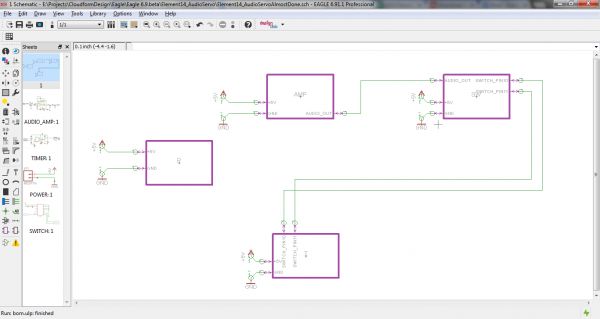
The first thing we did was use the new Hierarchical design feature. This allows you to put the schematic into modules, where each module takes up its own sheet.
Putting the schematic into modules is definitely an improvement over past design possibilities – especially for collaboration and replication. We couldn’t figure out a very efficient way to collaborate (we tried GitHub but it didn’t work very well), and a requested feature would be a way for people to “merge” changes to modules. However, the module layout makes everything look very clean and gives you a good idea of the “big signals” — i.e. the busses and wires that are going to have to travel longer distances across the board:
Immediately you can see that the UI on the left has a new look. It is laid out in the same order as Eagle always has been, however the symbols look more modern and (for new users) recognizable.
One thing that could be improved upon is that the module names are brought in along with the component name such as TIMER:R5 for a resistor in the TIMER module. This gives you very long names in your silkscreen, which can be annoying for even a board with such spread out components. To take care of this, we ended up shortening the names of the modules and deleting the names of all of the resistors and capacitors. We are unsure of what a good solution to this issue is. Perhaps module names could be on a separate layer so that the layer could be hidden if desired.
For more detail: Eagle v7 Beta Review
- What is the main purpose of the Eagle v7 review?
The blog serves as both a review and a tutorial of the new features in Eagle v7. - How does the new Hierarchical design feature work?
It allows users to put schematics into modules where each module occupies its own sheet. - Can users merge changes to modules efficiently in this version?
No, the authors could not figure out a very efficient way to collaborate or merge changes. - What improvement does the new UI offer?
The left-side UI retains its order but features more modern and recognizable symbols. - Why did the authors shorten component names?
Module names are combined with component names, creating long silkscreen labels that can be annoying. - Does the new layout help visualize signal paths?
Yes, the module layout makes it easy to see big signals like busses and wires traveling across the board. - What specific circuit was designed for this tutorial?
A simple circuit using an audio signal to control a hobby servo for an animatronic. - Who provided permission to use the circuit design?
Scary Terry gave permission to use his original design. - What future solution might solve the silkscreen name issue?
The authors suggest placing module names on a separate layer that can be hidden if desired.
