
Summary of Dual-Task CoreXY DrawBot
This article details the construction of a Dual-Task CoreXY DrawBot capable of simultaneous plotting and laser engraving. Built primarily from PVC pipes, acrylic sheets, and standard electronics like Arduino and stepper motors, the machine utilizes GRBL firmware for dual-axis control. The design features two Z-axes to duplicate tasks or combine drawing with engraving, offering a unique alternative to traditional 3D-printed plotters.
Parts used in the Dual-Task CoreXY DrawBot:
- DFRduino UNO R3
- Arduino CNC Shield V3 GRBL
- 3 Axis Control Board GRBL (Optional)
- 2500mW Laser Module (Optional)
- 4pcs Stepper Motor Driver A4988
- 2pcs Stepper motor NEMA 17
- 2pcs CD/DVD Rom Player Drive
- 2pcs 50 mm L Stepper Motor Support
- 3meter GT2 6mm Timing Belt
- 4pcs GT2 5mm Bore Aluminum Toothless Idler Pulley
- 1pcs GT2 Idler Timing Pulley 5mm Bore 20 Teeth
- 2pcs GT2 Timing Pulley 20 Teeth
- 4pcs Round Shaft Diameter 8mm, Length 500mm
- 8pcs Ball Flanged Shielded Bearings 8 x 22 x 7mm
- 8pcs Horizontal/Vertical Ball Bearing Bracket
- 2pcs Aluminum Flexible Shaft Coupling 10mm x 10mm
- Power Supply 12/24VDC
- 2pcs Clear/White Acrylic A3 size 5mm thickness
- 4pcs Copper Brass Pillars L-10mm
- 2 meter 8P/16P Rainbow Ribbon Cable
- 1pcs 5mm DC Female Power Plug
- Cable ties, bolts, nuts, and zinc wires
- 14pcs PVC Pipe Tee Ø21mm
- 16pcs PVC Three Way Tee Ø21mm
- 4 meter PVC Pipe Ø21mm
When I saw a COREXY (or H-Bot) plotter, I thought I would make it someday. Since most of its components were made from 3D printers so I have postponed it. Fortunately, once again the PVC pipes gave me an idea to build it with a special version. My Dual-Task CoreXY DrawBot can perform double tasks simultaneously, eg: plotting 2 same drawings at the same time, or using pen plotting and laser engraving simultaneously.
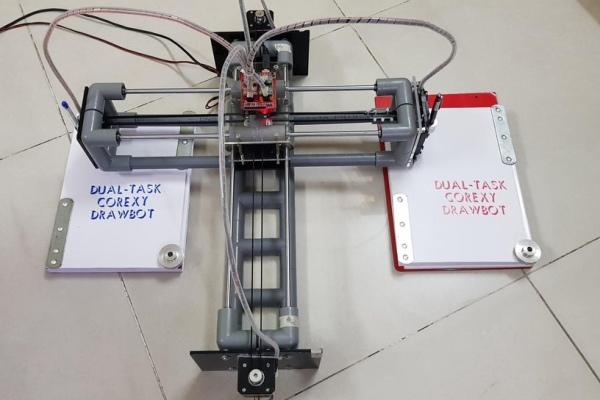
Please check my introduction video before getting started.
Step 1: Supplies
a. Main materials:
⦾ 1pcs x DFRduino UNO R3 – Compatible with Arduino Uno
⦾ 1pcs x Arduino CNC Shield V3 GRBL.
⦾ 1pcs x 3 Axis Control Board GRBL With Laser Engraver Supported. (Optional if we use Laser engraving mode)
⦾ 1pcs x 2500mW Laser Module (Optional if we use Laser engraving mode).
⦾ 4pcs x Stepper Motor Driver A4988
⦾ 2pcs x Stepper motor NEMA 17.
⦾ 2pcs x CD/DVD Rom Player Drive.
⦾ 2pcs x 50 mm L Stepper Motor Support.
⦾ 3meter x GT2 6mm Timing Belt.
⦾ 4pcs x GT2 5mm Bore Aluminum Toothless Idler Pulley for 6mm Width Timing Belt.
⦾ 1pcs x GT2 Idler Timing Pulley 5mm Bore 20 Teeth.
⦾ 2pcs x GT2 Timing Pulley 20 Teeth.
⦾ 4pcs x Round Shaft Diameter 8mm, Length 500mm.
⦾ 8pcs x Ball Flanged Shielded Bearings 8 x 22 x 7mm.
⦾ 8pcs x Horizontal Ball Bearing Bracket or Vertical Ball Bearing Bracket.
⦾ 2pcs x Aluminum Flexible Shaft Coupling, Inner Hole Size: 10mm x 10mm.
⦾ 1pcs x Power Supply 12/24VDC.
⦾ 2pcs x Clear/White Acrylic, size A3, thickness at least 5mm.
⦾ 4pcs x Copper Brass Pillars L-10mm.
⦾ 2 meter x 8P/16P Rainbow Ribbon Cable.
⦾ 1pcs x 5mm DC Female Power Plug.
⦾ Some small cable ties, cable spiral wrap, bolts and nuts and small zinc wires.
b. PVC pipes and fittings:
⦾ 14pcs x PVC Pipe Tee Ø21mm.
⦾ 16pcs x PVC Three Way Tee Ø21mm.
⦾ 4 meter x PVC Pipe Ø21mm.
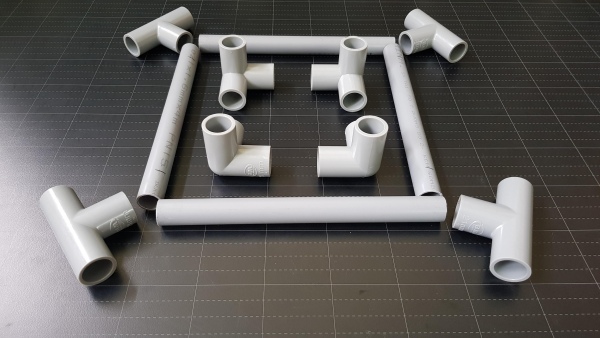
c. Tools:
⦾ Drilling machine.
⦾ Hand saw.
⦾ Soldering machine.
d. Firmware & Softwares:
⦾ GRBL.
⦾ Inkscape.
⦾ LaserGRBL.
⦾ Universal Gcode Platform (UGS).
Step 2: How It Works
My DrawBot is based on GRBL firmware and used built-in CoreXY kinematics in GRBL. Its mainframe and supports are made of PVC pipes and acrylic sheets. It has working range about Y350mm x X320mm and detail configuration is shown below:
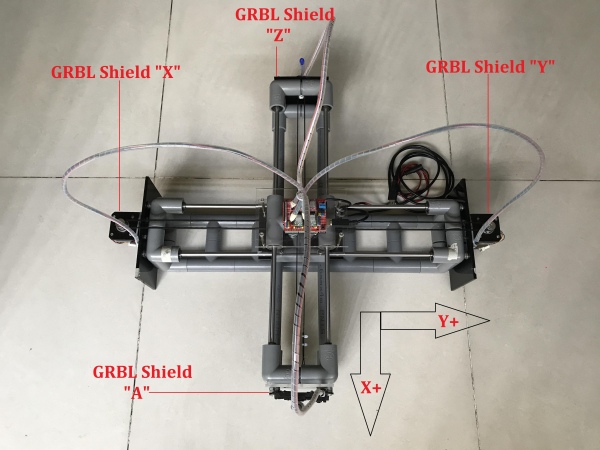
It has two Z axes (“A” is cloned from Z axis) so it is possible to draw two identical images or texts at the same time.
My DrawBot movement is described as follows:
⦾ X and Y rotate clockwise: Y-
⦾ X and Y rotate counterclockwise: Y+
⦾ X rotate clockwise and Y rotate counterclockwise: X-
⦾ X rotate counterclockwise and Y rotate clockwise: X+
Go to the next steps to see how I built it.
Step 3: Fixed Frame – Y Axis
Firstly, I joined 4 pcs x PVC three-way tees Ø21mm together. I made two sets like that (called Y supports) for 2 ends of the Y axis. Later, two stepper motors X and Y would be mounted on them.
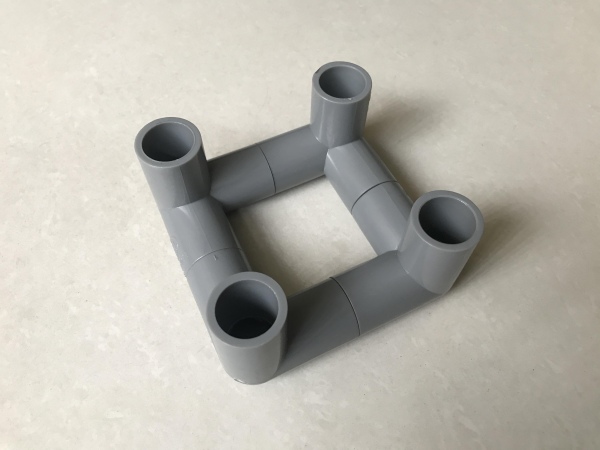
To build Y slider, I connected 2 pcs x PVC tees Ø21mm together and inserted ball bearings into 4 ends of this assembly.
Then I jointed 10pcs x PVC tee Ø21mm together. It was not only used to connect two Y supports, but also used as a footbase for my CNC DrawBot.
There’re 4 open holes for each Y support. I inserted locked bearings into 2 open holes of each assembly. I threaded 2pcs x T8 shafts, length 500mm through Y slider and they were fixed by two Y supports at open holes with locked bearings. To keep the frame strong enough, the remaining two open holes of the Y supports are connected to 10-tees support assembly above.
Step 4: Mounting X & Y Stepper Motors
I cut 2 acrylic sheets, dimension L180 x W120 x T5mm and drilled 8 holes. Four holes were used to mount stepper motors by L supports and the other for connecting to Y supports.
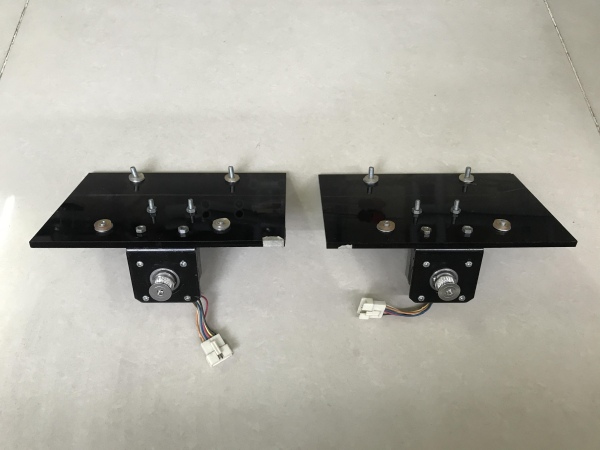
I drilled 4 holes in each Y supports corresponding to 4 holes on the acrylic motor supports above.
The first acrylic support was mounted to Y axis frame at one side.
And the second acrylic support was done in a same way at opposite side. The bottom level of PVC frame and acrylic sheets should be the same, making sure that both rested on a flat floor.
These acrylic sheets keep the DrawBot from falling down when the X axis moves far away from the DrawBot’s centerline. They also fix the Y pipe supports, pulleys and shafts do not move when the DrawBot is in operating.
Step 5: Moveble Frame – X Axis
Same as Y axis, I made two sets of X supports which were built from 4 pcs x PVC three-way tees Ø21mm. Detail’s as follow:
⦾ The first X support: inserted lock bearings at 2 open holes, and installed one idler timing pulley 20 teeth as below picture:
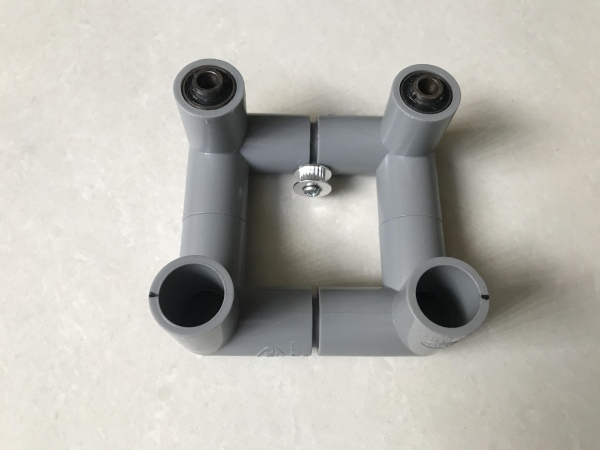
⦾ The second X support: inserted lock bearings at 2 open holes, and installed two bolts M4 – L20mm. The distance between them was equal to the diameter of idler timing pulley 20 teeth – about 12mm. They were used to fix the belt system.
X slider was contructed from 2 pcs x PVC tees and ball bearings were inserted into 4 ends of this slider.
Then I cut 2pcs x PVC pipes Ø21mm, length about 500mm.
I threaded 2pcs x T8 shafts, length 500mm into X slider and they were fixed by two X supports at open holes with lock bearings. To reinforce the X frame, the remaining two open holes of X supports were connected to 2 pipes Ø21mm above.
Now I had 2 main seperated parts of a DrawBot.
Step 6: Belt Support
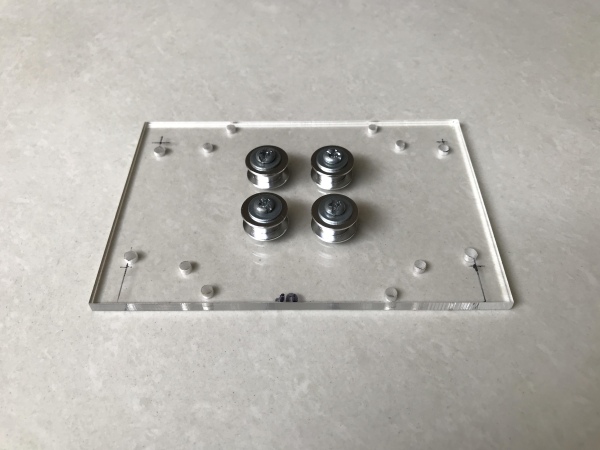
I cut an acrylic sheet, dimension L120mm x W120 x T5mm, drilled and installed 4 toothless idler pulleys in the center. The distances between them were still 12mm.
I disassembled X & Y sliders from their PVC frames, then did following works:
⦾ X slider: drilled 4 holes at bottom and connected 4 copper brass pillar L-10mm on these holes.
⦾ Y slider: drilled 4 holes on top.
Connect X slider to acrylic belt support through 4 copper brass pillars.
Cut 2 more acrylic sheets which had same size with acrylic support above (dimension L120 x W120 x T5mm)
⦾ Black one: reinforce the slider system and it was install at Y slider bottom.
⦾ Clear one: mount Arduino Uno and GRBL shield.
Acrylic belt support was mounted to Y frame.
Thread 2pcs x T8 shafts, length 500mm into X slider.
Step 7: Double Z Axis
I cut 2 acrylic sheets, dimension L120 x W100 x T5mm, drilled holes to mount 2pcs x CD/DVD frame and installed 2 aluminium flexible coupling 10 x 10mm for clamping the pens.
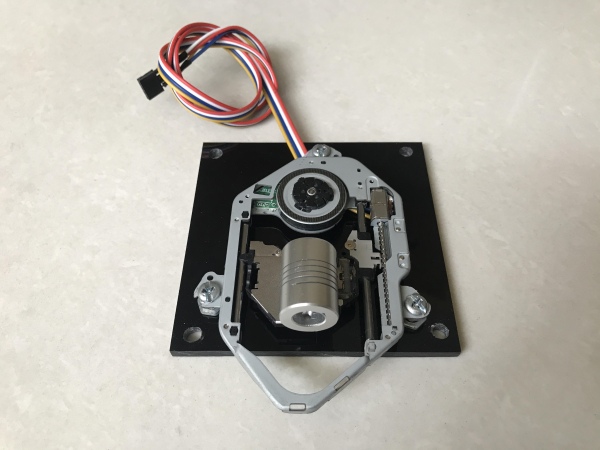
I disassembled X supports from X frame and drilled 4 holes on the each support.
Source: Dual-Task CoreXY DrawBot
- What is the primary function of this build?
The Dual-Task CoreXY DrawBot can perform double tasks simultaneously, such as plotting two identical drawings or combining pen plotting with laser engraving. - How does the X and Y rotation affect movement direction?
When X and Y rotate clockwise, Y moves negative; when they rotate counterclockwise, Y moves positive; X moves negative if X rotates clockwise and Y counterclockwise; X moves positive if X rotates counterclockwise and Y clockwise. - Can I use this machine for laser engraving?
Yes, you can enable laser engraving mode by adding an optional 3 Axis Control Board GRBL and a 2500mW Laser Module. - What materials are used for the mainframe and supports?
The mainframe and supports are constructed using PVC pipes and clear or white acrylic sheets. - How many Z axes does this drawbot have?
The machine has two Z axes, where one axis is cloned from the other to allow for simultaneous operation. - What software is required to operate this device?
The project requires GRBL firmware along with Inkscape, LaserGRBL, Engraver Master, and Universal Gcode Platform. - What type of stepper motors are recommended?
The build uses two NEMA 17 stepper motors mounted on acrylic supports attached to the Y axis frame. - How is the belt system reinforced?
An acrylic belt support sheet with four toothless idler pulleys is installed to connect the X and Y sliders and reinforce the system.
