
Summary of DIY bike tachometer
This article guides you through building a custom Arduino-based bike speedometer that displays speed, average speed, temperature, trip time, total distance, and a tachometer. The project uses a reed switch for wheel rotation detection and allows user interaction via a button to toggle settings.
Parts used in the DIY Bike Speedometer:
- Arduino
- Bike with reed switch
- LCD display 16x2
- Servo
- Breadboard
- Thermometer DS18B20
- Resistor 1.2k Ω
- Resistor 4.7k Ω
- Switch
- Button
- Potentiometer 10 kΩ
- 9V battery
- Cables
- Box
- Tools (drill, soldering, knife, tape)
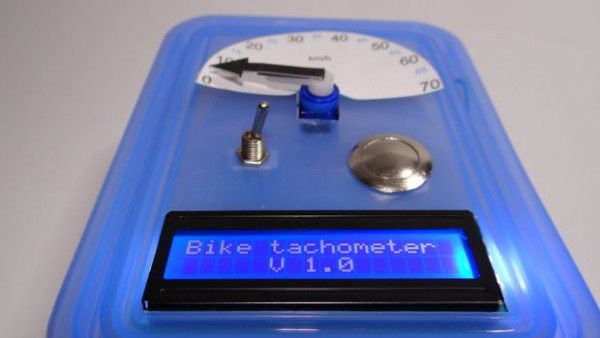
I will show you how to build a bike speedometer. It shows your speed,
the average speed,the temperature, the trip time and the total distance. You can change it using the button. Additionally, the speed is shown on a tachometer. I built it because I like building new things, I have not found anything like this on the internet so I want to show you how to build a good speedometer as the one on my bike is not as cool as I want 🙂 . So let’s get started.
Step 1: Parts:
This is a list of parts that you will need. They cost me about $ 40 but I bought them in Poland.
-arduino
-bike with reed switch
-LCD display 16×2
-servo
-breadboard
-thermometer DS18B20
-resistor 1.2k Ω , 4.7k Ω
-switch
-button
-potentiometer 10 kΩ
-9V battery
-cables
-box
-tools (drill, soldering, knife, tape)
Step 2: Connection
I added a picture from Fritzing and verbal description of how to connect it. In the picture all red wires are connected to 5V, all blue cables are connected to GND.
- LCD display:
VSS –> GND Arduino
VDP –> 5V Arduino
VO –> output potentiometer (potentiometer VCC -> 5V Arduino, potentiometer GND -> Arduino GND).
RS –> pin 12 Arduino
RW –> GND Arduino
E –> pin 11 Arduino
D4 –> pin 5 Arduino
D5 –> pin 4 Arduino
D6 –> pin 3 Arduino
D7 –> pin 2 Arduino
A –> 5V Arduino
K –> GND Arduino
- Servo:
VCC –> 5V Arduino
mass –> GND Arduino
Data –> pin 6 Arduino
- Thermometer:
VCC –> 5V Arduino
mass –> GND Arduino
Data –> pin 1 Arduino
data and power is connected via a 4.7 kΩresistor
- Sensor on wheel:
one end -> 5V Arduino
second end -> A0 Arduino and resistor 1,2 kΩ
The other end of the resistor to ground in the Arduino
- Button:
one end –> 5V Arduino
second end –> A1 Arduino
Step 3: Upload code:
Below I added the code in comments there is an explanation.
links to the download libraries:
http://www.pjrc.com/teensy/arduino_libraries/OneWire.zip
https://github.com/milesburton/Arduino-Temperature-Control-Library
If you have a different wheel diameter you have to change it. You can calculate it with this formula:
circuit = π*d*2,54 (d=diameter of your wheel, I multiplied it by 2.54 to get the result in meters).
For more detail: DIY bike tachometer
- What functions does this bike speedometer display?
The device shows current speed, average speed, temperature, trip time, total distance, and a visual tachometer. - How can I change the settings on the speedometer?
You can change the settings using the button included in the project. - What libraries are required to upload the code?
The project requires the OneWire library and the Arduino-Temperature-Control-Library. - How do I calculate the circuit value for a different wheel diameter?
Use the formula circuit = π*d*2.54, where d is the diameter of your wheel in inches to get meters. - Which Arduino pin connects to the data line of the thermometer?
The data line of the thermometer connects to pin 1 of the Arduino. - How is the LCD display connected to the Arduino power supply?
The VSS pin connects to GND, while the VDP and A pins connect to 5V from the Arduino. - What resistor values are needed for the sensor and thermometer connections?
A 1.2k Ω resistor is used for the wheel sensor, and a 4.7k Ω resistor is used for the thermometer. - Can this project be built without an LCD screen?
The provided text describes the build as including an LCD display 16x2; no alternative without it is mentioned.
