
Summary of DIY ARDUINO HEARING TEST DEVICE
This article describes a DIY Arduino-based hearing test system designed to plot audiograms by generating stepped frequencies and increasing volume until detection. The project features a custom cabinet with an 8×8 RGB LED matrix, a 128×64 OLED display for instructions, and a rotary encoder with a push-button for input. It includes an optional Class D amplifier extension for bone-conduction earpieces, offering a low-cost method to check for gross hearing issues or conduct interesting experiments, though it is not calibrated professional equipment.
Parts used in the DIY Arduino Hearing Test Device:
- Arduino
- Miniature cabinet
- 8×8 matrix of WS2812 addressable RGB LEDs
- 128×64 pixel OLED display
- Rotary encoder
- Push-button
- Earpieces (standard or bone-conduction)
- Class D audio amplifier (for extension)
Hearing loss is a common problem for many – especially those who may have attended too many loud concerts in their youth. [mircemk] had recently been for a hearing test, and noticed that the procedure was actually quite straightforward. Armed with this knowledge, he decided to build his own test system and document it for others to use.
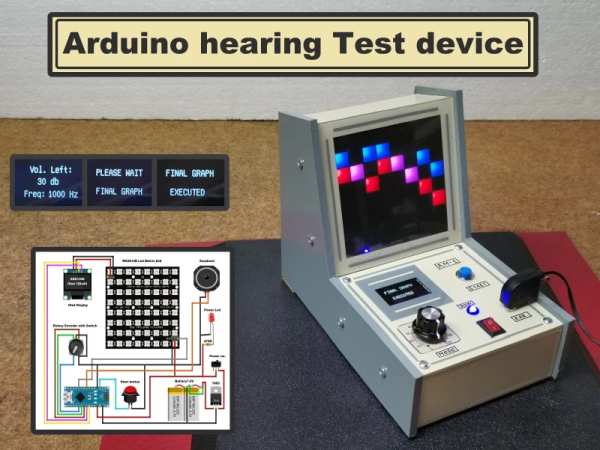
By using an Arduino to produce tones of various stepped frequencies, and gradually increasing the volume until the test subject can detect the tone, it is possible to plot an audiogram of hearing threshold sensitivity. Testing each ear individually allows a comparison between one side and the other.
[mircemk] has built a nice miniature cabinet that holds an 8×8 matrix of WS2812 addressable RGB LEDs. A 128×64 pixel OLED display provides user instructions, and a rotary encoder with push-button serves as the user input.Of course, this is not a calibrated professional piece of test equipment, and a lot will depend on the quality of the earpiece used. However, as a way to check for gross hearing issues, and as an interesting experiment, it holds a lot of promise.
There is even an extension, including a Class D audio amplifier, that allows the use of bone-conduction earpieces to help narrow down the cause of hearing loss further.
There’s some more information on bone conduction here, and we’ve covered an intriguing optical stimulation cochlear implant, too.
Source: DIY ARDUINO HEARING TEST DEVICE
-
How does the device determine hearing thresholds?
It uses an Arduino to produce tones of various stepped frequencies and gradually increases the volume until the test subject can detect the tone. -
Can this system test each ear individually?
Yes, testing each ear individually allows for a comparison between one side and the other. -
What components are used for user input?
A rotary encoder with a push-button serves as the user input mechanism. -
Does the device include visual feedback indicators?
Yes, it holds an 8×8 matrix of WS2812 addressable RGB LEDs within a miniature cabinet. -
Is this device considered professional medical equipment?
No, it is not a calibrated professional piece of test equipment and depends on the quality of the earpiece used. -
How can bone conduction be utilized with this project?
An extension including a Class D audio amplifier allows the use of bone-conduction earpieces to help narrow down the cause of hearing loss. -
What is the primary purpose of the OLED screen?
The 128×64 pixel OLED display provides user instructions during the test.
