
Summary of Dead-Simple Driver Installation for USBasp & USBtiny on Windows
This article introduces a simple method to install USBasp and USBtiny drivers on all Windows versions (XP to 8.1) using the Zadig tool. Unlike traditional methods requiring disabled driver signature enforcement, this approach uses digitally signed libusb-win32 drivers, ensuring immediate recognition without complex workarounds.
Parts used in USB Driver Installation:
- Windows XP
- Windows 7 (32-bit)
- Windows 7 (64-bit)
- Windows 8
- Windows 8.1
- USBasp device
- USBtiny device
- Zadig software
- libusb-win32 driver
Today I came across a surprisingly simple approach to installing USBasp and USBtiny drivers for all versions of Windows — XP, 7, 8, 8.1, whether 32-bit or 64-bit, all inclusive! As you may know, installing open-source drivers such as USBasp and USBtiny have been a great pain on some of the recent Windows OS, due to the enforcement of signed drivers. The typical solution involves rebooting Windows into a mode that disables driver signature enforcement. Even after you’ve done it once, if you boot into the normal mode next time, it may fail to recognize the driver again (reporting it’s not digitally signed). A huge source of frustration.
Anyways, while searching for ‘fully signed USBasp driver’, I came across this tool called Zadig, which can be used to install libusb drivers on all versions of Windows, and it’s digitally signed. Since USBasp and USBtiny are both based on libusb, could it be the right solution? To my great surprise it worked really well — I was able to install both drivers on Windows XP, 7 (32-bit and 64-bit), 8, and 8.1 instantly, without messing with driver signature enforcement at all. I was mostly surprised such a great solution wasn’t documented more widely online.
Instructions
- Go to http://zadig.akeo.ie/ and download the software (note that Windows XP has a separate link).
- Plug in your USBasp or USBtiny device. In case your microcontroller uses a USBasp or USBtiny bootloader, enter bootloading mode, and let Windows detect the device (it will report driver not found). If a window pops up asking to search for driver, just close it or click on Cancel.
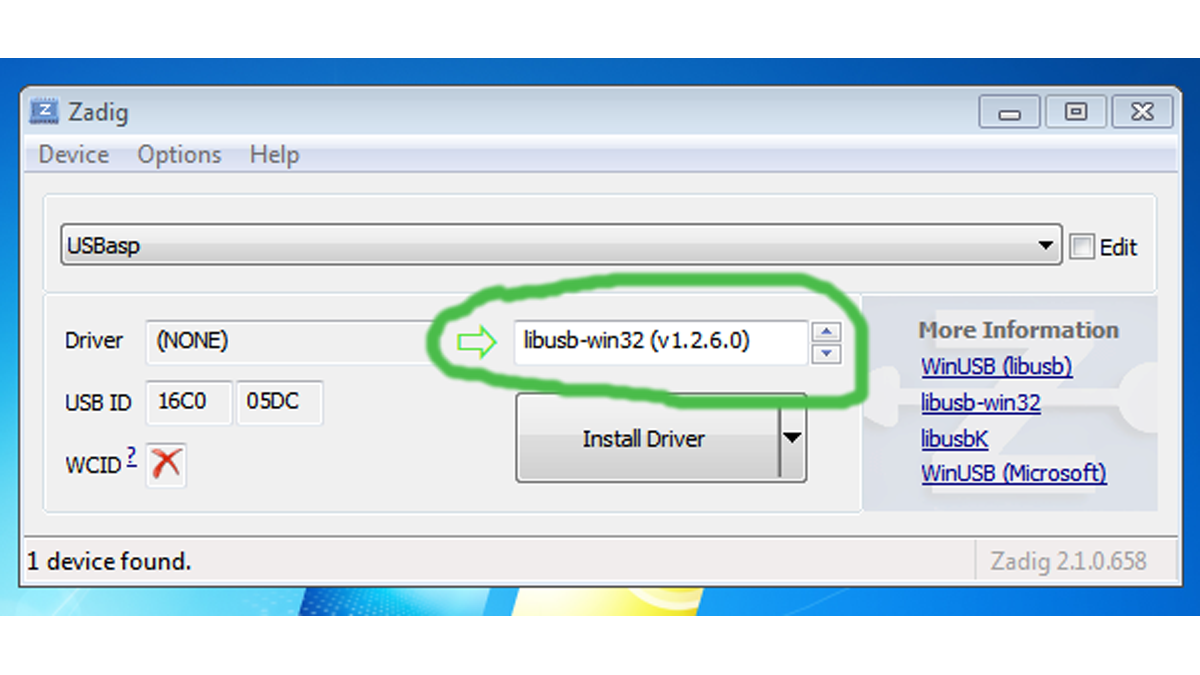
- At this point, run Zadig, it should detect the USBasp or USBtiny, or any libusb device that you have. Then in the selection box (see below), choose libusb-win32 (v1.2.6.0), and click on Install Driver, and wait for the installation to complete.
That’s it! Because the drivers are digitally signed, there is no hassle installing it in Windows 7 64-bit and Windows 8.1.
For more detail: Dead-Simple Driver Installation for USBasp and USBtiny on Windows
- What is the best way to install USBasp drivers on modern Windows?
Use the Zadig tool to install the digitally signed libusb-win32 driver. - How do I install drivers for USBtiny on Windows XP?
Download the specific version of Zadig for Windows XP and follow the installation steps. - Does this method require disabling driver signature enforcement?
No, the Zadig solution uses digitally signed drivers so no special boot modes are needed. - Can Zadig be used for both 32-bit and 64-bit systems?
Yes, it works instantly on Windows 7, 8, and 8.1 in both 32-bit and 64-bit configurations. - What should I do if Windows reports a driver not found error?
Close or cancel the pop-up window asking to search for the driver before running Zadig. - Which driver option must be selected inside Zadig?
You must choose libusb-win32 (v1.2.6.0) from the selection box. - Why do standard open-source drivers often fail on recent Windows OS?
Frequent failures occur due to the enforcement of signed drivers which blocks unsigned open-source options.
