
Summary of Control Door Lock Remotely Using Smartphone
This article describes a DIY project to remotely control a door latch using a smartphone. It addresses the common issue of forgetting keys or accidentally locking doors by enabling Bluetooth-based unlocking via an Arduino setup and a specific Android app, enhancing convenience and security for home users.
Parts used in Remote Door Latch Control:
- Arduino board
- Servo motor
- Door latch/lock mechanism
- 5V DC power adapter
- Whats Up Arduino Android app
Introduction
Hi, friends. I came to this idea of controlling a door latch/lock remotely using a smartphone when I saw many people many times forget to carry latch/lock keys when they leave the house for a short trip, or the door gets latched accidentally while casually talking to neighbors, etc. In such cases, there remains no option but to break the lock.
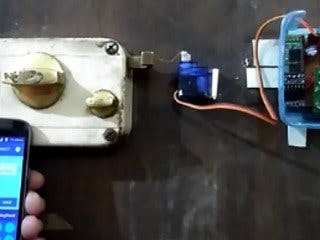
Also, sometimes you are inside your bedroom and want to unlock latch when a family member arrives at the door, then you can unlock it sitting in the room itself.
This project is simple to make and can save your lock. Let’s start to make it.
Wiring
Follow the schematic below to connect the components.
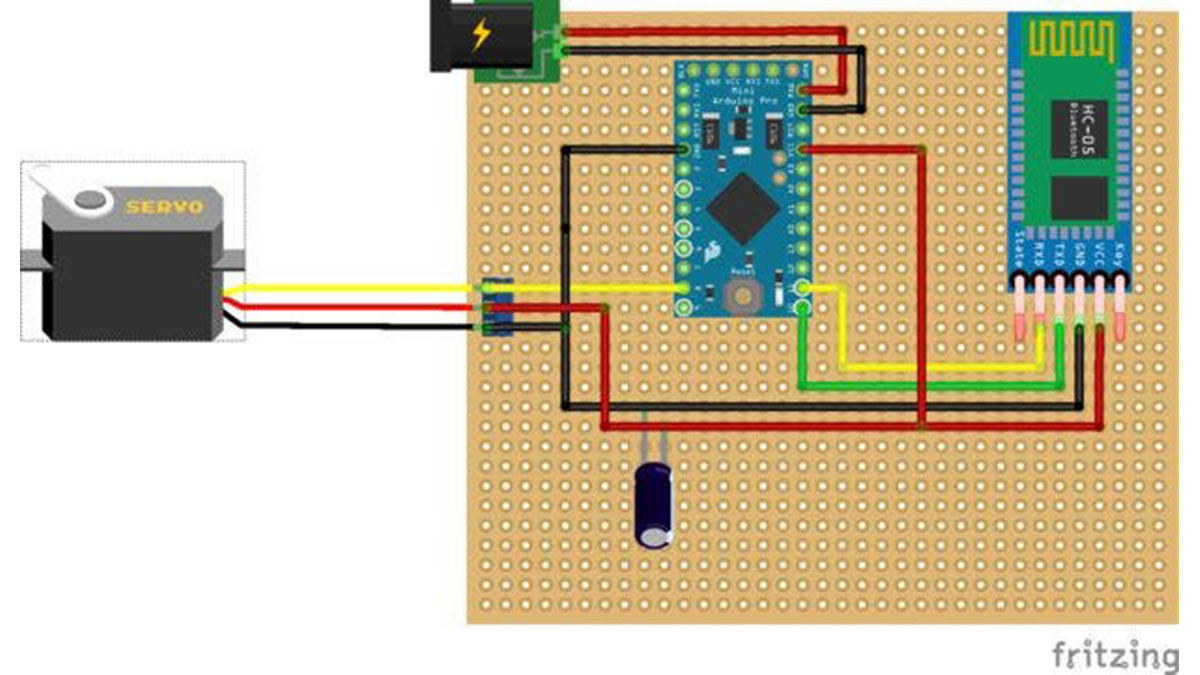
You will need a power adapter to power on the system. I had used a locally available 5V DC power adapter.
- Why was this remote door lock project created?
To solve issues like forgetting keys or accidentally latching doors while talking to neighbors. - How can I unlock the door from inside my bedroom?
You can unlock it sitting in the room itself when a family member arrives at the door. - What type of power adapter is recommended for this system?
A locally available 5V DC power adapter should be used to power on the system. - Which Android application is used to control the Arduino?
The free Whats Up Arduino app available through Google Play is used to control the lock via Bluetooth. - Does the user interface of the app resemble a messaging service?
Yes, it has a user interface similar to instant messaging apps like Whatsapp. - How do you physically connect the servo motor to the latch?
You fix the servo motor at an appropriate distance and tie the moving part of the latch to the servo motor shaft. - Is customization required for different types of latches?
Yes, customization is required because you may have a different latch than the one shown in the project. - What happens when the motor shaft moves in this project?
The goal is for the motor shaft movement to drive the latch into the unlock position.
