
Summary of Build Temperature & Humidity & Smoke Detector Alarm System Based on Arduino
Build temperature, humidity, and smoke alarm using an ICStation Mega2560 (Arduino-compatible). The system (5V) measures temperature, humidity, and smoke, displays real-time values on a 1602 LCD, and triggers buzzer and LEDs when readings exceed user-set danger thresholds. Users navigate pages and adjust temperature/humidity alarm setpoints with tactile keys; LEDs and buzzer indicate alarm states. Simple, low-cost monitoring and alarm solution.
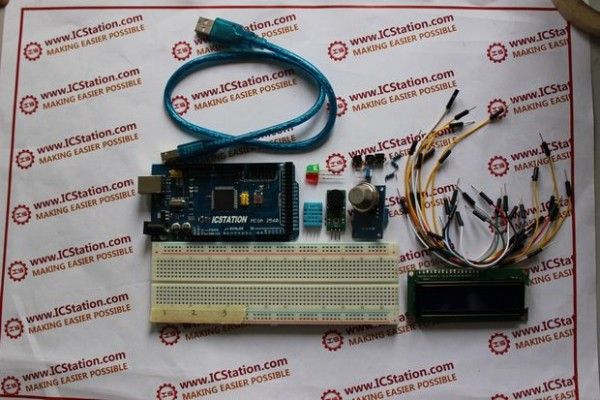
Parts used in the Temperature & Humidity & Smoke Alarm System:
- ICStation ATMEGA2560 Mega2560 R3 Board Compatible Arduino
- DHT11 Digital Humidity Temperature Sensor
- MQ-2 Gas Sensor Module
- 1602A HD44780 Character LCD Display Module LCM Blue Backlight
- Active Buzzer Module for Arduino
- 830 Point Solderless PCB Bread Board MB-102 Test DIY
- 100K ohm 3296W Trim Pot Trimmer Potentiometer 3296W-104
- 1K ohm 1/4W Metal Film Resistors (pack of 100)
- Dupont 20cm Color Cable Line 1p-1p Pin Connectors (pack of 10)
- 12X12X5mm Tact Switches 4 Legs (3 pieces)
- Dupont Wire Color Jumper Cable 2.54mm 1P-1P Male to Female (pack of 40)
- Green LED 5mm DIP
- Red LED 5mm DIP
Project Summary:
Build temperature & humidity & smoke alarm system based on ICStation Mega 2560 compatible with Arduino( Cost is USD32.39 ONLY) .
The working voltage of this system is DC5V.It can measure the current temperature, humidity and smoke. It can display real-time data by the 1602 LCD and can realize the sound and light alarm when in the dangerous temperature and humidity. It is a simply and easily to operate monitoring alarm system about temperature humidity and smoke.
Full Project:
1.When connect to the power supply, after the initialization of hardware, the1602 LCDwill display the current temperature,humidity and smoke volume
2.When we press the NO.1 key, the1602 LCD will turn the page and enter the dangerous temperature setting page.At this time, press NO.2 key once, the dangerous temperature will add one. If the actual temperature is higher than the setting value, the gree LED will light, at the same time the buzzer will alarm. When the actual temperature is lower than the dangerous temperature, the LED will go out and the buzzer will stop alarm.
3.When the 1602LCD display stays on the second page , we press the NO.1 key, you will see the 1602LCD will turn page to the third page and enter the dangerous humidity setting page.At this time, press the NO.3 key, the dangerous humidity will add one.If the actual humidity is higher than the setting value, the red LED will light,at the same time the buzzer alarms. When the actual humidity is lower than the dangerous humidity, the LED will go out and buzzer stop alarming.
Bill of Materials:
- 1 x ICStation ATMEGA2560 Mega2560 R3 Board Compatible Arduino
- 1 x DHT11 Digital Humidity Temperature Sensor
- 1 x MQ-2 Gas Sensor Module
- 1 x 1602A HD44780 Character LCD Display Module LCM Blue Backlight
- 1 x Active Buzzer Module for Arduino
- 1 x 830 Point Solderless PCB Bread Board MB-102 Test DIY
- 1 x 100K ohm 3296W Trim Pot Trimmer Potentiometer 3296W-104
- 1 x 100pcs 1K ohm 1/4W 1% Accuracy Metal Film Resistor
- 1 x 10pcs Dupont 20cm Color Cable Line 1p-1p Pin Connector
- 3 x 12X12X5mm Tact Switches 4 Legs
- 1 x 40pcs Dupont Wire Color Jumper Cable 2.54mm 1P-1P Male to Female
- 1 x Green LED 5mm DIP Hole Though
- 1 x Red LED 5mm DIP Hole Though
For more detail: Build Temperature & Humidity & Smoke Detector Alarm System Based on Arduino
- What is the working voltage of the system?
The working voltage is DC5V. - Which board is used as the controller?
The ICStation ATMEGA2560 Mega2560 R3 Board Compatible Arduino is used. - How are temperature and humidity displayed?
They are displayed in real time on the 1602 LCD. - How do you set the dangerous temperature threshold?
Press NO.1 to enter the dangerous temperature setting page, then press NO.2 to increase the dangerous temperature value by one. - What indicates a temperature alarm?
If actual temperature exceeds the set value, the green LED lights and the buzzer sounds; when below, the LED goes out and the buzzer stops. - How do you set the dangerous humidity threshold?
Navigate to the third page by pressing NO.1 on the second page, then press NO.3 to increase the dangerous humidity value by one. - What indicates a humidity alarm?
If actual humidity exceeds the set value, the red LED lights and the buzzer sounds; when below, the LED goes out and the buzzer stops. - Which sensor detects smoke or gas?
The MQ-2 Gas Sensor Module detects smoke/gas volume. - Can the system show smoke readings on the LCD at startup?
Yes, after initialization the 1602 LCD displays current temperature, humidity, and smoke volume.
