
Summary of Arduino Zumo Robot Maze Solver using Arduino Uno with Proteus Simulation
The Arduino Zumo Robot Maze Solver is a Proteus-simulated project using an Arduino Uno to navigate and solve mazes. It employs a left-hand wall-following strategy to learn the route, storing turns in memory. Upon reaching the goal, it simplifies the path to find the shortest route on a restart. This project integrates sensor calibration, motor control, and path optimization logic, serving as an excellent educational tool for embedded systems and robotics navigation.
Parts used in the Arduino Zumo Robot Maze Solver:
- Arduino Uno
- Zumo robot module
- Zumo reflectance sensor array
- Zumo motors
- Pushbutton
- Buzzer
- LED/status indication
- QTRSensors library
- ZumoReflectanceSensorArray library
- ZumoMotors library
- ZumoBuzzer library
- Proteus simulation environment
Introduction
The Arduino Zumo Robot Maze Solver is a smart microcontroller project built around the Arduino Uno and simulated in Proteus. Its job is simple but impressive: the robot moves through a maze, detects the correct route, and then finds the shortest path to the goal.
This makes it a strong learning project for anyone exploring embedded systems, DIY electronics, practical electronics, and robot navigation. In the simulation, the robot first learns the maze, stores its movement decisions, and then re-runs the route more efficiently.
Because it combines sensors, motor control, path logic, and firmware behavior, this project is a very good example of how a Proteus simulation can be used to understand real robotic systems before hardware testing.
How the Project Works
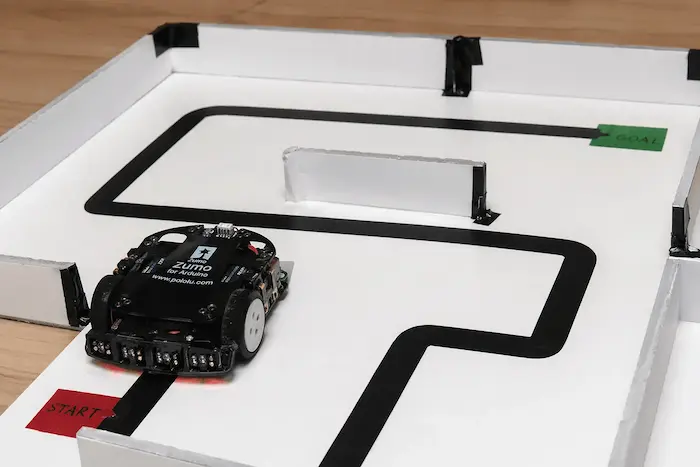
This project uses the Arduino Uno as the main controller for the Zumo robot. The robot follows a black path using its reflectance sensor array and keeps checking for turns, junctions, dead ends, and the finish line.
At startup, the robot begins with a sensor calibration process. This helps it understand the contrast between the black line and the white background. After calibration, it starts solving the maze using a left-hand wall-following strategy. During this learning run, every turn is stored in memory.
When the robot reaches the goal, it stops. After the user restarts it with the pushbutton, the robot uses the stored route and a path simplification routine to travel through the shortest learned path to the finish.
Workflow Explanation
1. Arduino Uno as Main Controller
The Arduino Uno controls the full behavior of the Zumo robot. It reads sensor data, decides movement direction, drives the motors, and handles the buzzer and pushbutton input.
2. Reflectance Sensor Array
The Zumo robot uses a reflectance sensor array to detect the black maze line. These sensors help the robot:
- stay centered on the path
- detect intersections
- identify left, straight, and right exits
- recognize the finish area
3. Motor Control
The motors are controlled to:
- move forward along the path
- adjust direction while line-following
- turn left, right, or reverse at intersections
A pushbutton is used to start important stages of operation:
- begin after calibration
- restart the robot for shortest-path run
5. Buzzer and Status Indication
The buzzer provides feedback for events such as:
- startup
- calibration complete
- maze solved
- finish reached
6. Path Learning and Optimization
During the first maze run, the robot records each movement decision as a path sequence. A simplification function then removes unnecessary turns and dead-end behavior, allowing a more direct route on the next run.
Key Features
- Automatic maze solving using a left-hand path strategy
- Shortest path optimization after the learning run
- Line-following control using reflectance sensors
- Sensor calibration before operation
- Intersection detection for route decisions
- Dead-end handling with reverse/back turns
- Pushbutton-based restart for shortest path run
- Audible buzzer feedback for robot status
- Proteus simulation ready for testing and learning
- Built on Arduino Uno firmware with AVR-based project flow
Components Used
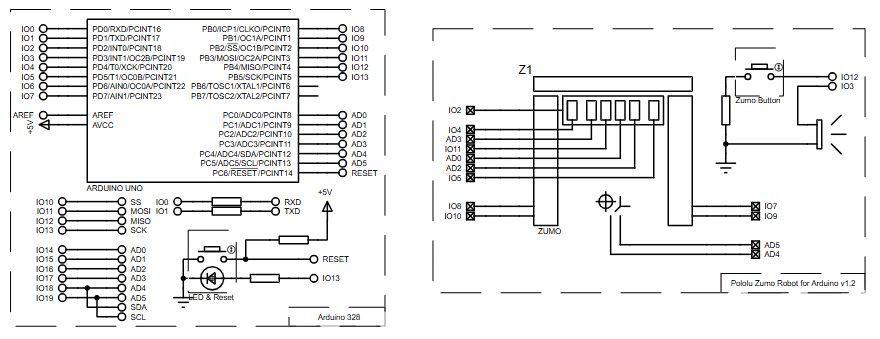
Based on the provided schematic and source structure, the project uses:
- Arduino Uno
- Zumo robot module
- Zumo reflectance sensor array
- Zumo motors
- Pushbutton
- Buzzer
- LED/status indication through Arduino pin behavior
- Arduino AVR-based firmware libraries:
QTRSensorsZumoReflectanceSensorArrayZumoMotorsZumoBuzzerPushbutton
Applications
This type of robot project can be useful in many learning and practical scenarios:
- Maze solving robot experiments
- Line-following robot development
- Embedded systems education
- Robotics algorithm testing
- Sensor-based navigation research
- DIY electronics and automation learning
- Prototype design in Proteus simulation
- Path planning and autonomous movement demonstrations
Explanation of Code
The source code is organized around the main functions needed for maze navigation.
Sensor Calibration
At startup, the robot calibrates the reflectance sensors by rotating and scanning the line. This improves reliability when detecting black and white surfaces.
Line Following
The robot continuously reads line position and calculates an offset from the center. Based on that offset, it adjusts motor speed to remain on track.
Intersection Detection
While moving through the maze, the code checks whether a left path, straight path, or right path exists. This decision is based on sensor states.
Turn Selection Logic
The function that chooses direction uses a left-hand-on-the-wall strategy:
- prefer left
- otherwise go straight
- otherwise go right
- otherwise go back
Path Recording
Each selected turn is stored in a path array. This gives the robot memory of how it moved through the maze.
Path Simplification
The project includes a path simplification routine that reduces unnecessary turns, especially around dead ends. This is what allows the robot to later follow the shortest path.
Finish Line Handling
When the middle sensors detect a large black finish area, the robot stops and signals completion.
Re-run Using Shortest Path
After solving the maze once, the user can press the button and the robot will navigate the optimized route directly.
Source Code
ZumoBuzzer buzzer;
ZumoReflectanceSensorArray reflectanceSensors;
ZumoMotors motors;
Pushbutton button(12);

// path[] keeps a log of all the turns made
// since starting the maze
char path[100] = "";
unsigned char path_length = 0; // the length of the pathProteus Simulation
In the Proteus simulation, the Arduino Uno is connected to the Pololu Zumo Robot for Arduino v1.2 along with the pushbutton and related control lines. The simulation is designed to demonstrate how the Zumo robot behaves while following a maze line, detecting junctions, and solving the route.
The expected behavior is:
- robot waits for button input
- performs calibration
- follows the maze line
- detects intersections and dead ends
- stores turn decisions
- reaches the goal
- waits for restart
- runs the optimized shortest path
This makes the project very useful for understanding working principle, firmware logic, circuit behavior, and robot movement before trying the design on physical hardware.
Conclusion
The Arduino Zumo Robot Maze Solver using Arduino Uno with Proteus Simulation is a smart and practical robotics project for learning how autonomous navigation works. It combines sensor input, motor control, path memory, and firmware logic into one neat build.
For anyone interested in microcontroller projects, embedded systems, circuit diagram analysis, and Proteus simulation, this is a very solid project to study and build from.
Complete File
Arduino Zumo Robot Maze Solver using Arduino Uno with Proteus Simulation
- How does the robot detect the maze line?
The robot uses a reflectance sensor array to detect the black maze line against a white background. - What strategy does the robot use to navigate the maze?
The robot follows a left-hand wall-following strategy during its initial learning run. - Can the robot find the shortest path automatically?
Yes, after solving the maze once, a path simplification routine removes unnecessary turns to enable a shorter route. - How does the user restart the robot for the optimized run?
The user must press the pushbutton to restart the robot after it reaches the goal for the first time. - Does the robot perform any calibration before starting?
Yes, the robot begins with a sensor calibration process to understand the contrast between the black line and white background. - What feedback does the buzzer provide?
The buzzer signals events such as startup, calibration complete, maze solved, and finish reached. - How are dead ends handled by the robot?
The robot detects dead ends and performs reverse or back turns to continue searching for the correct path. - Is this project suitable for physical hardware testing immediately?
No, the article describes it as a Proteus simulation designed to understand robotic systems before actual hardware testing. - What libraries are used for motor control in this project?
The project utilizes the ZumoMotors library along with ZumoReflectanceSensorArray and ZumoBuzzer libraries.
