
Summary of Arduino 328 and SPI Pot using ATmega328P with Proteus Simulation
This project demonstrates using an Arduino (ATmega328P) to control an AD5206 SPI digital potentiometer in Proteus, sending channel and resistance bytes to adjust six wipers. The firmware sweeps resistance values (0–255) up and down while LEDs on each wiper visualize voltage changes, showing SPI protocol usage and digital control of analog behavior for learning and prototyping.
Parts used in the Arduino SPI digital potentiometer project:
- ATmega328P (Arduino-compatible MCU)
- AD5206 SPI Digital Potentiometer
- LEDs (one per channel)
- 220Ω resistors
- +5V power supply
- Proteus VSM simulation environment
Introduction
This microcontroller project demonstrates how an Arduino (ATmega328P) controls an SPI-based digital potentiometer using a Proteus simulation. Instead of turning a physical knob, resistance values are changed digitally through SPI commands. This is a practical embedded systems example that shows how digital control can replace analog components. It’s especially useful for learners exploring Proteus simulation, DIY electronics, and real-world SPI communication in practical electronics projects.
This Arduino SPI digital potentiometer project demonstrates how analog resistance can be digitally controlled using embedded systems.
How the Project Works (Overview)
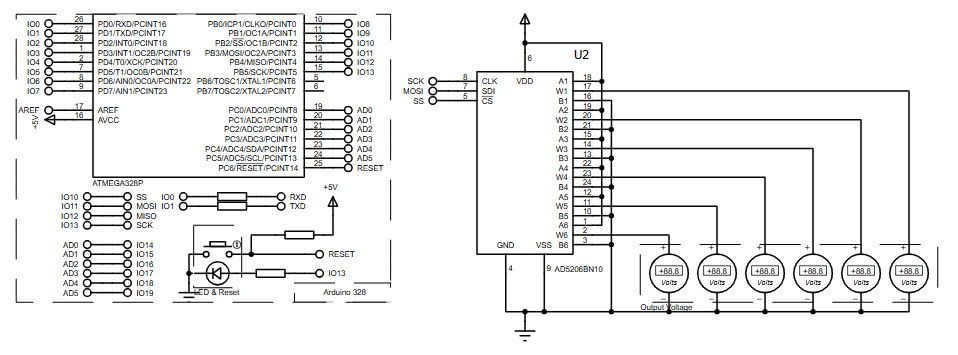
The ATmega328P communicates with an AD5206 digital potentiometer over the SPI bus. The microcontroller sends two bytes: one selects the potentiometer channel, and the other sets the resistance level. Each channel’s wiper output changes accordingly, which is visualized in the circuit using LEDs connected to the wiper pins. The firmware continuously sweeps resistance values up and down to demonstrate smooth digital control.
In this Arduino SPI digital potentiometer setup, the ATmega328P sends channel and resistance data over SPI to the AD5206.
Block Diagram / Workflow Explanation
-
Arduino ATmega328P initializes SPI communication
-
Slave Select (SS) activates the AD5206
-
SPI Data Transfer sends channel number and resistance value
-
Digital Potentiometer adjusts wiper position internally
-
LED Output reflects voltage change from each channel
-
Process repeats for all six channels
Key Features
-
SPI-based control of analog resistance
-
Six independent digital potentiometer channels
-
Smooth resistance sweep from 0–255 steps
-
Demonstrates real SPI protocol usage
-
Fully simulated in Proteus (no hardware required)
-
Easily expandable for sensor or signal control
Components Used
-
ATmega328P (Arduino-compatible MCU)
-
AD5206 SPI Digital Potentiometer
-
LEDs (one per channel)
-
220Ω resistors
-
+5V power supply
-
Proteus VSM simulation environment
Applications
-
Digital volume or gain control
-
Programmable voltage dividers
-
Calibration systems
-
Embedded systems learning labs
-
Sensor signal conditioning
-
Remote-controlled analog tuning
Explanation of Code
The code uses the SPI library to communicate with the AD5206. During setup, SPI is initialized and the chip select pin is configured. In the main loop, the firmware cycles through all six potentiometer channels. For each channel, resistance values increment from minimum to maximum and then decrease again. The digitalPotWrite() function handles SPI transmission by sending the channel address followed by the resistance value.
Source Code
Download
 Digital Pot Control

  This example controls an Analog Devices AD5206 digital potentiometer.
  The AD5206 has 6 potentiometer channels. Each channel's pins are labeled
  A - connect this to voltage
  W - this is the pot's wiper, which changes when you set it
  B - connect this to ground.

 The AD5206 is SPI-compatible,and to command it, you send two bytes,
 one with the channel number (0 - 5) and one with the resistance value for the
 channel (0 - 255).

 The circuit:
  * All A pins  of AD5206 connected to +5V
  * All B pins of AD5206 connected to ground
  * An LED and a 220-ohm resisor in series connected from each W pin to ground
  * CS - to digital pin 10  (SS pin)
  * SDI - to digital pin 11 (MOSI pin)
  * CLK - to digital pin 13 (SCK pin)
Proteus Simulation
In Proteus, the Arduino sends SPI commands to the AD5206 exactly as real hardware would. As resistance changes, the voltage at each wiper output updates dynamically. LEDs connected to the wiper pins visibly change brightness, confirming correct SPI communication and firmware behavior.
FAQs
[ultimate-faqs Include_category=”arduino-328-and-spi-pot”]Conclusion
This project is a clean, practical example of combining digital control with analog behavior in embedded systems. Using an Arduino, SPI communication, and Proteus simulation, it provides strong learning value for anyone exploring microcontroller projects, firmware development, and real-world circuit control.This project is a practical example of an Arduino SPI digital potentiometer implemented through firmware and Proteus simulation.
Complete File
Arduino 328 and SPI Pot using ATmega328P with Proteus Simulation
- How does the Arduino communicate with the AD5206?
The Arduino uses SPI to send two bytes: a channel number and a resistance value to the AD5206. - Can this project be run without physical hardware?
Yes; the project is fully simulated in Proteus VSM and requires no physical hardware. - What voltage range do the AD5206 A and B pins use in this project?
All A pins are connected to +5V and all B pins are connected to ground. - How many potentiometer channels does the AD5206 provide?
The AD5206 provides six independent potentiometer channels (channels 0–5). - What visual indicator shows wiper voltage changes?
LEDs connected in series with 220Ω resistors to each W pin change brightness as the wiper voltage changes. - What pin connections are used between the Arduino and the AD5206?
CS to digital pin 10, SDI (MOSI) to digital pin 11, and CLK (SCK) to digital pin 13. - How are resistance values formatted for the AD5206?
Resistance values are sent as an 8-bit value from 0 to 255 for each channel. - Does the firmware sweep resistance values automatically?
Yes; the firmware cycles through channels and increments resistance values from minimum to maximum and then decreases them again.
