
Summary of Arduino Light & Temperature Logger using ATmega328P with Proteus Simulation
This project implements an Arduino Light & Temperature Logger using an ATmega328P, DS1307 RTC, LDR, and analog temperature sensor to log timestamped CSV entries to an SD card. Fully testable in Proteus, it records readings every second, supports live serial output, status LEDs, and automatic file creation. The firmware uses SPI/SD and I2C libraries, ADC reads, timer logic, and periodic sync to flush data to the card.
Parts used in the Arduino Light & Temperature Logger:
- ATmega328P (AVR microcontroller)
- Arduino-compatible Data Logger Shield
- DS1307 Real-Time Clock (RTC)
- SD Card Module
- LDR (Light Dependent Resistor)
- Analog Temperature Sensor
- Status LEDs
- Crystal Oscillator (32.768 kHz for RTC)
Introduction
This Arduino Light & Temperature Logger is a practical microcontroller project designed to monitor environmental conditions and store them for later analysis. Using an ATmega328P, a data logger shield, and Proteus simulation, the system records light intensity and temperature along with accurate timestamps.
It’s a great example of embedded systems working together with sensors, real-time clocks, and SD card storage.
This project is especially useful for learners exploring DIY electronics, data logging, and real-world sensor interfacing. This project demonstrates an Arduino Light and Temperature Data Logger Proteus Simulation designed using the ATmega328P microcontroller and a data logger shield.
All functionality is fully testable inside Proteus simulation, making it ideal for both beginners and intermediate users.
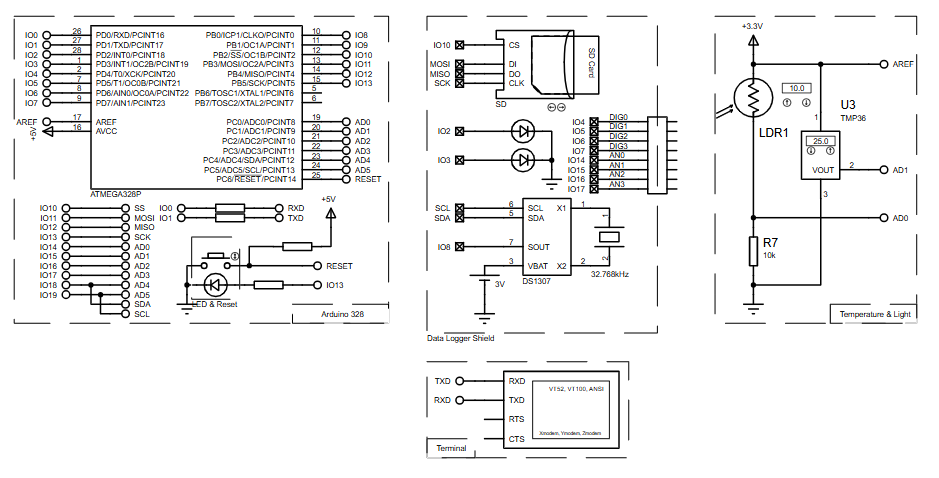
How the Project Works (Overview)
The system continuously measures light levels using an LDR and temperature using an analog temperature sensor. These values are read by the ATmega328P’s ADC and combined with real-time data from a DS1307 RTC.
Every second, the collected data is stored as a CSV file on an SD card, making it easy to open and analyze later on a computer.
Status LEDs indicate logging activity and SD card write operations, helping with debugging and monitoring during simulation.
Block Diagram / Workflow Explanation
-
Sensors (LDR & Temperature Sensor) generate analog signals
-
ATmega328P ADC converts sensor values to digital data
-
DS1307 RTC provides date and time via I²C
-
SD Card Module stores logged data using SPI
-
UART Serial Output displays live logs in terminal
-
Status LEDs indicate logging and SD sync operations
The microcontroller synchronizes sensor readings, timestamps, and SD card writes at fixed intervals for reliable data capture.
Key Features
-
Real-time light and temperature data logging
-
Accurate timestamping using DS1307 RTC
-
CSV file generation for easy data analysis
-
SD card storage with automatic file naming
-
Live serial monitoring during operation
-
Supply voltage monitoring using internal bandgap reference
-
Fully functional Proteus simulation support
Components Used
-
ATmega328P (AVR microcontroller)
-
Arduino-compatible Data Logger Shield
-
DS1307 Real-Time Clock (RTC)
-
SD Card Module
-
LDR (Light Dependent Resistor)
-
Analog Temperature Sensor
-
Status LEDs
-
Crystal Oscillator (32.768 kHz for RTC)
Applications
-
Environmental monitoring systems
-
Weather data collection projects
-
Smart agriculture and greenhouse monitoring
-
Educational embedded systems labs
-
DIY sensor data acquisition systems
-
Long-term temperature and light trend analysis
Explanation of the Code (High-Level)
The firmware is written using the Arduino AVR framework and is structured for reliability and clarity:
-
SPI & SD Libraries handle SD card communication
-
Wire & RTClib manage I²C communication with the RTC
-
ADC module reads analog light and temperature values
-
Timer logic ensures fixed logging intervals
-
Serial UART outputs real-time data for debugging
-
Bandgap reference reading estimates system supply voltage
The code automatically creates a new CSV file on each startup and logs sensor values every second.
Source Code
Download
#include
#include
#include
#include "RTClib.h"

// A simple data logger for the Arduino analog pins

// how many milliseconds between grabbing data and logging it. 1000 ms is once a second
#define LOG_INTERVAL  1000 // mills between entries (reduce to take more/faster data)

// how many milliseconds before writing the logged data permanently to disk
// set it to the LOG_INTERVAL to write each time (safest)
// set it to 10*LOG_INTERVAL to write all data every 10 datareads, you could lose up to
// the last 10 reads if power is lost but it uses less power and is much faster!
#define SYNC_INTERVAL 1000 // mills between calls to flush() - to write data to the card
uint32_t syncTime = 0; // time of last sync()Proteus Simulation
In Proteus, the ATmega328P interfaces seamlessly with the Data Logger Shield, RTC, and sensors.
The simulation shows live serial output, LED indicators, and SD card activity. Sensor values can be adjusted interactively to verify logging accuracy.
This makes Proteus an excellent environment to test timing, storage reliability, and sensor behavior before hardware deployment.
FAQs
[ultimate-faqs Include_category=”arduino-light-&-temperature-logger”]- How often does the project log sensor data?
The project logs sensor values every second as defined by LOG_INTERVAL set to 1000 ms. - Can the system timestamp logged data?
Yes, timestamps are provided by the DS1307 RTC via I2C. - Does the project store data in a readable format?
Yes, data are stored as CSV files on the SD card for easy analysis. - What interfaces are used for the RTC and SD card?
The RTC uses I2C (Wire and RTClib) and the SD card uses SPI with SPI and SD libraries. - How does the project provide live monitoring?
Live serial output displays real-time logs in a terminal via UART. - What indicates logging and SD activity?
Status LEDs indicate logging activity and SD card write operations. - Can the project be fully tested without hardware?
Yes, all functionality is fully testable inside Proteus simulation. - How does the code handle writing to the SD card?
The code writes logged entries and calls flush via a SYNC_INTERVAL to permanently write data to the card.
