
Summary of Arduino DHT22 Humidity & Temperature Sensor using ATmega328P with Proteus Simulation
This project demonstrates reading temperature and humidity from a DHT22 (AM2302) sensor with an ATmega328P (Arduino-compatible) in Proteus simulation, decoding single-wire sensor timing, computing heat index, and sending results via UART to a virtual serial terminal. It’s optimized for 8 MHz Proteus timing and suitable for testing firmware before hardware builds.
Parts used in the Arduino DHT22 Humidity & Temperature Sensor using ATmega328P with Proteus Simulation:
- ATmega328P microcontroller
- DHT22 (AM2302) humidity & temperature sensor
- 10 kΩ pull-up resistor
- +5 V power supply
- Virtual serial terminal
- Proteus VSM (AVR) software
Introduction
This microcontroller project demonstrates how to measure temperature and humidity using an Arduino-compatible ATmega328P and a DHT22 sensor in Proteus simulation.
The setup is simple, practical, and commonly used in embedded systems and DIY electronics.
Sensor data is read digitally and sent to a serial terminal for real-time monitoring.
This project is ideal for learning sensor interfacing, serial communication, and virtual prototyping.
It’s especially useful for testing firmware behavior before building physical hardware.
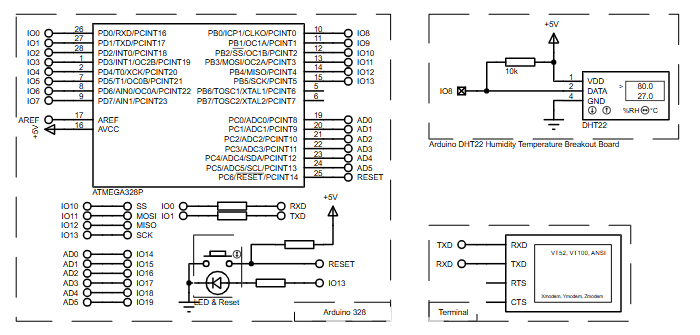
How the Project Works (Overview)
The ATmega328P communicates with the DHT22 sensor using a single digital data line.
The microcontroller periodically requests humidity and temperature values from the sensor.
Once the data is decoded, the firmware calculates temperature in Celsius and Fahrenheit.
The processed readings are transmitted to a virtual serial terminal via UART.
All behavior is verified using Proteus simulation without physical components.
Block Diagram / Workflow Explanation
-
DHT22 Sensor measures humidity and temperature internally
-
Single-wire digital data is sent to ATmega328P (IO pin 8)
-
ATmega328P firmware decodes sensor timing signals
-
Temperature, humidity, and heat index are calculated
-
UART serial output displays values on the terminal
Key Features
-
Digital humidity and temperature sensing using DHT22
-
Single GPIO data interface
-
Serial monitoring via UART
-
Heat index calculation in firmware
-
Optimized for Proteus 8 MHz simulation timing
-
Arduino-compatible source code
Components Used
-
ATmega328P microcontroller
-
DHT22 (AM2302) humidity & temperature sensor
-
10 kΩ pull-up resistor
-
Virtual serial terminal
-
+5 V power supply
-
Proteus VSM (AVR)
Applications
-
Weather monitoring systems
-
Smart home climate control
-
Environmental data loggers
-
IoT sensor nodes (prototype stage)
-
HVAC monitoring projects
-
Embedded systems training and labs
Explanation of Code (High-Level)
The firmware uses the DHT sensor library to manage sensor timing and decoding.
A digital pin is assigned for sensor communication.
The UART module is initialized for serial output at 9600 bps.
Every two seconds, humidity and temperature values are requested.
If sensor communication fails, an error message is printed.
The code also computes the heat index using temperature and humidity data.
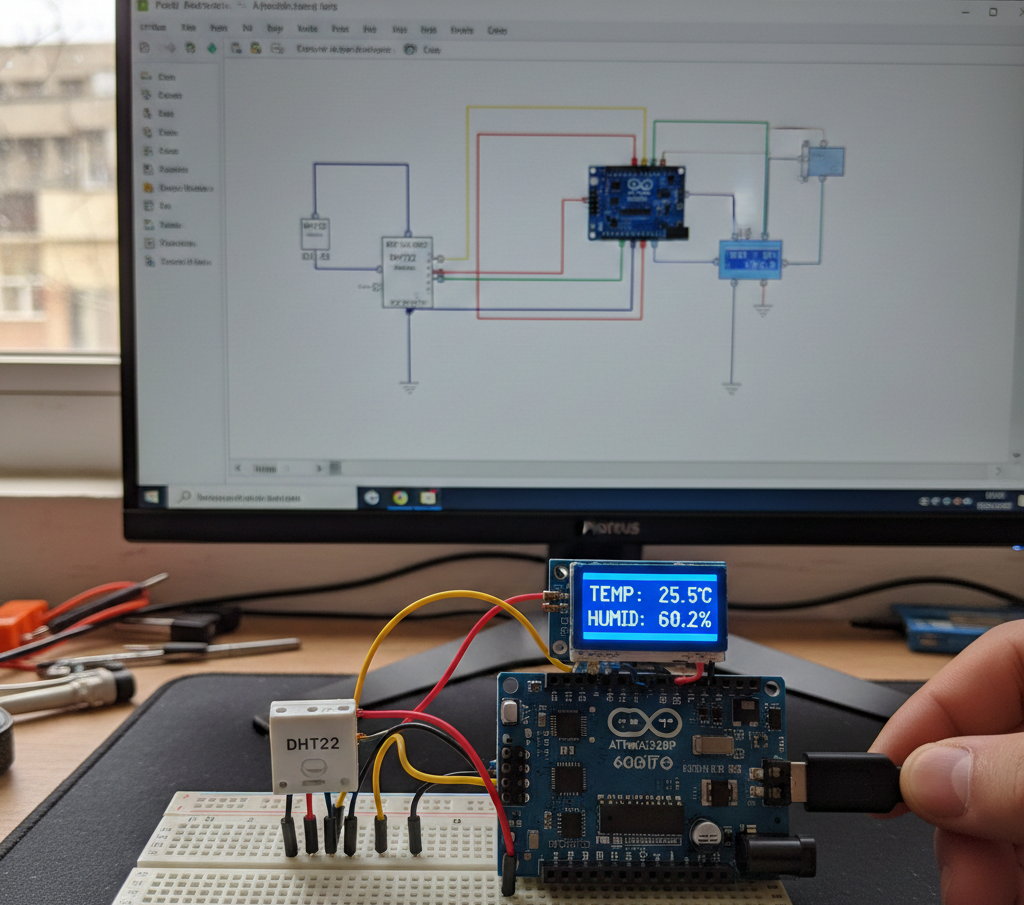
Source Code
Download
// Example testing sketch for various DHT humidity/temperature sensors
// Written by ladyada, public domain

#include "DHT.h"

#define DHTPIN 8     // what pin we're connected to

#define DHTTYPE DHT22   // DHT 22  (AM2302)
//#define DHTTYPE DHT21   // DHT 21 (AM2301)

// Connect pin 1 (on the left) of the sensor to +5V
// NOTE: If using a board with 3.3V logic like an Arduino Due connect pin 1
// to 3.3V instead of 5V!
// Connect pin 2 of the sensor to whatever your DHTPIN is
// Connect pin 4 (on the right) of the sensor to GROUND
// Connect a 10K resistor from pin 2 (data) to pin 1 (power) of the sensorProteus Simulation
In Proteus, the ATmega328P runs at 8 MHz, which requires adjusting the DHT timing threshold.
The DHT22 sensor outputs digital humidity and temperature values correctly.
Serial data appears in the virtual terminal every two seconds.
The simulation allows safe testing of firmware logic and sensor communication.
FAQs
[ultimate-faqs Include_category=”dht22-humidity-temperature-sensor”]Conclusion
This project is a clean and practical example of sensor interfacing in embedded systems using Proteus simulation.
It helps learners understand digital sensors, timing-sensitive communication, and serial data handling.
Perfect for students, hobbyists, and anyone building temperature or humidity-based DIY electronics projects.
Complete File
Arduino DHT22 Humidity & Temperature Sensor using ATmega328P with Proteus Simulation
- How does the ATmega328P communicate with the DHT22 sensor?
Via a single digital data line connected to a GPIO pin (DHTPIN defined as pin 8). - Can the project run in Proteus without physical components?
Yes, the project is verified using Proteus simulation and a virtual serial terminal. - What data is transmitted to the serial terminal?
Temperature, humidity, and heat index values are transmitted via UART. - How often are readings requested from the DHT22?
Readings are requested every two seconds. - Does the firmware handle sensor communication failures?
Yes, if sensor communication fails an error message is printed. - What voltage should power the DHT22 in this project?
The DHT22 is powered from +5 V in this setup (note 3.3V for 3.3V logic boards). - What resistor value is used as the pull-up on the data line?
A 10 kΩ pull-up resistor is used between data and power. - Is the project code Arduino-compatible?
Yes, the source code is Arduino-compatible and uses the DHT library.
