
Summary of Arduino Smart Cane for the Visually Impaired
This Arduino-based Smart Cane helps visually impaired users detect obstacles using an ultrasonic sensor, then provides haptic and auditory alerts via a vibration motor and piezo buzzer. It is low-cost, lightweight, easy to build with common parts, and enhances mobility and independence.
Parts used in the Smart Cane:
- Arduino Uno (or compatible microcontroller)
- Ultrasonic sensor (e.g., HC-SR04)
- Vibration motor
- Piezo buzzer
- Battery pack
- 3/4-inch diameter PVC pipe
- PVC elbow joint (for handle)
- Insulation tape
- Adhesive glue or screws
- Enclosure box for electronics
- Breadboard and wires
- Screwdriver
- Utility knife
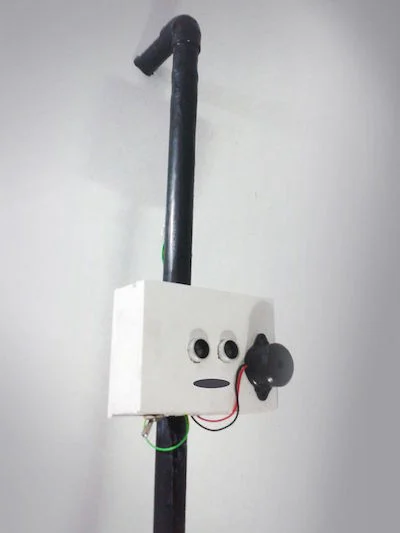
Advances in technology continue to make life easier for individuals with disabilities. Inspired by a desire to help visually impaired individuals navigate their surroundings more confidently, this Arduino-based Smart Cane project is an affordable, open-source solution. With a combination of sensors, haptic feedback, and intelligent programming, this device enhances mobility and independence. The idea of creating a smart cane—simple, cost-effective, and easy to build, so even a child could assemble it in a few hours. This Smart Cane can detect obstacles and provide real-time feedback using a vibration motor and a piezo buzzer.
Key Features of the Smart Cane
- Obstacle Detection: Ultrasonic sensors detect objects in the user’s path.
- Haptic Feedback: Vibrations alert the user when obstacles are detected.
- Auditory Alerts: A buzzer provides an additional warning signal.
- Lightweight & Portable: Designed for everyday use, similar to a traditional walking stick.
How the Smart Cane Works
The Smart Cane comprises three main components:
- Input: An ultrasonic sensor detects obstacles up to 13 feet away.
- Controller: An Arduino processes the sensor data to determine the distance to obstacles.
- Output: A vibration motor and piezo buzzer provide feedback to alert the user.
When the ultrasonic sensor detects an obstacle within a preset range, the Arduino triggers the vibration motor and buzzer to warn the user.
Materials Required
- Electronics:
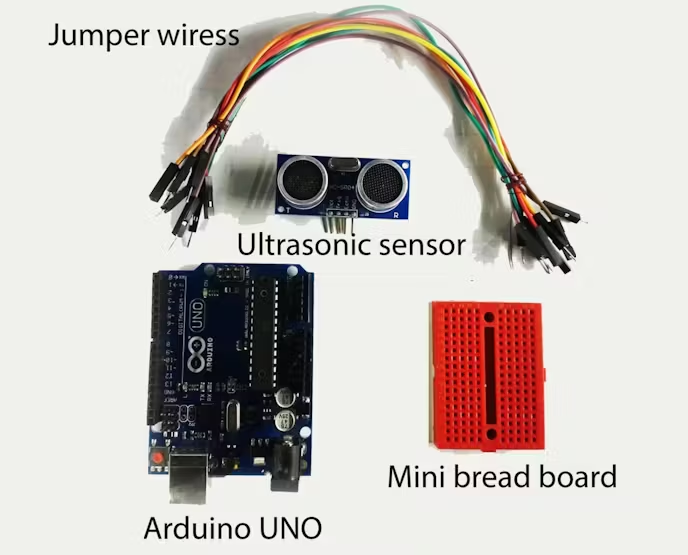
- Arduino Uno (or compatible microcontroller)
- Ultrasonic sensor (e.g., HC-SR04)
- Vibration motor (salvaged from an old cell phone or purchased)
- Piezo buzzer
- Battery pack for portability
- Other Materials:
- 3/4-inch diameter PVC pipe and elbow for the cane frame
- Insulation tape
- Adhesive glue or screws
- A box to house the electronics
- Tools:
- Screwdriver
- Utility knife
- Breadboard and wires
Step-by-Step Guide to Building the Smart Cane
-
Prepare the Ultrasonic Sensor:
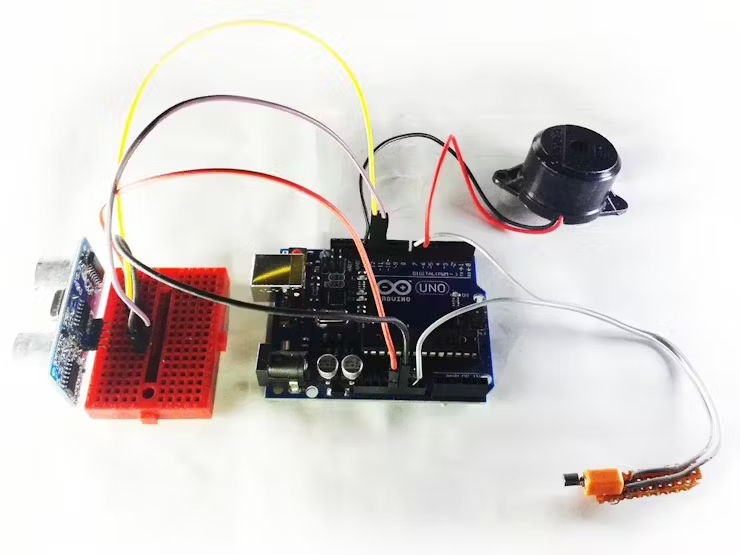
Connect the ultrasonic sensor to the Arduino as follows:- VCC to Arduino 5V
- GND to Arduino GND
- TRIG to Arduino D12
- ECHO to Arduino D11
-
Connect the Output Devices:
- Vibration Motor: Pin 1 to Arduino D7, Pin 2 to GND
- Piezo Buzzer: Red wire to Arduino D8, Black wire to GND
-
Assemble the Cane:
- Use a 3/4-inch diameter PVC pipe as the main cane. Attach an elbow joint to create a handle.
- Wrap the pipe with insulation tape for a clean finish.
- Mount the electronics in a box attached to the cane. Use glue or screws to secure the box.
- Attach the ultrasonic sensor to the box’s lid and position the vibration motor near the handle.
-
Implement the Code into Arduino:
Write The Code into your Arduino IDE And Implement it -
Test the Cane:
Power the system using a battery pack and test the functionality. Adjust the sensor range or feedback intensity as needed.
Benefits of the Smart Cane
- Improved Mobility: Real-time assistance ensures users can move safely.
- Enhanced Independence: Reduces reliance on external help.
- Customization: Add LEDs, advanced sensors, or other features for added functionality.
- Affordable Solution: Costs significantly less than commercial smart canes.
Files:
Why Build the Smart Cane?
This Smart Cane is more than a DIY project; it’s a step toward accessible technology that improves the quality of life for visually impaired individuals. By leveraging simple electronics and open-source programming, it empowers users with greater confidence, mobility, and independence.
Quick Solutions to Questions related to the Smart Cane:
- What sensors does the Smart Cane use?
The Smart Cane uses an ultrasonic sensor such as the HC-SR04 to detect obstacles up to 13 feet away. - How does the Smart Cane alert the user to obstacles?
The Arduino triggers a vibration motor for haptic feedback and a piezo buzzer for auditory alerts when an obstacle is detected within a preset range. - Can the Smart Cane be powered portably?
Yes, the project uses a battery pack for portability. - What materials are used for the cane frame?
The cane frame is made from 3/4-inch diameter PVC pipe with a PVC elbow joint for the handle. - How is the ultrasonic sensor connected to the Arduino?
Connect VCC to Arduino 5V, GND to Arduino GND, TRIG to Arduino D12, and ECHO to Arduino D11. - How are the output devices wired to the Arduino?
Vibration motor pin 1 to Arduino D7 and pin 2 to GND; piezo buzzer red wire to Arduino D8 and black wire to GND. - Where should the electronics be mounted on the cane?
Mount the electronics inside a box attached to the cane and attach the ultrasonic sensor to the box lid; position the vibration motor near the handle. - What tools are needed to build the Smart Cane?
The listed tools are a screwdriver, utility knife, and basic breadboard and wires for wiring. - Is code required for the Smart Cane to work?
Yes, you must write and upload the Arduino code through the Arduino IDE to process sensor data and control the outputs.
