Home > Ideas > Arduino Infrared Send and Receive using Arduino Uno with Proteus Simulation

Arduino Infrared Send and Receive using Arduino Uno with Proteus Simulation

Summary of Arduino Infrared Send and Receive using Arduino Uno with Proteus Simulation


This project simulates IR send/receive between two Arduino Uno boards in Proteus VSM, using an IR LED transmitter and a TSOP-style demodulator with the IRremote library to decode protocols (NEC, Sony, RC5, RC6, etc.) and print protocol, value, bit count, and raw timings to the Proteus Serial Terminal for analysis, reverse engineering, and replaying via generated raw arrays.

Parts used in the Arduino Infrared Send and Receive using Arduino UNO with Proteus Simulation:

  • Arduino Uno (ATmega328P) — 2 units (IR TX and IR RX)
  • IR LED transmitter
  • IR Demodulator Module (TSOP-type, e.g., TSOP4838)
  • Serial Terminal module in Proteus
  • Oscilloscope block (optional, from schematic)
  • Jumper wiring inside Proteus
  • Proteus VSM for AVR simulation engine
  • IRremote library (software component)

Introduction

This project demonstrates how to send and receive infrared (IR) signals using an Arduino Uno inside a full Proteus VSM simulation. It’s a practical embedded systems project that helps students and hobbyists understand how IR communication works in devices like TV remotes, automation gadgets, and wireless control modules.This project demonstrates Arduino IR Communication Proteus simulation using two Arduino Uno boards. With Arduino IR Communication Proteus, an IR LED transmits modulated signals to a TSOP receiver, allowing protocol decoding using the IRremote library inside Proteus VSM.
The setup uses an IR demodulator to receive signals and the popular IRremote library to decode and display protocol information on the Serial Monitor. This makes it a great microcontroller project, especially for learning DIY electronicsProteus simulation, and embedded system design.
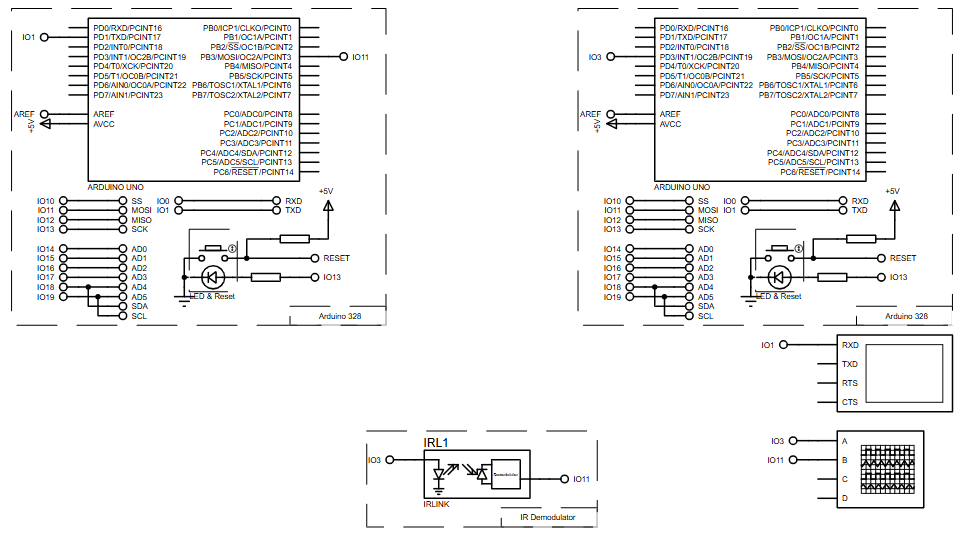
Arduino ir communication proteus simulation circuit


How the Project Works (Overview)

The system consists of an IR transmitter and an IR receiver, each connected to separate Arduino Uno boards inside Proteus.
Here’s the basic idea:

  • An IR LED on the transmitter side emits infrared pulses.

  • The TSOP-style IR demodulator on the receiver side detects these pulses.

  • The demodulator outputs a digital IR signal to Arduino pin 11.

  • The IRremote library decodes the signal and identifies the protocol (NEC, Sony, RC5, etc.).

  • The decoded information is shown on the Serial Terminal inside Proteus.

The simulation provides a safe, hardware-free way to observe IR waveforms, debug timing values, and analyze how IR remotes communicate.

Block Diagram / Workflow Explanation

Based on the schematic you provided, the project workflow is:

  1. IR LED Transmitter
    Emits modulated IR pulses toward the receiver.

  2. IR Demodulator Module (IR Link / TSOP module)
    Receives 38 kHz IR signal → demodulates it to a clean digital pulse stream.

  3. Arduino Uno (Receiver)
    Reads pulses on pin 11 and hands them to the IRremote decoder.

  4. IRremote Library

    • Detects IR protocol

    • Extracts address and data

    • Extracts raw timings

    • Prints everything to serial

  5. Serial Terminal in Proteus
    Shows protocol, value, bit count, raw timings, and generated replay-ready code arrays.

Key Features

Auto-generated from code, schematic, and project description:

  • Full IR decoding using the IRremote library

  • Supports the most common IR protocols (NEC, Sony, RC5, RC6, JVC, Panasonic, Samsung, LG, etc.)

  • Real-time IR capture and analysis

  • Displays timing data for protocol reverse engineering

  • Automatically generates ready-to-use raw IR arrays

  • Complete Proteus VSM simulation for transmitter and receiver

  • Works with IR demodulators like TSOP4838

  • High-speed UART output (115200 baud) for detailed logs

arduino infrared communication proteus arduino uno
Illustrative View of the Concept.

Components Used

  • Arduino Uno (ATmega328P) – 2 units (IR TX and IR RX)

  • IR Demodulator Module (TSOP-type)

  • IR LED transmitter

  • Serial Terminal module in Proteus

  • Optional oscilloscope block (from schematic)

  • Jumper wiring inside Proteus

  • Proteus VSM for AVR simulation engine

Applications

  • Universal IR remote development

  • Home automation controlled by existing IR remotes

  • Wireless control systems

  • Learning IR protocol structures (NEC, Sony, RC5, RC6, etc.)

  • Reverse engineering remote controls

  • Device cloning or IR code recording

  • Educational microcontroller labs and embedded systems courses

Explanation of the Code (High-Level)

1. Initialization

The receiver pin is set to digital pin 11, compatible with IRremote.
irrecv.enableIRIn() activates the internal IR state machine.

2. Decoding IR Packets

Whenever an IR signal is received:

  • The library identifies the protocol (NEC, Sony, RC6, Panasonic, etc.)

  • Extracts the valueaddress, and bit length

3. Printing the Result

Three types of outputs are displayed:

  • Human-readable info (protocol + value + bits)

  • Raw timing data (useful for waveform analysis)

  • C-style array output for replaying the code later

4. Resume Waiting

irrecv.resume() resets the decoder to detect the next IR command.

This makes it perfect for analyzing remote controls or creating your own universal IR transmitter.

Download Complete Source Code

FAQs

[ultimate-faqs Include_category=”arduino-infrared-send-and-receive-using-arduino-uno”]

Conclusion

This Arduino Infrared Send and Receive project with Proteus simulation is an excellent hands-on introduction to IR communication, protocol decoding, and embedded firmware analysis. With its clean schematic, IRremote-powered code, and easy simulation workflow, it’s perfect for students, hobbyists, and anyone building remote-controlled electronics.

Complete Project File Download

Quick Solutions to Questions related to Arduino Infrared Send and Receive using Arduino UNO with Proteus Simulation:

  • How does the project decode IR signals?
    The IRremote library running on the Arduino Uno decodes the demodulated digital pulses from the TSOP receiver and identifies the protocol, value, address, and bit length.
  • Can this simulate both transmitter and receiver?
    Yes; the Proteus VSM simulation includes two Arduino Uno boards, one driving an IR LED transmitter and one connected to an IR demodulator as the receiver.
  • What protocols are supported by the simulation?
    The project supports common IR protocols such as NEC, Sony, RC5, RC6, JVC, Panasonic, Samsung, and LG via the IRremote library.
  • How are decoded results displayed?
    Decoded protocol, value, bit count, raw timings, and replay-ready code arrays are printed to the Serial Terminal inside Proteus at 115200 baud.
  • What does the TSOP demodulator output to the Arduino?
    The TSOP-style IR demodulator converts the 38 kHz modulated IR signal into a clean digital pulse stream output connected to Arduino pin 11.
  • Can this help with reverse engineering remotes?
    Yes; the simulation captures raw timing data and generates raw IR arrays useful for protocol reverse engineering and device cloning.
  • Do I need physical hardware to run this project?
    No; Proteus VSM provides a hardware-free environment to simulate the entire IR transmitter and receiver setup and observe waveforms and serial logs.
  • How does the project resume detection after decoding a packet?
    After printing results, the code calls irrecv.resume() to reset the decoder and wait for the next IR command.

About The Author

Muhammad Bilal

I am a highly skilled and motivated individual with a Master's degree in Computer Science. I have extensive experience in technical writing and a deep understanding of SEO practices.

Scroll to Top