
Summary of Arduino & RGB Common Anode LED ShiftPWM using Arduino Uno with Proteus Simulation
This project uses an Arduino Uno with the ShiftPWM library and cascaded 74HC595 shift registers to drive multiple RGB common anode LEDs via hardware SPI and a latch pin. It provides smooth PWM brightness, HSV/RGB color modes, fades, color cycling, animations, and is fully simulated in Proteus for scalable LED control and learning PWM, multiplexing, and embedded timing techniques.
Parts used in the Arduino & RGB Common Anode LED ShiftPWM using Arduino Uno with Proteus Simulation:
- Arduino Uno
- RGB Common Anode LEDs
- 74HC595 Shift Registers (3 units)
- Current-limiting resistors
- SPI connections (MOSI, SCK)
- Latch control pin
- Proteus simulation software (digital LED models)
Introduction
This microcontroller project demonstrates how to control multiple RGB common anode LEDs using an Arduino Uno and ShiftPWM through shift registers in a Proteus simulation environment.
Instead of using many Arduino pins, the design efficiently expands outputs using shift registers while still achieving smooth PWM-based color control.
The project showcases advanced LED fading, color transitions, hue shifting, and animation effects using embedded systems techniques.
It is a practical example of combining DIY electronics, firmware libraries, and timing control for visually rich LED applications.
This setup is ideal for learning LED multiplexing, PWM concepts, and scalable RGB lighting control.
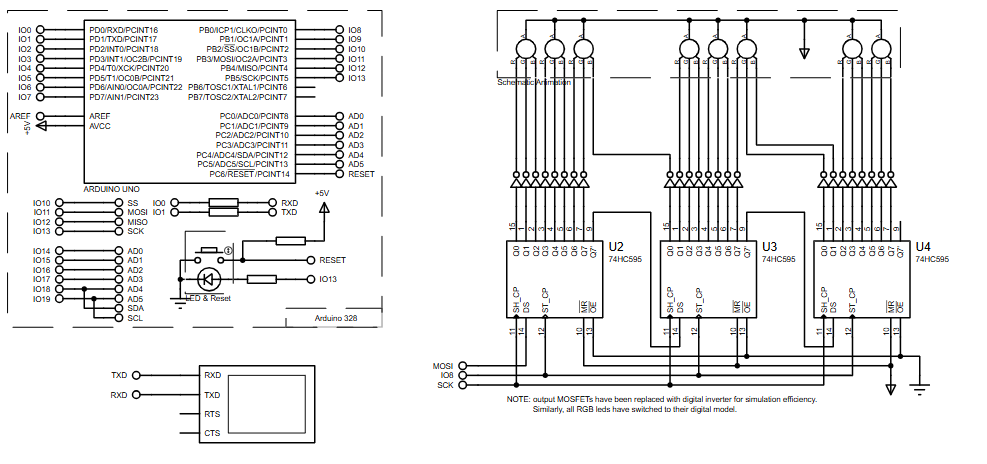
How the Project Works (Overview)
The Arduino Uno uses the ShiftPWM library to generate PWM signals for RGB LEDs via multiple 74HC595 shift registers.
Data is sent using the Arduino’s hardware SPI pins (MOSI and SCK), while a latch pin updates the outputs simultaneously.
Each shift register controls multiple LED channels, allowing the Arduino to drive many RGB LEDs with only a few pins.
The firmware generates brightness levels, fades, color cycling, HSV-based color control, and animation patterns entirely in software.
Block Diagram / Workflow Explanation
-
Arduino Uno initializes the ShiftPWM library and SPI interface
-
SPI communication shifts PWM data into cascaded 74HC595 registers
-
Latch pin updates all LED outputs at once
-
ShiftPWM timer interrupt maintains PWM brightness levels
-
RGB LEDs display fades, colors, rainbows, and animations
-
Loop routines continuously update patterns and visual effects
Key Features
-
Controls multiple RGB LEDs using minimal Arduino pins
-
Smooth PWM-based brightness and color transitions
-
HSV and RGB color control modes
-
Hardware SPI for fast data transfer
-
Scalable design using multiple shift registers
-
Fully simulated and testable in Proteus
Components Used
-
Arduino Uno
-
RGB Common Anode LEDs
-
74HC595 Shift Registers (3 units)
-
Current-limiting resistors
-
SPI connections (MOSI, SCK)
-
Latch control pin
Applications
-
RGB LED lighting panels
-
Decorative LED displays
-
DIY ambient lighting systems
-
LED animation and visual effects projects
-
Educational embedded systems demonstrations
-
Prototyping scalable LED drivers
Explanation of Code (High-Level)
The firmware uses the ShiftPWM library to abstract PWM handling across multiple shift registers.
During setup, the number of registers, brightness levels, and PWM frequency are configured.
The loop function demonstrates multiple lighting patterns such as fade-in/out, color cycling, hue shifts, random effects, VU meter simulation, and moving rainbows.
HSV color space functions simplify smooth color transitions, while timer interrupts ensure stable PWM output.
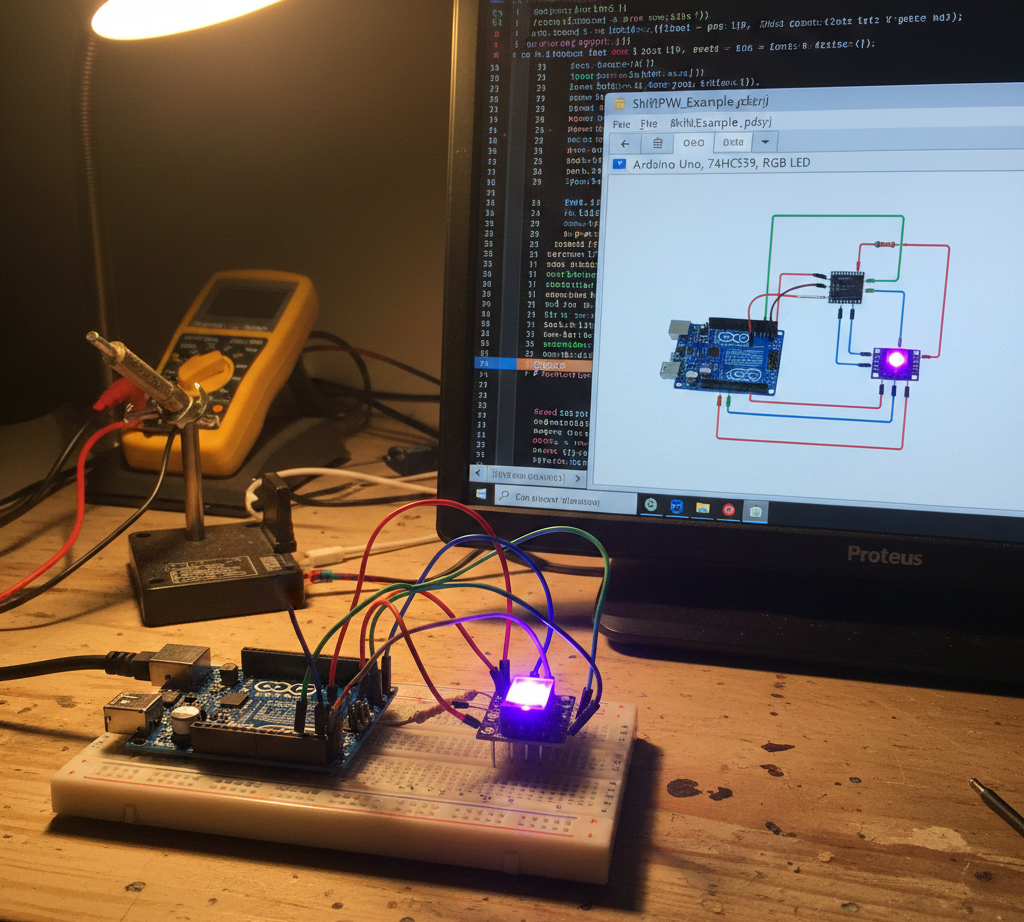
Source Code
Download
void setup(){
  Serial.begin(9600);

  // Sets the number of 8-bit registers that are used.
  ShiftPWM.SetAmountOfRegisters(numRegisters);

  // SetPinGrouping allows flexibility in LED setup.
  // If your LED's are connected like this: RRRRGGGGBBBBRRRRGGGGBBBB, use SetPinGrouping(4).
  ShiftPWM.SetPinGrouping(1); //This is the default, but I added here to demonstrate how to use the funtion

  ShiftPWM.Start(pwmFrequency,maxBrightness);
}Proteus Simulation
In Proteus, the Arduino Uno communicates with three cascaded 74HC595 shift registers using SPI.
The simulation visualizes smooth RGB fades, color cycling, and animated patterns exactly as expected from real hardware.
Digital LED models are used to improve simulation efficiency while maintaining accurate PWM behavior.
FAQs
[ultimate-faqs Include_category=”arduino-&-rgb-common-anode-led-shiftpwm”]Conclusion
This project is a strong example of scalable RGB LED control using Arduino Uno, ShiftPWM, and Proteus simulation.
It demonstrates practical embedded systems concepts such as PWM timing, SPI communication, and output expansion.
Perfect for learners and hobbyists, it bridges theory and real-world LED applications with clean, reusable firmware.
Arduino & RGB Common Anode LED ShiftPWM using Arduino Uno with Proteus Simulation
- How does the project expand Arduino outputs to control many RGB LEDs?
By cascading 74HC595 shift registers and sending data over SPI, allowing many LED channels while using few Arduino pins. - Can the project produce smooth fades and color transitions?
Yes. The ShiftPWM library and timer interrupts generate smooth PWM-based brightness and color transitions. - What pins are used for data transfer to the shift registers?
The Arduino hardware SPI pins MOSI and SCK are used, plus a latch control pin. - Does the firmware support HSV color control?
Yes. The firmware includes HSV functions to simplify smooth color transitions. - How many 74HC595 registers are used in the described setup?
Three 74HC595 shift registers are used in the described setup. - Is this design testable in simulation before hardware implementation?
Yes. The project is fully simulated and testable in Proteus using digital LED models. - What kinds of lighting patterns does the example firmware demonstrate?
It demonstrates fade-in/out, color cycling, hue shifts, random effects, VU meter simulation, and moving rainbows. - How does the firmware maintain stable PWM output?
ShiftPWM uses a timer interrupt to maintain PWM brightness levels and stable output.
