
Summary of Arduino 16 Channel PWM Shield – PWM Test using ATmega328P with Proteus Simulation
This project demonstrates testing and generating smooth, phase-shifted PWM waves on all 16 channels of an Adafruit 16-Channel PWM/Servo Shield using an ATmega328P in Proteus. It uses the PCA9685 12-bit PWM driver over I2C to offload timing, runs at a reduced 100 Hz for simulation stability, and updates duty cycles to create a flowing waveform—useful for LEDs, servos, and PWM diagnostics.
Parts used in the Arduino 16-Channel PWM Shield – PWM Test using ATmega328P with Proteus Simulation:
- ATmega328P microcontroller
- Adafruit 16-Channel PWM/Servo Shield
- PCA9685 16-channel 12-bit PWM driver
- I2C communication lines (SDA, SCL)
- Arduino AVR firmware environment (Wire library, Adafruit_PWMServoDriver library)
- Proteus simulation software
Introduction
This microcontroller project demonstrates how to test and generate PWM signals using the Adafruit 16-Channel PWM/Servo Shield with an Arduino-compatible ATmega328P in a Proteus simulation environment.
The project focuses on driving all 16 PWM outputs in a smooth wave pattern, making it ideal for learning multi-channel PWM control in embedded systems.
Using the PCA9685 12-bit PWM driver, this setup offloads timing-critical PWM generation from the microcontroller.
It is a practical electronics example for understanding I2C-based peripherals, PWM resolution, and simulation-friendly firmware design.
This project is especially useful for embedded systems learners working with Arduino, Proteus simulation, and PWM-based applications.
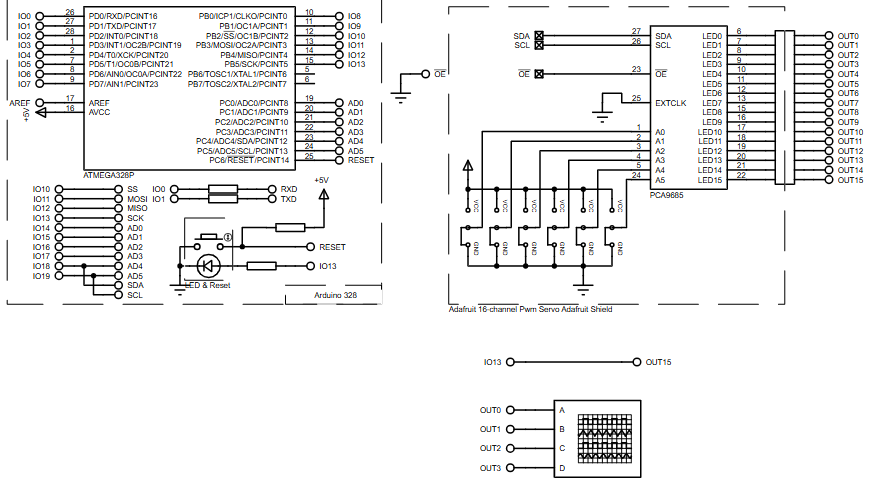
How the Project Works (Overview)
The ATmega328P communicates with the PCA9685 PWM driver over the I2C bus using the Arduino Wire library.
The PWM driver generates independent 12-bit PWM signals on 16 output channels without consuming Arduino timers.
In this test project, the firmware continuously updates PWM duty cycles to create a phase-shifted “wave” pattern across all channels.
Each output receives a slightly delayed PWM value, producing a smooth, flowing waveform suitable for LEDs, motors, or servo testing.
Block Diagram / Workflow Explanation
-
ATmega328P (Arduino Core) initializes I2C communication
-
Wire Library handles SDA/SCL data transfer
-
Adafruit PWM Servo Driver Library configures PCA9685 registers
-
PCA9685 PWM Controller generates 12-bit PWM signals
-
16 PWM Outputs change duty cycles in a wave pattern
This workflow allows accurate multi-channel PWM generation while keeping the firmware simple and efficient.
Key Features
-
16 independent PWM output channels
-
12-bit PWM resolution (0–4095 steps)
-
I2C-based communication using SDA and SCL
-
Reduced PWM frequency optimized for Proteus simulation
-
Smooth wave-style PWM output across all channels
-
Minimal microcontroller timer usage
Components Used
-
ATmega328P microcontroller
-
Adafruit 16-Channel PWM/Servo Shield
-
PCA9685 16-channel 12-bit PWM driver
-
I2C communication lines (SDA, SCL)
-
Arduino AVR firmware environment
Applications
-
Multi-LED brightness testing
-
Servo motor signal verification
-
PWM output diagnostics
-
Embedded systems PWM learning projects
-
DIY electronics involving motor or LED arrays
Explanation of Code (High-Level)
The firmware starts by initializing serial communication for debug output.
The Wire and Adafruit_PWMServoDriver libraries handle I2C communication and PWM control.
During setup, the PCA9685 is initialized and configured to operate at 100 Hz, which improves simulation stability in Proteus.
In the main loop, PWM values increment gradually and are phase-shifted across all 16 channels.
This creates a continuously moving wave effect, demonstrating precise and synchronized PWM control.
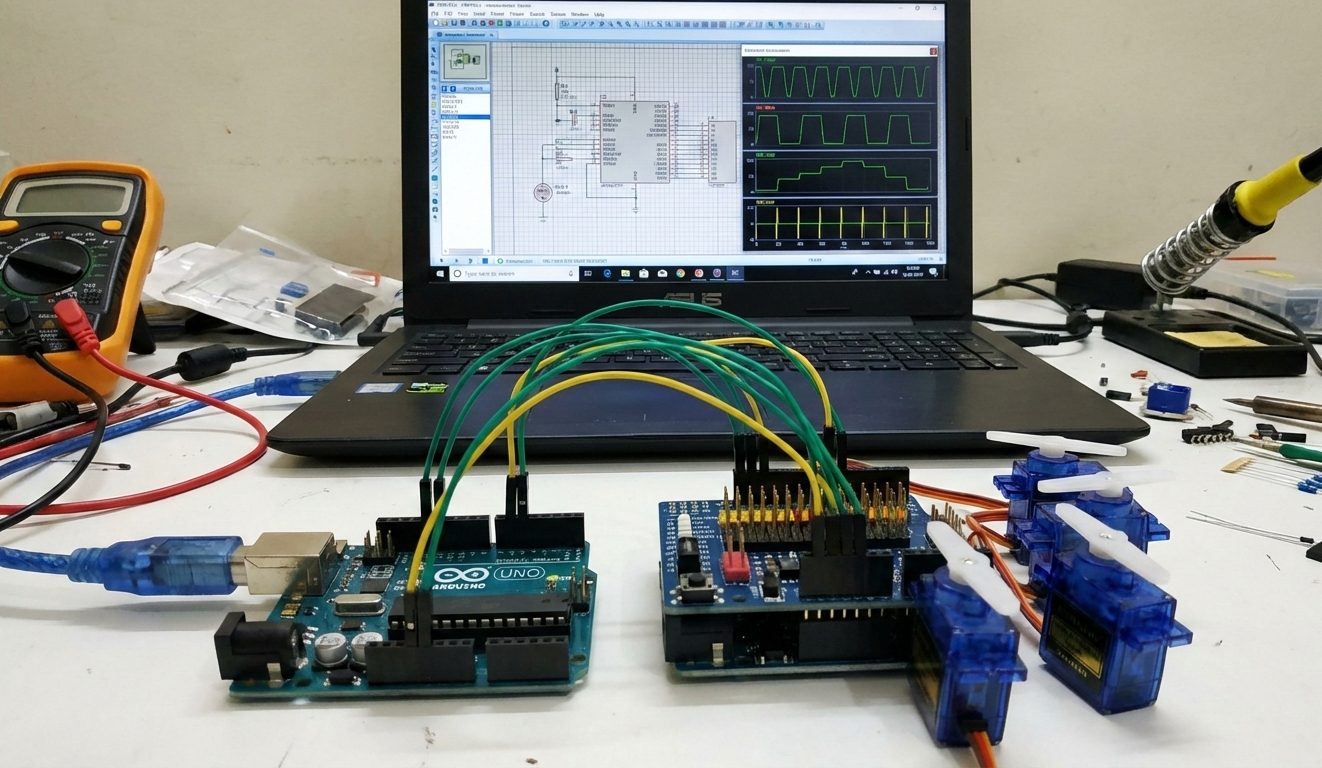
Source Code
Download
void setup() {
  Serial.begin(9600);
  Serial.println("16 channel PWM test!");

  // if you want to really speed stuff up, you can go into 'fast 400khz I2C' mode
  // some i2c devices dont like this so much so if you're sharing the bus, watch
  // out for this!

  pwm.begin();
  //pwm.setPWMFreq(1600);  // This is the maximum PWM frequency
  pwm.setPWMFreq(100);     // For simulation efficiency we reduce the maximum PWM frequency.

  // save I2C bitrate
  uint8_t twbrbackup = TWBR;
  // must be changed after calling Wire.begin() (inside pwm.begin())
TWBR = 12; // upgrade to 400KHz!Proteus Simulation
In the Proteus simulation, the ATmega328P communicates with the PCA9685 over the I2C bus.
Each PWM output shows a dynamically changing waveform, phase-shifted relative to adjacent channels.
The reduced PWM frequency ensures stable waveform visualization and smooth simulation performance.
This setup accurately represents real hardware behavior for PWM testing and validation.
(FAQs)
[ultimate-faqs Include_category=”arduino-16-channel-pwm-shield-pwm”]Conclusion
This Arduino 16-Channel PWM Shield project is a clean and effective way to understand multi-channel PWM control using Proteus simulation.
By leveraging the PCA9685 driver, complex PWM tasks are simplified while maintaining high resolution and accuracy.
It serves as a valuable embedded systems learning project for PWM control, I2C communication, and practical electronics experimentation.
Complete File
Arduino 16 Channel PWM Shield – PWM Test using ATmega328P with Proteus Simulation
- How does the ATmega328P communicate with the PCA9685?
It communicates over the I2C bus using the Wire library. - Can the PCA9685 generate independent PWM signals without using Arduino timers?
Yes, the PCA9685 generates independent 12-bit PWM signals without consuming Arduino timers. - What PWM resolution does the PCA9685 provide?
The PCA9685 provides 12-bit PWM resolution (0–4095 steps). - What PWM frequency is used for the Proteus simulation?
The firmware configures the PCA9685 to operate at 100 Hz for simulation stability. - How is the wave pattern across all 16 channels produced?
The firmware increments PWM values gradually and phase-shifts them across channels to create a moving wave effect. - Does this setup offload timing-critical PWM generation from the microcontroller?
Yes, using the PCA9685 offloads timing-critical PWM generation from the microcontroller. - What are typical applications for this project?
Applications include multi-LED brightness testing, servo signal verification, PWM diagnostics, and embedded PWM learning projects. - How is I2C bitrate adjusted in the code?
The code saves and then sets the TWBR register (example sets TWBR = 12 to upgrade to 400 kHz I2C) after initializing Wire in pwm.begin(). - Why is the PWM frequency reduced for simulation?
The PWM frequency is reduced to improve simulation stability and visualization in Proteus.
