
Summary of Arduino Digital Voltmeter 0V to 30V
This article describes a DIY digital voltmeter using an Arduino Uno to measure DC voltages from 0 to 30V. It utilizes a voltage divider circuit with resistors to scale down the input voltage for the Arduino's analog pins, which have a 5V limit. The system uses an LCD display to show readings and includes specific code to calculate actual voltage based on resistor values. Calibration tips are provided for accuracy, emphasizing the use of precision resistors and warning about over-voltage risks above 55V.
Parts used in the Arduino Digital Voltmeter:
- Arduino Uno Board
- 100K Resistor
- 10K Resistor
- 100R Resistor
- 10K Preset Pot
- 16×2 Parallel LCD (Hitachi HD44780 driver compatible)
Here is a useful circuit for Arduino lovers and experimenters. It is a simple digital voltmeter, which can safely measure input dc voltages in 0 to 30V range. The Arduino board can be powered from a standard 9V battery pack, as usual.
As you may well know, Arduino’s analog inputs can be used to measure DC voltage between 0 and 5V (when using the standard 5V analog reference voltage) and this range can be increased by using two resistors to create a voltage divider. The voltage divider decreases the voltage being measured to within the range of the Arduino analog inputs. Code in the Arduino sketch is then used to compute the actual voltage being measured.
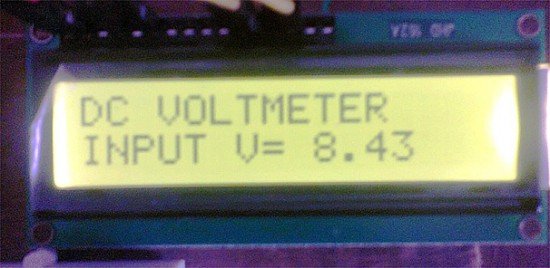 As you may well know, Arduino’s analog inputs can be used to measure DC voltage between 0 and 5V (when using the standard 5V analog reference voltage) and this range can be increased by using two resistors to create a voltage divider. The voltage divider decreases the voltage being measured to within the range of the Arduino analog inputs. Code in the Arduino sketch is then used to compute the actual voltage being measured
Notes
- If the display reading didn’t match when comparing with your lab DVM, use a precision DMM to find the actual resistance of R1 and R2, and replace R1=100000.0 and R2=10000.0 in the code with that values. Next check the 5V supply with the lab DVM at GND and 5V pins on the Arduino board. It might give you less (for instance 4.95V), replace the value into the code vout = (value * 5.0) / 1024.0 (ie replace the 5.0 value to the actual V reading, in this case 4.95V). Further,always try to use precision 1% tolerance resistors for R1 and R2.
- The resistor values (R1&R2) in the circuit diagram provide some over-voltage protection then measuring low voltages. Keep it in mind that any input voltage higher than about 55V could fry the Arduino. No other protection (for voltage spikes, reverse voltages or higher voltages) is incorporated in this circuit!
Arduino Digital Voltmeter Sketch
- /*
- DC Voltmeter
- An Arduino DVM based on voltage divider concept
- T.K.Hareendran
- */
- #include <LiquidCrystal.h>
- LiquidCrystal lcd(7, 8, 9, 10, 11, 12);
- int analogInput = 0;
- float vout = 0.0;
- float vin = 0.0;
 float R1 = 100000.0; // resistance of R1 (100K) -see text!
- float R2 = 10000.0; // resistance of R2 (10K) – see text!
- int value = 0;
- void setup(){
- pinMode(analogInput, INPUT);
- lcd.begin(16, 2);
- lcd.print(“DC VOLTMETER”);
- }
- void loop(){
- // read the value at analog input
- value = analogRead(analogInput);
- vout = (value * 5.0) / 1024.0; // see text
- vin = vout / (R2/(R1+R2));
- if (vin<0.09) {
- vin=0.0;//statement to quash undesired reading !
- }
- lcd.setCursor(0, 1);
- lcd.print(“INPUT V= “);
- lcd.print(vin);
- delay(500);
- }
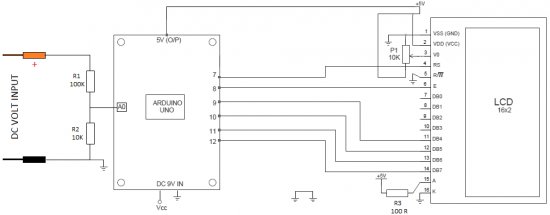
Schematic of the Arduino DVM Circuit
Parts
- Arduino Uno Board
- 100K Resistor
- 10K Resistor
- 100R Resistor
- 10K Preset Pot
- 16×2 Parallel LCD ( Hitachi HD44780 driver compatible)
Source: Arduino Digital Voltmeter 0V to 30V
- How does the circuit handle voltage measurement beyond 5V?
The circuit uses two resistors to create a voltage divider that decreases the measured voltage to within the 0-5V range of the Arduino analog inputs. - What is the maximum safe input voltage for this project?
Any input voltage higher than about 55V could fry the Arduino as no other protection is incorporated. - Can I power the Arduino board from a standard battery pack?
Yes, the Arduino board can be powered from a standard 9V battery pack. - What should I do if the display reading does not match my lab DVM?
Use a precision DMM to find the actual resistance of R1 and R2, replace the values in the code, and adjust the 5V supply value if necessary. - Are there any warnings regarding over-voltage protection?
No other protection for voltage spikes, reverse voltages, or higher voltages is incorporated in this circuit besides the resistor values providing some protection. - What type of resistors are recommended for R1 and R2?
You should always try to use precision 1% tolerance resistors for R1 and R2. - How does the code compute the actual voltage being measured?
The code computes the actual voltage by dividing the output voltage by the ratio of the resistors in the voltage divider. - What happens if the calculated input voltage is below 0.09V?
The code sets the input voltage to 0.0 to quash undesired readings when vin is less than 0.09.
