
Summary of Arduino Board Sound Alarm
Summary: I built a configurable Arduino sound level detector that triggers a flashing-LED alarm when noise is too high for too long, intended to give visual feedback in a classroom. I reverse-engineered an LED string IR remote with the IRremote library and used an Adafruit electret microphone, a ZX-Sound based detector circuit, a 16x2 LCD, and an IR LED. The project includes a breadboard Fritzing diagram, Arduino sketch on GitHub, and photos showing prototyping and assembly.
Parts used in the Arduino Board Sound Alarm:
- Arduino Uno
- Makershed Arduino Enclosure
- 9V power supply
- 100K potentiometer
- Pushbutton switch
- Breadboard PCB
- Electret microphone (Adafruit)
- IR LED (Adafruit)
- LCD 16x2 (Adafruit)
- Resistors: 1k ohm x2
- Resistors: 100k ohm x2
- Resistor: 12 ohm
- Resistor: 39k ohm
- Resistor: 22k ohm
- Resistor: 230 ohm (for IR LED)
- Capacitors: 470uF 16V
- Capacitors: 0.1uF 50V
- Capacitors: 22uF 25V
- Dual op amp IC: TLC272
I’ve just completed my second Arduino project, a sound level detector which sets off an “alarm” when there’s the sound level is to high for too long. I built it for use in a school that wants to provide visual feedback to students when they are being too loud. The “alarm” is a string of flashing LEDs that’s controlled by an IR-remote, which I reverse engineered using the the arduino itself and the excellent IRremote library to figure out which codes activate the LED string. The IRremote library includes an example that dumps the codes and code types that remotes typically use. So I just ran that example with my arduino hooked up to an IR detector from adafruit. It was really quite easy to do.
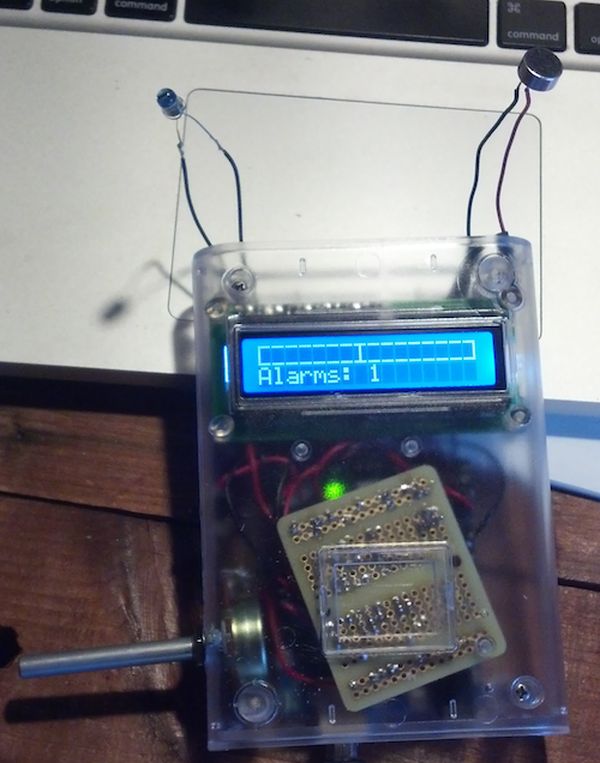
It’s been a fun project because it’s quite flexible and configurable. Here’s a short video of the finished product:
For anyone who wants to build one of these here’s a bread-board diagram that I made using the very cool Fritzing package:
The Adruino sketch that powers this is available on github.
Here are some details on the circuitry. The sound detector is based on the ZX-Sound board. Here’s a nice post on the arduino.cc site that I used as my starting place for building the sound part of this board. The video helpfully includes a parts list which I sourced from Allied electronics, all except for the mic. The LCD is the $10 16×2 from Adafruit (their tutorial on wiring it up was great), and I also used their electret microphone. One note about the microphone is that it’s polarity matters. If you get it in backwards, it’s much less sensitive. I found this out purely by accident! I also used their IR LED.
Here are some photos of assembling the project.
First the prototyping phase:
Arduino Uno: https://www.adafruit.com/products/50 ($29.95)
Makershed Arduino Enclosure: http://www.makershed.com/Clear_Enclosure_for_Arduino_p/mkad40.htm ($15.00)
9V powersupply: https://www.adafruit.com/products/63 ($6.95)
100K Potentiometer: Radioshack ($1.69)
pushbutton switch: Radioshack ($.99)
Breadboard PCB: https://www.adafruit.com/products/589 ($3.00)
Electret Mic: https://www.adafruit.com/products/1064 ($1.50)
IR LED: https://www.adafruit.com/products/387 ($.75)
LCD 2×16: https://www.adafruit.com/products/181 ($9.95)
Components: (~$5)
- resistors: 1k ohm x 2; 100k ohm x 2; 12 ohm; 39k ohm; 22k ohm; 230 ohm (for IR led)
- capacitors: 470uf 16v; 0.1uf 50v; 22uf 25v
- Dual op amp IC: TLC272
Total Price: ~$70
For more detail: Arduino Board Sound Alarm
- What does the project do?
It detects high sound levels for a set duration and triggers a flashing LED alarm for classroom visual feedback. - Which microphone was used?
An Adafruit electret microphone was used. - How were the IR codes for the LED string obtained?
By running the IRremote library example with the Arduino and an Adafruit IR detector to dump codes and types. - Where is the Arduino sketch available?
The Arduino sketch is available on GitHub. - What sound detector circuitry was used as a starting point?
The ZX-Sound board and an arduino.cc post were used as the starting place for the sound circuit. - Which LCD was used and where is wiring guidance from?
A $10 16x2 LCD from Adafruit was used and their tutorial provided wiring guidance. - Does microphone polarity matter?
Yes; if the microphone is reversed it is much less sensitive. - What tool was used to create the breadboard diagram?
The Fritzing package was used to create the breadboard diagram. - What components control the alarm LEDs?
The LED string alarm is controlled via IR using an IR LED and codes learned with the IRremote library. - Approximately how much did the project cost?
Total price was about $70 according to the article.
