
Summary of Arduino and Android Projects for the Evil Genius
This article provides errata and updates for the book "Arduino and Android Projects for the Evil Genius" following the release of Arduino 1.0 and changes to Google's Open Accessory standard. It advises using Arduino version 023 until library updates occur, supplies download links for necessary libraries (AndroidAccessory, MeetAndroid) and GitHub repositories for code and apps, and corrects specific errors in schematics, component labels, and text across various chapters.
Parts used in Arduino and Android Projects for the Evil Genius:
- Arduino 023
- USB Host Shield
- Ultrasonic range finder
- Laser module resistor
- 7909 IC
- VirtualWire library
- DroidDroid Rover code
- Temperature logger components
- Binary APK Android apps
Since this book was written, Arduino 1.0 was released and Google has changed the Open Accessory standard a lot. At the start of December 2011 Arduino 1.0 was released. This changed a few things, requiring all third-party libraries to be updated. This hasn’t happened yet for the Android Open Accessory ADK. So until this is updated, please use Arduino 023. This is still available for download from the main Arduino site. The version of the Open Accessory Arduino Libraries needed is no longer available from Google. But can download the Google library used in the book from here: http://duinodroid.com/downloads/AndroidAccessory.zip
 And the original version of the Amarino (amarino-toolkit.net by Mark Weiser) library from here: http://duinodroid.com/downloads/MeetAndroid.zipUse the binary (APK) Android apps from my GitHub page. Note that the code for the Rover is called DroidDroid. The Arduino sketches themselves are also all in GitHub here.
Errata
* Chapter 2. The schematic diagram (Fig 2-3) shows R4 connecting to D6. It should connect to D3 as per the wiring diagram of Fig 2.6.
Here is an updated version of Fig 2-3.
page 21. Step 1 should refer to ‘USB Host Shield’ NOT ‘USB Motor Shield’. There is no motor shield for this project.
page 34. “Handlers are Arduino’s way” should read “Handlers are Android’s way”.
* Chapter 5. The binary app was initially missing for download from this site. Its there now.
page 64 in a freak cut and paste accident, I sugest that you need an ultrasonic range finder to make the temperature logger. Doh!
page 64. The phrase ‘Laser module resistor’ should have a comma in it. The ‘laser module resistor’ is not a special kind of resistor. The resistor is just R1.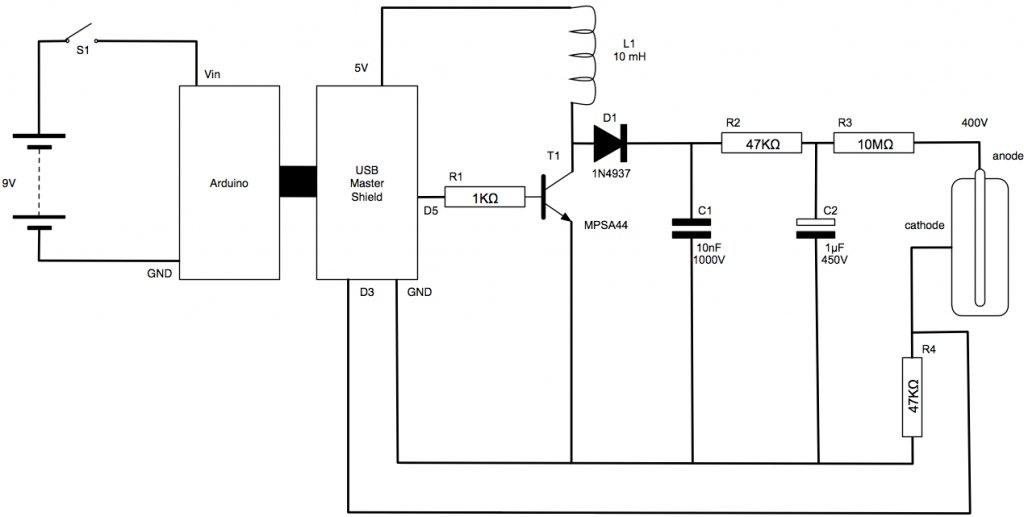 * Chapter 6. Page 75. The ultrasonic range finder is not included in the parts bin. See the description.
* Chapter 7. IC2 in Figure 7-33 should be labelled as a 7909 not a 7905.
* Chapter 10. I do not say where the VirtualWire library is obtained from. The official page for it is here: http://www.open.com.au/mikem/arduino/VirtualWire.pdf
* Paragraph 3, line 4 on page 105 says: “…to link to Android over USB.”. This should say Arduino.
For more detail: Arduino and Android Projects for the Evil Genius
-
Which Arduino version should I use?
You should use Arduino 023 because the Android Open Accessory ADK has not yet been updated for Arduino 1.0. -
Where can I download the required Android libraries?
The Google library is available at http://duinodroid.com/downloads/AndroidAccessory.zip and the Amarino library at http://duinodroid.com/downloads/MeetAndroid.zip. -
How do I fix the schematic error in Chapter 2?
R4 in Figure 2-3 should connect to D3 instead of D6 as shown in the wiring diagram of Fig 2.6. -
What shield is actually needed for the project on page 21?
Step 1 refers to the USB Host Shield, not a USB Motor Shield which does not exist for this project. -
Is the VirtualWire library available for download?
Yes, the official page for the VirtualWire library is located at http://www.open.com.au/mikem/arduino/VirtualWire.pdf. -
What correction is needed for the IC label in Figure 7-33?
IC2 should be labeled as a 7909 rather than a 7905. -
Do I need an ultrasonic range finder for the temperature logger?
Yes, you need an ultrasonic range finder to make the temperature logger as noted on page 64. -
What is the name of the code for the Rover?
The code for the Rover is called DroidDroid.
