
Summary of Analog In with an Arduino
This lab demonstrates connecting a variable resistor (potentiometer) to an Arduino microcontroller to read analog input. The project converts physical rotation into digital values, adjusting an LED's brightness accordingly via code that maps the 0-1023 range to 0-255 for PWM output.
Parts used in Analog In with an Arduino:
- Arduino module
- Breadboard
- Potentiometer
- LED
- Wires
Overview
In this lab, you’ll learn how to connect a variable resistor to a microcontroller and read it as an analog input. You’ll be able to read changing conditions from the physical world and convert them to changing variables in a program.
(:toc Table of Contents:)
Parts
For this lab you will need to have the following parts:
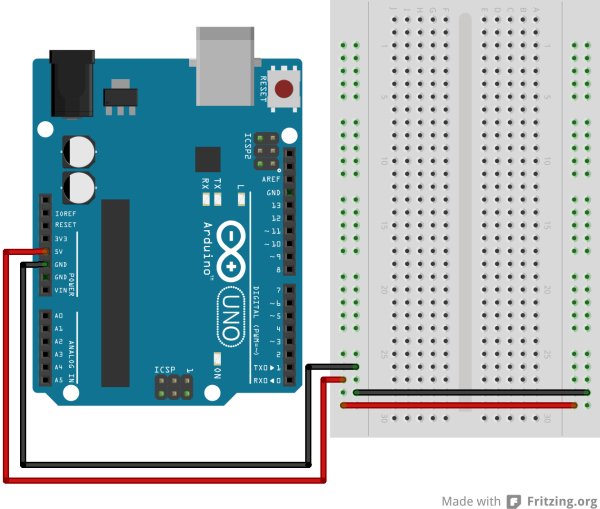
Prepare the breadboard
Conect power and ground on the breadboard to power and ground from the microcontroller. On the Arduino module, use the 5V and any of the ground connections:
Add a potentiometer and LED
Connect a potentiometer to analog in pin 0 of the module, and an LED to digital pin 9:
Program the Module
Program your Arduino as follows:
First, establish some global variables: One to hold the value returned by the potentiometer, and another to hold the brightness value. Make a global constant to give the LED’s pin number a name.
In the setup() method, initialize serial communications at 9600 bits per second, and set the LED’s pin to be an output.
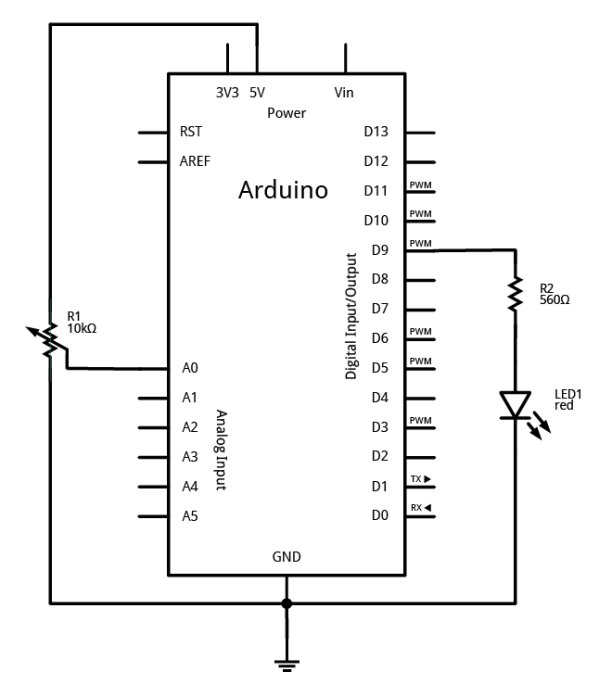
In the main loop, read the analog value using analogRead() and put the result into the variable that holds the analog value. Then divide the analog value by 4 to get it into a range from 0 to 255. Then use the analogWrite() command to face the LED. Then print out the brightness value.
When you run this code, the LED should dim up and down as you turn the pot, and the brightness value should show up in the serial monitor.
For more detail: Analog In with an Arduino
- What is the main goal of this lab?
To learn how to connect a variable resistor to a microcontroller and read it as an analog input. - How do you prepare the breadboard connections?
Connect power and ground on the breadboard to the 5V and ground connections on the Arduino module. - Which pins are used for the potentiometer and LED?
The potentiometer connects to analog in pin 0, and the LED connects to digital pin 9. - What global variables are established in the code?
One variable holds the potentiometer value, another holds the brightness value, and a constant names the LED pin. - At what speed is serial communication initialized?
Serial communications are initialized at 9600 bits per second. - How is the analog value converted for the LED?
The analog value is divided by 4 to convert the range from 0 to 1023 down to 0 to 255. - Which command is used to control the LED brightness?
The analogWrite() command is used to set the LED brightness. - What happens when the code runs successfully?
The LED dims up and down as the potentiometer is turned, and the brightness value appears in the serial monitor.
