
Summary of A MACRO KEYBOARD IN A MICRO PACKAGE
The Knobo is a sleek, macro keypad featuring 8 mechanical keys and a rotary encoder knob, offering 13 customizable inputs for media control or software shortcuts. While currently requiring an In-Circuit Serial Programmer for firmware changes, the creator is developing user-friendly configuration software to simplify customization.
Parts used in the Knobo:
- 8 mechanical Cherry-style keys
- Clickable rotary encoder knob
- Arduino-based firmware
- In-Circuit Serial Programmer
Remember back in the early-to-mid 2000s when pretty much every cheap USB keyboard you could find started including an abundance of media keys in its layout? Nowadays, especially if you have a customized or reduced-sized mechanical keyboard, those are nowhere to be seen. Whenever our modern selves need those extra keys, we have to turn to external peripherals, and [Gary’s] Knobo is one that looks like it could’ve come straight out of a fancy retail package.
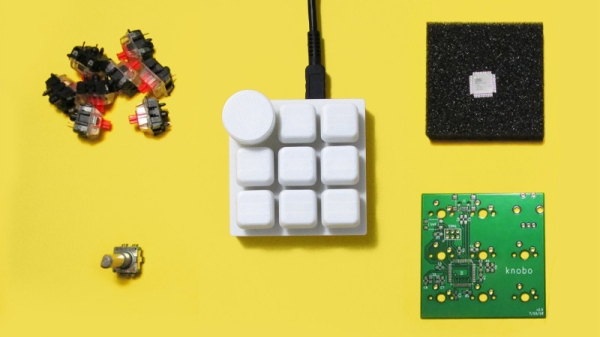
The Knobo is a small macro keypad with 8 mechanical Cherry-style keys and a clickable rotary encoder knob as its main feature. Each key and knob gesture can be customized to any macro, and with five gestures possible with the knob, that gives you a total of thirteen inputs. On top of that, the build and presentation look so sleek and clean we’d swear this was a product straight off of Teenage Engineering’s money-printing machine.
The actions you can do with those inputs range from simple media controls with a volume knob all the way to shortcuts to make a Photoshop artist’s life easier. Right now you can only reprogram the Knobo’s Arduino-based firmware with an In-Circuit Serial Programmer to change what the inputs do, but [Gary] is currently working on configuration software so that users without any programming knowledge will be able to customize it too.
Knobs are just one of those things that everyone wants to use to control their computers, much like giant red buttons. Alternative input devices can range from accessibility-designed to just downright playful. Whatever the inspiration is for them, it’s always nice to see the creativity of these projects.
Source: A MACRO KEYBOARD IN A MICRO PACKAGE
-
What features does the Knobo have?
It has 8 mechanical keys and a clickable rotary encoder knob providing 13 total inputs. -
How many gestures are possible with the knob?
The knob supports five different gestures. -
Can I reprogram the Knobo without programming knowledge?
Currently no, but the creator is working on configuration software to enable this. -
What tool is needed to change the inputs now?
An In-Circuit Serial Programmer is required to reprogram the Arduino-based firmware. -
What kind of actions can be performed with the Knobo?
Actions range from simple media controls like volume adjustment to Photoshop shortcuts. -
Does the Knobo look like a commercial product?
Yes, its build and presentation look as sleek as a product from a fancy retail package. -
Is the Knobo based on Arduino?
Yes, it runs on Arduino-based firmware.
