
Summary of Arduino 7-Segment & Terminal using ATmega328P with Proteus Simulation
This project shows how to control a common-anode 7-segment display from an Arduino (ATmega328P) using a 74HC595 shift register and serial input from a terminal. Typing digits 0–9 in the serial monitor causes the Arduino to send segment patterns via the shift register (using the Pineapple library), lighting the appropriate segments. The design is tested in Proteus simulation and emphasizes efficient pin usage, simple firmware, and suitability for learning embedded systems.
Parts used in the Arduino 7-Segment & Terminal project:
- ATmega328P (Arduino-based)
- 74HC595 shift register
- 7-segment display (common anode)
- Proteus virtual serial terminal
- Connecting wires
- Resistors / basic resistive network
Introduction
This microcontroller project demonstrates how to control a 7-segment display using an Arduino (ATmega328P) and a 74HC595 shift register, with input coming directly from a serial terminal.
By typing numbers (0–9) into the serial monitor, the corresponding digit instantly appears on the 7-segment display.
The project is simple, practical, and ideal for learning how serial communication, shift registers, and display interfacing work together.
It’s a great example of embedded systems design using Proteus simulation for testing before real hardware implementation.This Arduino 7 segment Proteus project demonstrates how to control a 7-segment display using an ATmega328P and a 74HC595 shift register through Proteus simulation.
This setup highlights efficient pin usage and clean digital control—core skills in DIY electronics and microcontroller projects.
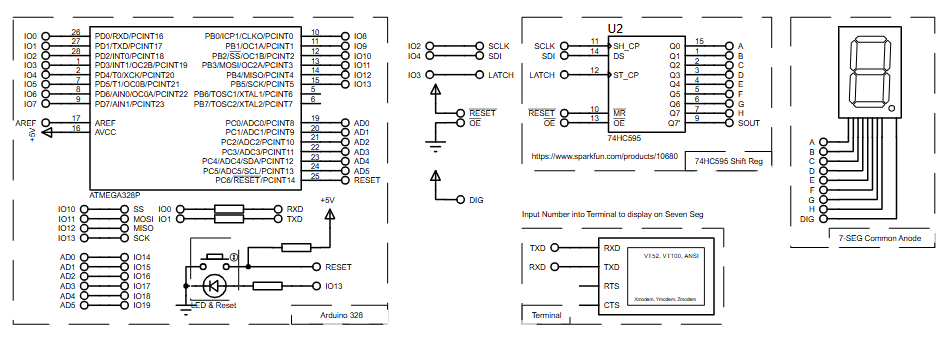
How the Project Works (Overview)
The Arduino continuously listens for incoming data from the serial terminal.
When a character between '0' and '9' is received, the microcontroller processes it and sends the corresponding segment pattern to a 74HC595 shift register.
The shift register then drives the 7-segment common-anode display, lighting the correct segments to show the digit.
All segment control is handled using the Pineapple library, simplifying the logic and keeping the firmware clean and readable.
Block Diagram / Workflow Explanation
-
Serial Terminal Input
A user types a digit (0–9) into the serial monitor. -
Arduino (ATmega328P)
The microcontroller reads the serial data and identifies the digit. -
74HC595 Shift Register
The Arduino shifts segment data serially using three control pins (data, clock, latch). -
7-Segment Display
The shift register outputs control the individual segments (A–G + DP), displaying the selected number.
Key Features
-
Displays digits 0–9 using serial terminal input
-
Uses 74HC595 shift register to reduce Arduino pin usage
-
Supports common-anode 7-segment display
-
Clean abstraction using the Pineapple library
-
Fully testable using Proteus simulation
-
Simple firmware ideal for beginners in embedded systems
Components Used
-
ATmega328P (Arduino-based)
-
74HC595 Shift Register
-
7-Segment Display (Common Anode)
-
Serial Terminal (Proteus Virtual Terminal)
-
Connecting wires and basic resistive network (implicit in schematic)
Applications
-
Digital counters and numeric indicators
-
Debug displays for embedded systems
-
Educational labs for learning shift registers
-
Serial-controlled display modules
-
Simple human-machine interfaces (HMI)
Explanation of the Code (High-Level)
The firmware initializes the Pineapple display library, defining which shift-register pins control each segment.
Serial communication is configured at 9600 baud to receive input from the terminal.
Inside the main loop:
-
The program checks if serial data is available
-
Reads one character from the terminal
-
Uses a
switchstatement to match digits'0'through'9' -
Sends the corresponding digit to the 7-segment display
-
Clears the display if an invalid character is received
A small delay ensures stable operation during simulation.
Source Code
Download
/*  PineappleSerial

When you type in a number between 0 and 9 on the serial monitor, the 7-segment
display, driven by the Pineapple library, will light up correspondingly.
Credits go to Qtechknow (Quin), Adam Meyer of Bildr, and Arduino Forum member
lloyddean.

created 08 May 2012
made by Qtechknow (Quin)
*/

#include "Pineapple.h"

Pineapple pineapple;      // initialize the library

int serial = 4;              // serial pin
int registerClock = 3;       // register clock pin
int serialClock = 2;         // serial clock pin
int rxdpin = 0;Proteus Simulation
In Proteus, the Arduino receives input from a virtual terminal.
When a digit is typed, the simulated ATmega328P shifts the correct bit pattern into the 74HC595, which then activates the appropriate segments on the 7-segment display.
The behavior closely mirrors real hardware, making it ideal for testing logic and timing before physical deployment.
FAQs
[ultimate-faqs Include_category=”arduino-7-segment-&-terminal”]Conclusion
This project is a clean and practical example of combining serial communication, shift registers, and display control in embedded systems.
It’s ideal for learners exploring Proteus simulation, Arduino firmware, and efficient I/O expansion.
By mastering this setup, you build a strong foundation for more advanced microcontroller projects involving displays and user interaction.
Complete File
Arduino 7-Segment & Terminal using ATmega328P with Proteus Simulation
- How does the project receive input to display digits?
The project receives digit characters via the serial terminal connected to the Arduino. - Can the project display all digits from 0 to 9?
Yes, typing digits 0 through 9 in the serial monitor displays the corresponding number on the 7-segment display. - What component reduces Arduino pin usage for the display?
The 74HC595 shift register is used to reduce the number of Arduino pins required. - Does the project use a common-anode or common-cathode display?
The project uses a common-anode 7-segment display. - How are the segment patterns sent to the display?
The Arduino shifts segment data serially to the 74HC595 using data, clock, and latch control pins. - What library does the firmware use for display control?
The firmware uses the Pineapple library to abstract segment control. - Can the project be tested before building real hardware?
Yes, the project is fully testable using Proteus simulation with a virtual terminal. - What happens if an invalid character is received over serial?
The program clears the display if an invalid character is received. - What baud rate is used for serial communication?
Serial communication is configured at 9600 baud in the firmware.
