
Summary of DIY Arduino power bank with display and 60w power output
Makers and hobbyists can build a DIY 60W portable power bank by Instructables user tobychui. It uses an Arduino Nano and a 2.2 inch UART HMI display to show real-time battery information, a 4S (14.8V) pack made from four Panasonic 3200mAh Li-ion cells, and an IP2716-based 60W boost/charging module. The project includes schematics, a full parts list, step-by-step instructions, and STL files for a 3D-printed case.
Parts used in the DIY 60W battery pack:
- Arduino Nano
- 2.2 inch UART HMI display
- Four Panasonic 3200mAh Lithium Ion cells (4S configuration)
- 60W IP2716 power boost and charging module
- 3D-printed custom case (STL files provided)
- Wiring and connectors
- Schematics and mounting hardware
Makers and hobbyists looking for a more substantial portable battery pack that they can make themselves, should check out this excellent DIY power bank created by Instructables user “tobychui”. Using an Arduino Nano board together with a 2.2 inch UART HMI display the batteries can provide up to 60w of power output. Fitted with a 4S (14.8v) Lithium Ion battery in the form of four Panasonic 3200mAH cells connected to a 60W IP2716 based power boost and charging module.
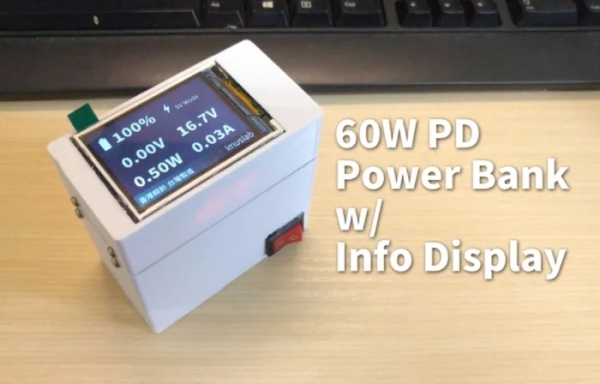
The portable battery pack is perfect for charging your iPhone, laptop, tablet, phone were any projects you may be working on which need to be powered without being connected to the main grid.
DIY 60w battery pack
“Recently, I was planning to get a 60W PD power bank for my laptop so that I don’t need to worry about my laptop running out of battery during lectures. However, all the 60W power bank on the market are bulk and expensive. That is why I decided to make my own. While I was designing the power bank, I thought to myself, why can’t I make one with a real time battery display? That is why I started this project: A 60W PD power bank with real time battery information display!”
For full instructions on how to build your very own DIY power bank jump over to the Instructables project page by following the link below. A full list of all the materials and components needed are provided together with schematic’s and step-by-step instructions as well as the.STL files to 3D print the custom case.
Source: DIY Arduino power bank with display and 60w power output
- What maximum power output does the DIY power bank provide?
The DIY power bank provides up to 60W of power output using the IP2716 module. - What battery configuration is used in the project?
The project uses a 4S configuration of four Panasonic 3200mAh Lithium Ion cells totaling 14.8V. - Which microcontroller is used to drive the display and system?
The project uses an Arduino Nano board. - What display is used for real-time battery information?
A 2.2 inch UART HMI display is used to show real-time battery information. - Can this power bank charge laptops and phones?
Yes, the portable battery pack is suitable for charging iPhone, laptop, tablet, and phone devices as described. - Is the case for the power bank provided?
Yes, STL files for a 3D-printed custom case are provided in the project. - Are step-by-step instructions and schematics available?
Yes, the Instructables project page includes full instructions, schematics, and a materials list. - Why did the creator build this DIY power bank?
The creator wanted a less bulky and expensive 60W power bank with a real-time battery display for laptop use during lectures.
