
Summary of TEENSY 4 PUSHED TO THE LIMIT WITH 1 GHZ OVERCLOCK
This article details an experiment where [Visual Micro] overclocked the Teensy 4.1 microcontroller beyond its standard 600 MHz speed, successfully reaching up to 800 MHz without cooling and attempting higher speeds with active cooling. The project utilized a modified CPU/GPU cooler or commercial heatsinks to manage temperatures during benchmarking. Results showed significant performance improvements, calculating over 21 million prime numbers compared to 15.2 million on the stock chip. While practical for enthusiasts, the setup highlights the board's potential for high-speed tasks when thermal management is applied.
Parts used in the Overclocked Teensy 4.1 Project:
- Teensy 4.1 microcontroller
- CPU/GPU cooler (modified)
- Thermal compound
- Commercially available heatsink
- Laptop cooler fan
Do you need a microcontroller that runs at 1 GHz? No, probably not. But that didn’t stop [Visual Micro] from trying, and the results are pretty interesting. Not only did the plucky little chip not cook itself, it actually seemed to run fairly well; with the already powerful microcontroller getting a considerable boost in performance.
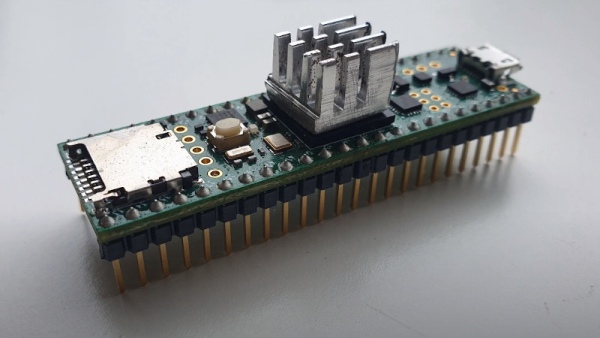
According to [Visual Micro] the Teensy 4.1, which normally has its ARM Cortex-M7 clocked at 600 MHz, can run at up to 800 MHz without any additional cooling. But beyond that, you’ll want to invite some extra surface area to the party. It’s easy enough to cut a chunk out of an old CPU/GPU cooler and stick it on with a dab of thermal compound, but of course there’s no shortage of commercially available heatsinks at this size that you could pick up cheap.
With the heatsink installed, [Visual Micro] shows the Teensy running at around 62 °C during a benchmark. If that’s a little hot for your liking, they also experimented with an old laptop cooler which knocked the chip down to an impressive 38 °C while under load. It doesn’t look like a particularly practical setup to us, but at least the option is there.
[Visual Micro] unfortunately doesn’t go into a lot of detail about the benchmark results, but from what’s shown, it appears the overclock netted considerable gains. A chart shows that in the time it took a stock Teensy to calculate 15.2 million prime numbers, the overclocked chip managed to blow through 21.1 million. The timescale for this test is not immediately clear, but the improvement is obvious.
Even at the stock 600 MHz, the Teensy 4 is a very powerful MCU. Especially after the 4.1 refresh brought in support for additional peripherals and more RAM. But we suppose some people are never satisfied. Got a project in mind that could benefit from an overclocked Teensy? We’d love to hear about it.
Source: TEENSY 4 PUSHED TO THE LIMIT WITH 1 GHZ OVERCLOCK
- Can the Teensy 4.1 run at 800 MHz without additional cooling?
Yes, according to Visual Micro, it can run at up to 800 MHz without any additional cooling. - How does a laptop cooler affect the temperature of the overclocked chip?
An old laptop cooler reduced the chip temperature to 38 °C while under load. - What is the stock clock speed of the ARM Cortex-M7 in the Teensy 4.1?
The stock clock speed is normally 600 MHz. - Does overclocking the Teensy 4.1 provide noticeable performance gains?
Yes, the overclocked chip calculated 21.1 million prime numbers versus 15.2 million on the stock version. - What components are needed to cool the chip beyond 600 MHz?
You need extra surface area such as a cut chunk of a CPU/GPU cooler or a commercial heatsink. - What happened to the chip when pushed to 1 GHz?
The chip did not cook itself and seemed to run fairly well despite the extreme speed. - What improvements did the Teensy 4.1 refresh bring compared to the original?
The 4.1 refresh brought support for additional peripherals and more RAM. - Is the laptop cooler setup considered practical for general use?
No, the setup does not look like a particularly practical option for most users.
